> ## Documentation Index
> Fetch the complete documentation index at: https://docs.bytebase.com/llms.txt
> Use this file to discover all available pages before exploring further.
# Database Group
Database groups are a powerful feature in Bytebase that allow you to manage collections of databases as a single unit. This simplifies operations when you need to apply consistent changes or run queries across multiple databases with similar structures.
## Overview
A database group is a logical collection of databases that share common characteristics. Instead of selecting databases individually for each operation, you can define a group once and reuse it for batch operations.
Database groups are particularly useful in the following scenarios:
* **Multi-Tenant SaaS Applications**: Software as a Service providers often maintain separate database instances for each customer or tenant. Database groups enable you to apply updates across all tenant databases simultaneously while maintaining isolation.
* **Geographic Distribution**: Organizations operating across multiple regions (US, EU, AP) often deploy separate database instances for compliance, latency, or data sovereignty requirements. Groups help manage these regional deployments efficiently.
* **Database Sharding**: For applications using horizontal partitioning, database groups simplify managing sharded databases by treating all shards as a cohesive unit during schema migrations.
## Creating a Database Group
### Prerequisites
* You must have appropriate project permissions
* Target databases should already be added to your Bytebase project
### Steps
1. **Navigate to Database Groups**
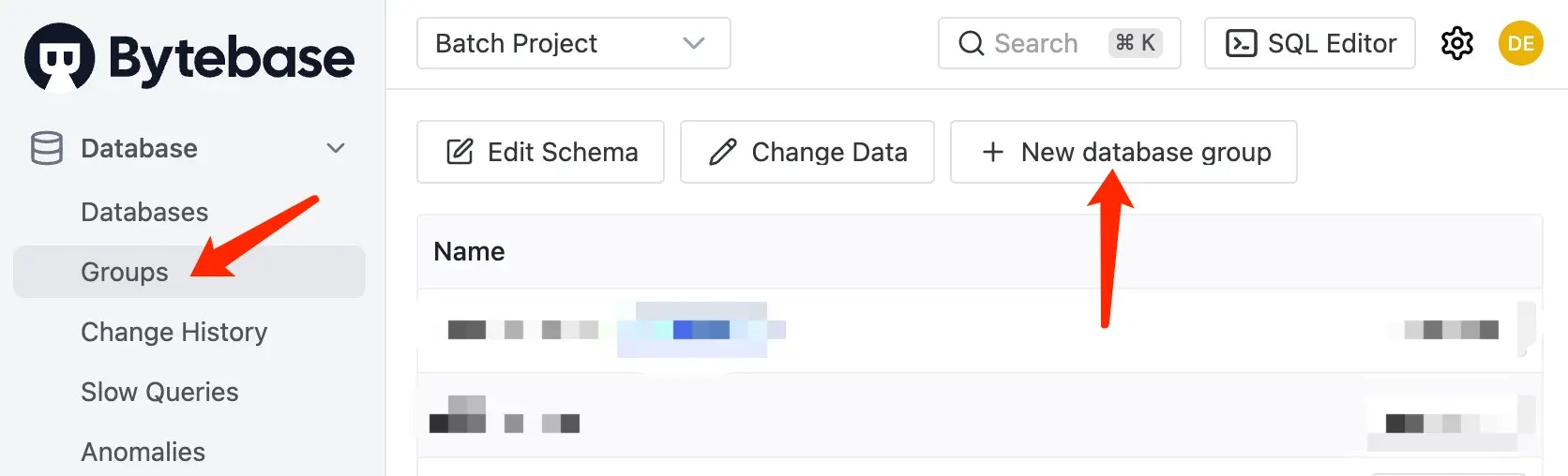
Within your project, click **Database > Groups** in the left sidebar.
 2. **Create New Group**
Click **New database group** to open the creation dialog.
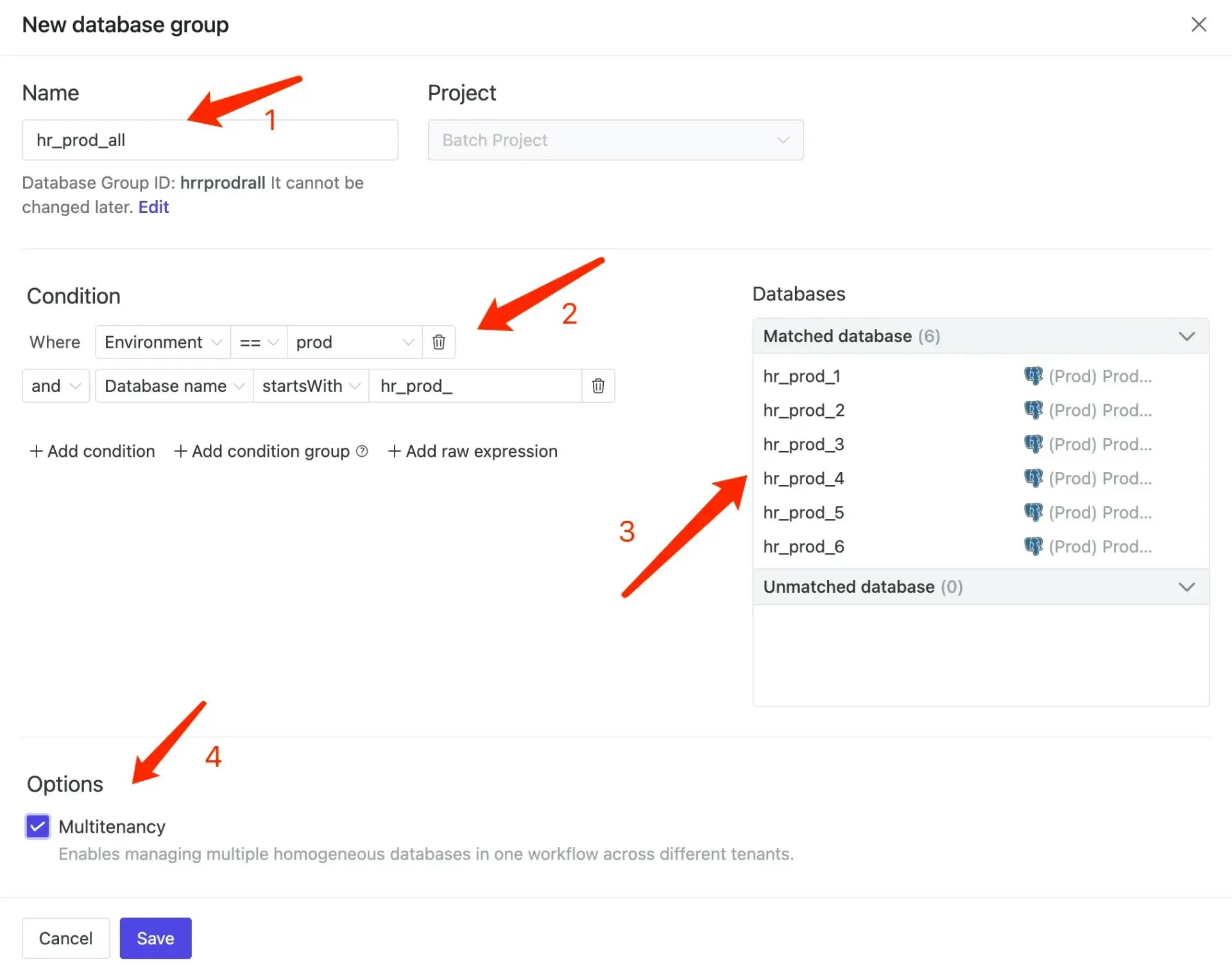
3. **Configure Group Settings**
* **Name**: Provide a descriptive name for your database group
* **Description** (optional): Add details about the group's purpose
* **Database Selection Rules**: Define criteria to automatically include databases
2. **Create New Group**
Click **New database group** to open the creation dialog.
3. **Configure Group Settings**
* **Name**: Provide a descriptive name for your database group
* **Description** (optional): Add details about the group's purpose
* **Database Selection Rules**: Define criteria to automatically include databases
 ### Database Selection Methods
#### Basic Filtering
Select databases based on:
* Environment (Development, Staging, Production)
* Instance location
* Database name patterns
#### Advanced Filtering with Labels
For more complex scenarios, use database labels with raw expressions:
```
Where resource.labels.YOUR_LABEL_KEY == "YOUR_LABEL_VALUE"
and has(resource.labels.YOUR_LABEL_KEY)
```
**Example expressions:**
* Filter by tenant: `Where resource.labels.tenant == "enterprise" and has(resource.labels.tenant)`
* Filter by region: `Where resource.labels.region == "us-west" and has(resource.labels.region)`
* Combine multiple labels: `Where resource.labels.tier == "premium" and resource.labels.region == "eu" and has(resource.labels.tier) and has(resource.labels.region)`
4. **Save the Configuration**
Click **Save** to create the group. The new group will appear in your database groups list and be available for batch operations.
## Managing Database Groups
### Editing Groups
To modify an existing group:
1. Navigate to **Database > Groups**
2. Click on the group name
3. Update the configuration as needed
4. Save your changes
### Deleting Groups
To remove a database group:
1. Navigate to **Database > Groups**
2. Click the delete icon next to the group
3. Confirm the deletion
**Note**: Deleting a group does not affect the underlying databases; it only removes the grouping configuration.
### Database Selection Methods
#### Basic Filtering
Select databases based on:
* Environment (Development, Staging, Production)
* Instance location
* Database name patterns
#### Advanced Filtering with Labels
For more complex scenarios, use database labels with raw expressions:
```
Where resource.labels.YOUR_LABEL_KEY == "YOUR_LABEL_VALUE"
and has(resource.labels.YOUR_LABEL_KEY)
```
**Example expressions:**
* Filter by tenant: `Where resource.labels.tenant == "enterprise" and has(resource.labels.tenant)`
* Filter by region: `Where resource.labels.region == "us-west" and has(resource.labels.region)`
* Combine multiple labels: `Where resource.labels.tier == "premium" and resource.labels.region == "eu" and has(resource.labels.tier) and has(resource.labels.region)`
4. **Save the Configuration**
Click **Save** to create the group. The new group will appear in your database groups list and be available for batch operations.
## Managing Database Groups
### Editing Groups
To modify an existing group:
1. Navigate to **Database > Groups**
2. Click on the group name
3. Update the configuration as needed
4. Save your changes
### Deleting Groups
To remove a database group:
1. Navigate to **Database > Groups**
2. Click the delete icon next to the group
3. Confirm the deletion
**Note**: Deleting a group does not affect the underlying databases; it only removes the grouping configuration.