> ## Documentation Index
> Fetch the complete documentation index at: https://docs.bytebase.com/llms.txt
> Use this file to discover all available pages before exploring further.
# Roles and Permissions
## Overview
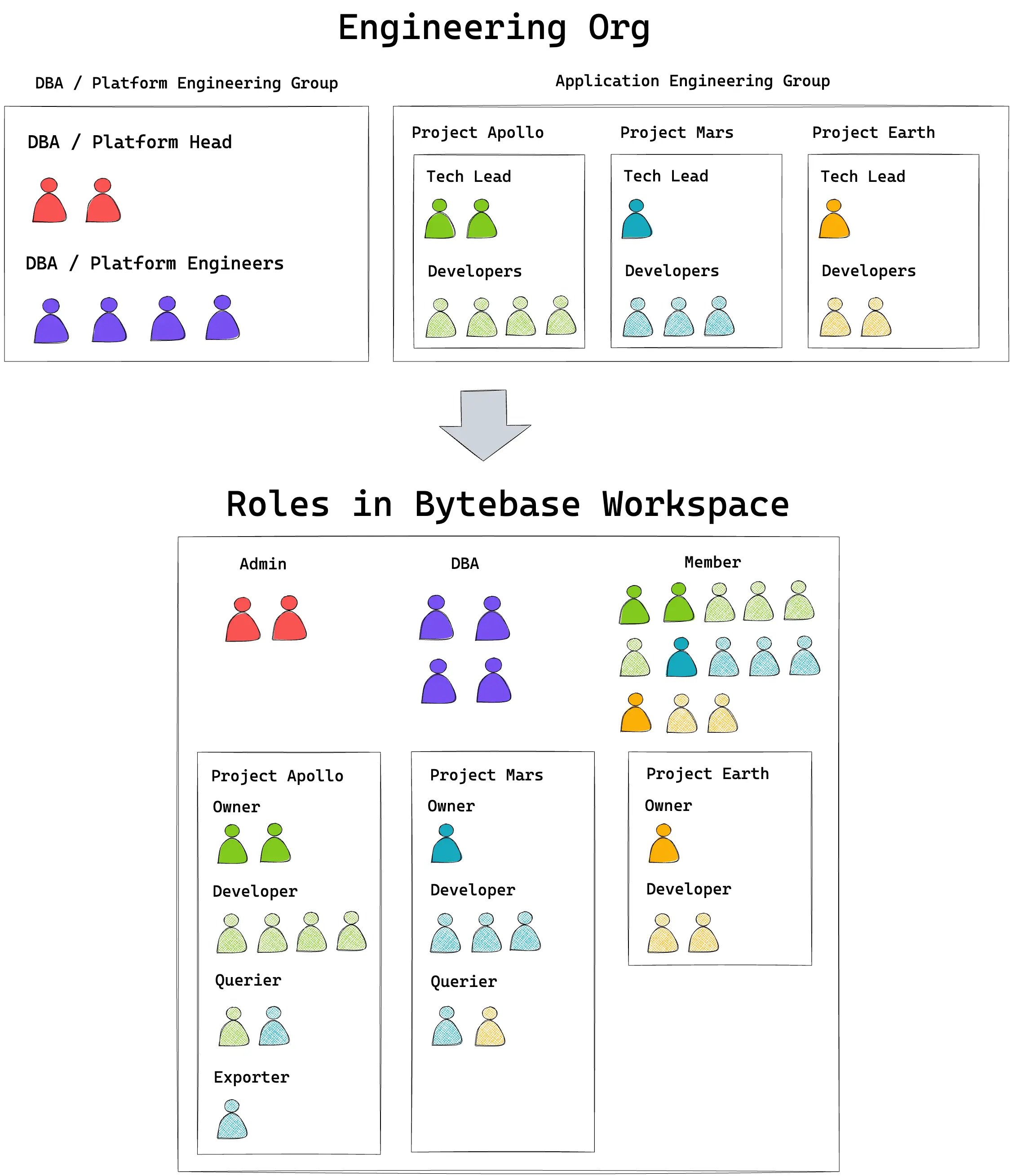
Bytebase uses RBAC (Role-Based Access Control) to manage permissions. A **role** is a collection of permissions that can be granted to users and user groups.
### Permission Scope
Permissions in Bytebase apply to two levels of resources:
* **Workspace-level resources**: Settings, instances, environments, and overall workspace management
* **Project-level resources**: Project settings, databases, issues, and project-specific operations
### Role Types
Bytebase provides two types of roles:
#### Built-in Roles
**Workspace roles:**
* `Workspace Admin` - Full administrative control
* `Workspace DBA` - Database administration across all projects
* `Workspace Member` - Basic access (automatically assigned to all users)
**Project roles:**
* `Project Owner` - Full control over project resources
* `Project Developer` - Create and manage database changes; create Export issues for one-time exports
* `Project Releaser` - Approve and release changes
* `SQL Editor User` (formerly `Project Querier`) - Query in SQL Editor; export results directly from the Editor
* `Project Viewer` - Read-only access
* `GitOps Service Agent` - Automated CI/CD workflows to create and execute database changes via GitOps
#### Custom Roles
Organizations can create custom roles with specific permission sets tailored to their needs. Custom roles are defined at the workspace level and can be granted at both workspace and project levels.
**Granular Permissions:** Bytebase provides granular permissions for sensitive operations like masking policies. For example, instead of generic `bb.policies.create/update/delete` permissions, you can grant specific permissions like `bb.policies.createMaskingExemptionPolicy` or `bb.policies.updateMaskingRulePolicy` to control access to masking exemptions and global masking rules separately.
### Granting Roles
Roles are granted through IAM policies at two levels:
1. **Workspace IAM Policy** (Workspace > Members page)
* Grant roles that apply across all projects
* Manage workspace-level permissions
2. **Project IAM Policy** (Project > Members page)
* Grant roles for specific project resources
* Inherits roles granted at the workspace level
**Inheritance:** Project IAM policies automatically inherit roles granted at the workspace level. For example, if a user is granted `Project Developer` at the workspace level, they have that role in all projects.
 ## Creating Custom Roles
1. Navigate to **IAM & Admin > Custom Roles**
2. Click **Add role**
3. Configure permissions for your new role
## Creating Custom Roles
1. Navigate to **IAM & Admin > Custom Roles**
2. Click **Add role**
3. Configure permissions for your new role
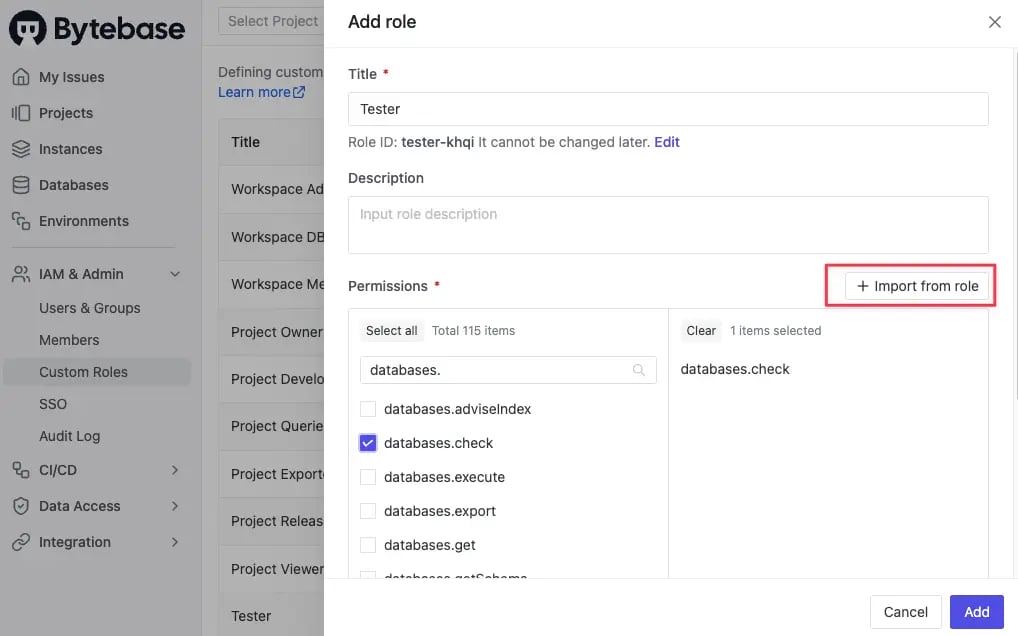 Use **Import from role** to start with an existing role's permissions and modify them as needed.
**Example:** To create a role that can approve and comment on issues but not execute them, create a `Project Approver` role by importing from `Project Releaser` and removing execution permissions.
## Granting Roles in IAM Policy
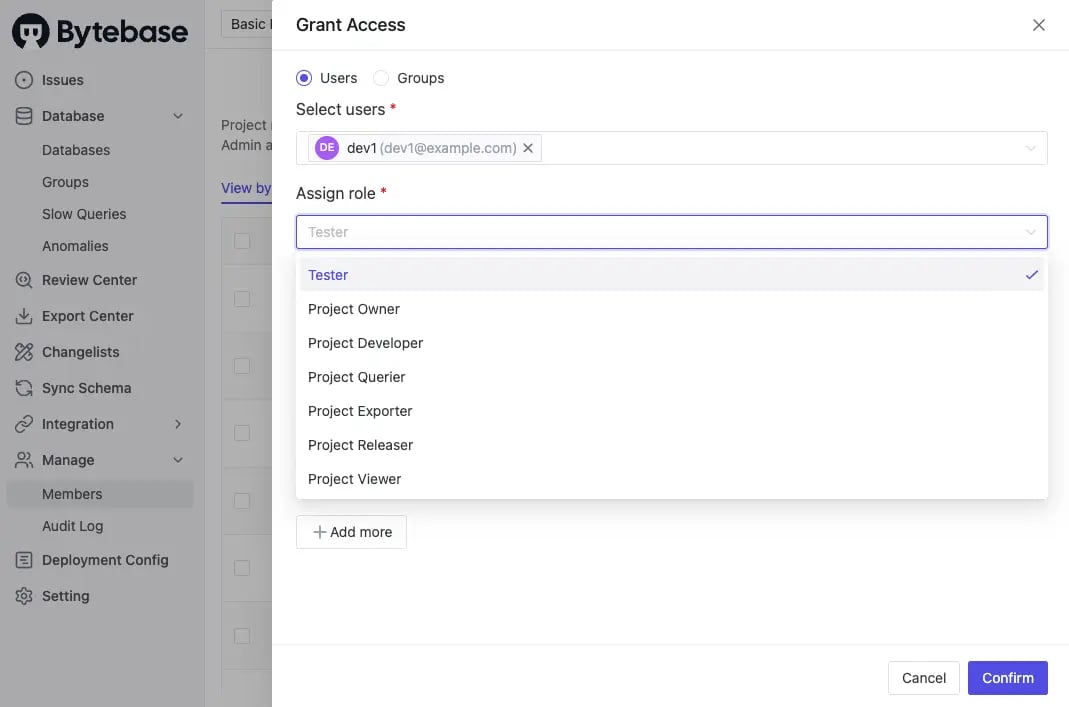
Roles (both built-in and custom) can be assigned to users and groups through the Members page at either workspace or project level:
1. Navigate to **Members** page (either in Workspace or specific Project)
2. Click **Grant Access** to add users or groups
3. Select the appropriate roles to grant
4. Confirm to apply the IAM policy changes
When roles are granted at the workspace level, they automatically apply to all projects. Project-level grants only affect the specific project.
Use **Import from role** to start with an existing role's permissions and modify them as needed.
**Example:** To create a role that can approve and comment on issues but not execute them, create a `Project Approver` role by importing from `Project Releaser` and removing execution permissions.
## Granting Roles in IAM Policy
Roles (both built-in and custom) can be assigned to users and groups through the Members page at either workspace or project level:
1. Navigate to **Members** page (either in Workspace or specific Project)
2. Click **Grant Access** to add users or groups
3. Select the appropriate roles to grant
4. Confirm to apply the IAM policy changes
When roles are granted at the workspace level, they automatically apply to all projects. Project-level grants only affect the specific project.
 ## Appendix
### Workspace Role Permissions
By default, the first registered user is granted the `Admin` role, all following registered users are granted `Member` role. `Admin` can update any user's role later.
| Workspace Permission | Member | DBA | Admin |
| ----------------------------------- | ------ | --- | ----- |
| Change own name and password | ✔️ | ✔️ | ✔️ |
| Add new user | | | ✔️ |
| View all users | ✔️ | ✔️ | ✔️ |
| Change any user's role | | | ✔️ |
| De-activate/re-activate user | | | ✔️ |
| Change any user's name and password | | | ✔️ |
| Manage identity providers (SSO) | | | ✔️ |
| Add environment | | ✔️ | ✔️ |
| View all environments | ✔️ | ✔️ | ✔️ |
| Edit environment | | ✔️ | ✔️ |
| Reorder environment | | ✔️ | ✔️ |
| Archive environment | | ✔️ | ✔️ |
| View all instances | | ✔️ | ✔️ |
| Add instance | | ✔️ | ✔️ |
| Edit instance | | ✔️ | ✔️ |
| Archive instance | | ✔️ | ✔️ |
| Sync instance schema | | ✔️ | ✔️ |
| Create database | | ✔️ | ✔️ |
| View all databases | | ✔️ | ✔️ |
| Create project | ✔️ | ✔️ | ✔️ |
| View all projects | | ✔️ | ✔️ |
| Create issue | | ✔️ | ✔️ |
| View all issues | | ✔️ | ✔️ |
| Become issue assignee | | ✔️ | ✔️ |
| Re-assign issue | | ✔️ | ✔️ |
| Add comment to all issues | | ✔️ | ✔️ |
| Subscribe to all issues | | ✔️ | ✔️ |
| Alter schema | | ✔️ | ✔️ |
| Change data | | ✔️ | ✔️ |
| Configure SQL Review Policy | | ✔️ | ✔️ |
| Manage version control system (VCS) | | | ✔️ |
| Manage sensitive data | | ✔️ | ✔️ |
| Manage database access control | | ✔️ | ✔️ |
| Manage IM integration | | | ✔️ |
| Change logo | | | ✔️ |
### Project Role Permissions
Any user can create project. By default, the project creator is granted the `Project Owner` role. `Workspace DBA` and `Workspace Admin` assume the `Project Owner` role for all projects.
| Project Permission | SQL Editor User | Project Developer | Project Releaser | GitOps Service Agent | Project Owner | Workspace DBA | Workspace Admin |
| ---------------------------- | --------------- | ----------------- | ---------------- | -------------------- | ------------- | ------------- | --------------- |
| Change project role | | | | | ✔️ | ✔️ | ✔️ |
| Edit project | | | | | ✔️ | ✔️ | ✔️ |
| Archive project | | | | | ✔️ | ✔️ | ✔️ |
| Configure UI/GitOps workflow | | | | | ✔️ | ✔️ | ✔️ |
### Database Permissions
Bytebase does not define database specific roles. Whether a user can perform certain action to the database is based on the user's Workspace role and the role of the project owning the database.
| Database Permission | SQL Editor User | Project Developer | Project Releaser | GitOps Service Agent | Project Owner | Workspace DBA | Workspace Admin |
| ------------------- | --------------- | ----------------- | ---------------- | -------------------- | ------------- | ------------- | --------------- |
| Query | ✔️ | | | | ✔️ | ✔️ | ✔️ |
| Edit database label | | | | | ✔️ | ✔️ | ✔️ |
| Transfer database | | | | | ✔️ | ✔️ | ✔️ |
### Sheet Permissions
User can save sheets from [SQL Editor](/sql-editor/overview). A sheet always belongs to a project. Sheet has three visibility levels:
* Private
* Project
* Public
#### Private Sheet
| Permission | Creator | SQL Editor User | Project Developer | Project Owner | Workspace DBA | Workspace Admin |
| ---------- | ------- | --------------- | ----------------- | ------------- | ------------- | --------------- |
| Star | ✔️ | | | | | |
| Read | ✔️ | | | | | |
| Write | ✔️ | | | | | |
| Delete | ✔️ | | | | | |
#### Project Sheet
| Permission | Creator | SQL Editor User | Project Developer | Project Owner | Workspace DBA | Workspace Admin |
| ---------- | ------- | --------------- | ----------------- | ------------- | ------------- | --------------- |
| Star | ✔️ | ✔️ | ✔️ | ✔️ | ✔️ | ✔️ |
| Read | ✔️ | ✔️ | ✔️ | ✔️ | ✔️ | ✔️ |
| Write | ✔️ | | | ✔️ | ✔️ | ✔️ |
| Delete | ✔️ | | | ✔️ | ✔️ | ✔️ |
#### Public Sheet
| Permission | Creator | SQL Editor User | Project Developer | Project Owner | Others |
| ---------- | ------- | --------------- | ----------------- | ------------- | ------ |
| Star | ✔️ | ✔️ | ✔️ | ✔️ | ✔️ |
| Read | ✔️ | ✔️ | ✔️ | ✔️ | ✔️ |
| Write | ✔️ | | | ✔️ | |
| Delete | ✔️ | | | ✔️ | |
### Issue Permissions
| Issue Permission | Assignee | Creator | SQL Editor User | Project Developer | Project Releaser | GitOps Service Agent | Project Owner | Workspace DBA | Workspace Admin |
| ------------------------- | -------- | ------- | --------------- | ----------------- | ---------------- | -------------------- | ------------- | ------------- | --------------- |
| Create issue | N/A | N/A | | ✔️ | | ✔️ | ✔️ | ✔️ | ✔️ |
| Change issue status | ✔️ | | | | ✔️ | ✔️ | Depends\* | ✔️ | ✔️ |
| Edit name and description | ✔️ | ✔️ | | | | | | ✔️ | ✔️ |
| Edit SQL Statement | | ✔️ | | | | | | | |
| Subscribe/Unsubscribe | ✔️ | ✔️ | ✔️ | ✔️ | ✔️ | | ✔️ | ✔️ | ✔️ |
| Add comment | ✔️ | ✔️ | ✔️ | ✔️ | ✔️ | | ✔️ | ✔️ | ✔️ |
\* `Project Owner` can change issue status when the current active [Environment Rollout Policy](/change-database/environment-policy/rollout-policy) is set to **Require manual rolling out**.
## Appendix
### Workspace Role Permissions
By default, the first registered user is granted the `Admin` role, all following registered users are granted `Member` role. `Admin` can update any user's role later.
| Workspace Permission | Member | DBA | Admin |
| ----------------------------------- | ------ | --- | ----- |
| Change own name and password | ✔️ | ✔️ | ✔️ |
| Add new user | | | ✔️ |
| View all users | ✔️ | ✔️ | ✔️ |
| Change any user's role | | | ✔️ |
| De-activate/re-activate user | | | ✔️ |
| Change any user's name and password | | | ✔️ |
| Manage identity providers (SSO) | | | ✔️ |
| Add environment | | ✔️ | ✔️ |
| View all environments | ✔️ | ✔️ | ✔️ |
| Edit environment | | ✔️ | ✔️ |
| Reorder environment | | ✔️ | ✔️ |
| Archive environment | | ✔️ | ✔️ |
| View all instances | | ✔️ | ✔️ |
| Add instance | | ✔️ | ✔️ |
| Edit instance | | ✔️ | ✔️ |
| Archive instance | | ✔️ | ✔️ |
| Sync instance schema | | ✔️ | ✔️ |
| Create database | | ✔️ | ✔️ |
| View all databases | | ✔️ | ✔️ |
| Create project | ✔️ | ✔️ | ✔️ |
| View all projects | | ✔️ | ✔️ |
| Create issue | | ✔️ | ✔️ |
| View all issues | | ✔️ | ✔️ |
| Become issue assignee | | ✔️ | ✔️ |
| Re-assign issue | | ✔️ | ✔️ |
| Add comment to all issues | | ✔️ | ✔️ |
| Subscribe to all issues | | ✔️ | ✔️ |
| Alter schema | | ✔️ | ✔️ |
| Change data | | ✔️ | ✔️ |
| Configure SQL Review Policy | | ✔️ | ✔️ |
| Manage version control system (VCS) | | | ✔️ |
| Manage sensitive data | | ✔️ | ✔️ |
| Manage database access control | | ✔️ | ✔️ |
| Manage IM integration | | | ✔️ |
| Change logo | | | ✔️ |
### Project Role Permissions
Any user can create project. By default, the project creator is granted the `Project Owner` role. `Workspace DBA` and `Workspace Admin` assume the `Project Owner` role for all projects.
| Project Permission | SQL Editor User | Project Developer | Project Releaser | GitOps Service Agent | Project Owner | Workspace DBA | Workspace Admin |
| ---------------------------- | --------------- | ----------------- | ---------------- | -------------------- | ------------- | ------------- | --------------- |
| Change project role | | | | | ✔️ | ✔️ | ✔️ |
| Edit project | | | | | ✔️ | ✔️ | ✔️ |
| Archive project | | | | | ✔️ | ✔️ | ✔️ |
| Configure UI/GitOps workflow | | | | | ✔️ | ✔️ | ✔️ |
### Database Permissions
Bytebase does not define database specific roles. Whether a user can perform certain action to the database is based on the user's Workspace role and the role of the project owning the database.
| Database Permission | SQL Editor User | Project Developer | Project Releaser | GitOps Service Agent | Project Owner | Workspace DBA | Workspace Admin |
| ------------------- | --------------- | ----------------- | ---------------- | -------------------- | ------------- | ------------- | --------------- |
| Query | ✔️ | | | | ✔️ | ✔️ | ✔️ |
| Edit database label | | | | | ✔️ | ✔️ | ✔️ |
| Transfer database | | | | | ✔️ | ✔️ | ✔️ |
### Sheet Permissions
User can save sheets from [SQL Editor](/sql-editor/overview). A sheet always belongs to a project. Sheet has three visibility levels:
* Private
* Project
* Public
#### Private Sheet
| Permission | Creator | SQL Editor User | Project Developer | Project Owner | Workspace DBA | Workspace Admin |
| ---------- | ------- | --------------- | ----------------- | ------------- | ------------- | --------------- |
| Star | ✔️ | | | | | |
| Read | ✔️ | | | | | |
| Write | ✔️ | | | | | |
| Delete | ✔️ | | | | | |
#### Project Sheet
| Permission | Creator | SQL Editor User | Project Developer | Project Owner | Workspace DBA | Workspace Admin |
| ---------- | ------- | --------------- | ----------------- | ------------- | ------------- | --------------- |
| Star | ✔️ | ✔️ | ✔️ | ✔️ | ✔️ | ✔️ |
| Read | ✔️ | ✔️ | ✔️ | ✔️ | ✔️ | ✔️ |
| Write | ✔️ | | | ✔️ | ✔️ | ✔️ |
| Delete | ✔️ | | | ✔️ | ✔️ | ✔️ |
#### Public Sheet
| Permission | Creator | SQL Editor User | Project Developer | Project Owner | Others |
| ---------- | ------- | --------------- | ----------------- | ------------- | ------ |
| Star | ✔️ | ✔️ | ✔️ | ✔️ | ✔️ |
| Read | ✔️ | ✔️ | ✔️ | ✔️ | ✔️ |
| Write | ✔️ | | | ✔️ | |
| Delete | ✔️ | | | ✔️ | |
### Issue Permissions
| Issue Permission | Assignee | Creator | SQL Editor User | Project Developer | Project Releaser | GitOps Service Agent | Project Owner | Workspace DBA | Workspace Admin |
| ------------------------- | -------- | ------- | --------------- | ----------------- | ---------------- | -------------------- | ------------- | ------------- | --------------- |
| Create issue | N/A | N/A | | ✔️ | | ✔️ | ✔️ | ✔️ | ✔️ |
| Change issue status | ✔️ | | | | ✔️ | ✔️ | Depends\* | ✔️ | ✔️ |
| Edit name and description | ✔️ | ✔️ | | | | | | ✔️ | ✔️ |
| Edit SQL Statement | | ✔️ | | | | | | | |
| Subscribe/Unsubscribe | ✔️ | ✔️ | ✔️ | ✔️ | ✔️ | | ✔️ | ✔️ | ✔️ |
| Add comment | ✔️ | ✔️ | ✔️ | ✔️ | ✔️ | | ✔️ | ✔️ | ✔️ |
\* `Project Owner` can change issue status when the current active [Environment Rollout Policy](/change-database/environment-policy/rollout-policy) is set to **Require manual rolling out**.