> ## Documentation Index
> Fetch the complete documentation index at: https://docs.bytebase.com/llms.txt
> Use this file to discover all available pages before exploring further.
# AI Assistant
Bytebase only sends the database schema (table and column names) to the configured AI provider. It never sends the table data.
You can check the [relevant code](https://github.com/bytebase/bytebase/blob/main/frontend/src/plugins/ai/logic/prompt.ts).
AI Assistant uses the configured AI provider to augment the database development workflow. It powers [SQL Editor AI Assistant](/sql-editor/ai-assistant) and the [Page Agent](/page-agent).
You can connect it to OpenAI, Azure OpenAI, Gemini, or Claude. Each provider works with its hosted API or with a custom endpoint — a private deployment, self-hosted model, or LLM gateway — that implements that provider's API.
## Enable AI Assistant
Go to Bytebase console, click **Settings > General**. Scroll down to **AI Assistant** and check **Enable AI Assistant**.
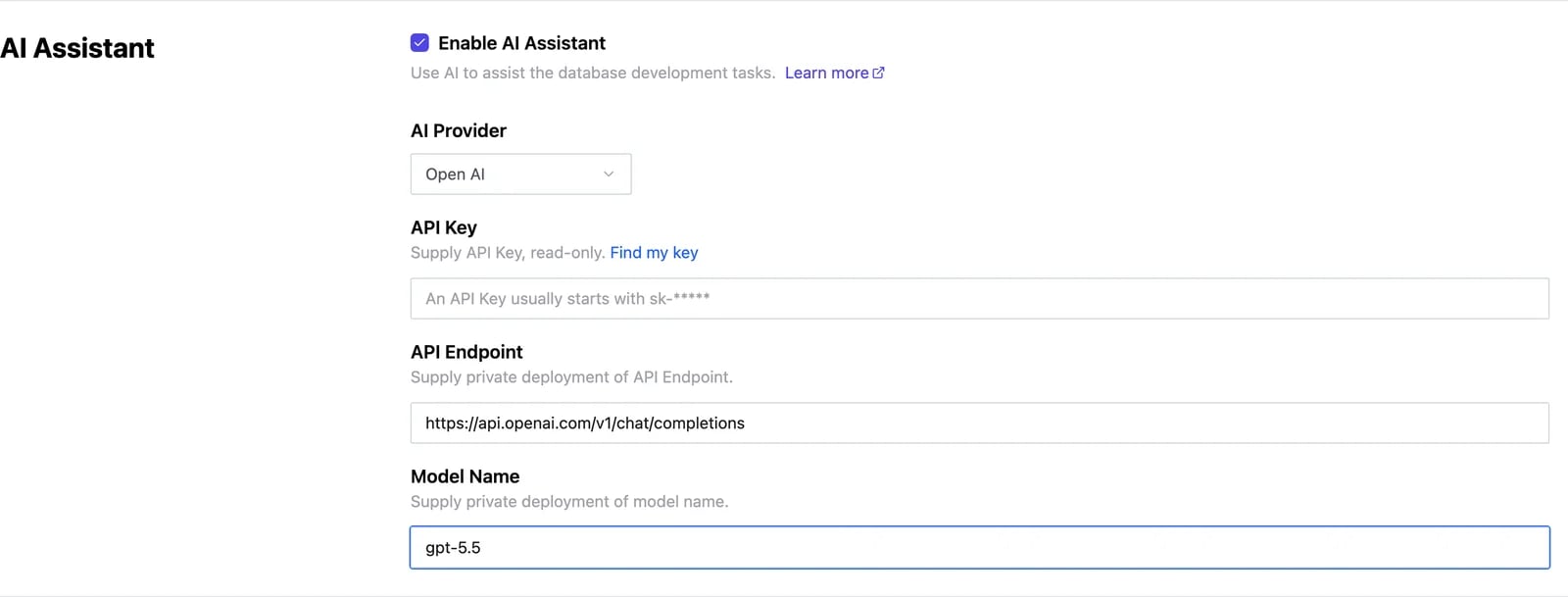 Configure the following:
* **AI Provider**. Choose **OpenAI**, **Azure OpenAI**, **Gemini**, or **Claude**. Selecting a provider prefills the default **API Endpoint** and **Model Name** below.
* **API Key**. The API key for the selected provider. Use the **Find my key** link next to the field to reach the provider's key page.
* **API Endpoint**. The provider's API endpoint. Prefilled with the default; override it to point at a private deployment, proxy, or gateway. The endpoint must implement the **selected provider's** API — OpenAI-compatible for OpenAI and Azure OpenAI, Gemini-compatible for Gemini, Anthropic-compatible for Claude (see [Connect to a custom endpoint](#connect-to-a-custom-endpoint)). When overriding, follow the same URL shape as the provider defaults below (e.g., Gemini uses the `v1beta` base URL; OpenAI/Azure/Claude use the full request URL).
* **Model Name**. The model to use. Prefilled with the provider default; you can enter any model name the endpoint serves, including newer models if your endpoint supports them.
Each provider prefills these defaults:
| Provider | Default API Endpoint | Default Model Name |
| ------------ | --------------------------------------------------------------------------------------------------------------------- | ------------------ |
| OpenAI | `https://api.openai.com/v1/chat/completions` | `gpt-5.5` |
| Azure OpenAI | `https://{resource name}.openai.azure.com/openai/deployments/{deployment id}/chat/completions?api-version=2024-06-01` | `gpt-5.5` |
| Gemini | `https://generativelanguage.googleapis.com/v1beta` | `gemini-3.5-flash` |
| Claude | `https://api.anthropic.com/v1/messages` | `claude-sonnet-5` |
**Model Name** is a free-form field — Bytebase does not validate it against a fixed list. If you enter a model the endpoint doesn't serve, the error surfaces only when you use the assistant.
In Bytebase Cloud (SaaS), Gemini is enabled automatically and the AI Assistant settings are hidden.
## Connect to a custom endpoint
Every provider's **API Endpoint** can point at a custom URL instead of the vendor's hosted API — a private deployment, a self-hosted model, or an LLM gateway. Bytebase sends the selected provider's native request format to whatever URL you set, so the endpoint must implement that provider's API.
To connect to one, select the matching **AI Provider**, then set **API Endpoint** to your service's URL and fill in the **API Key** and **Model Name** it expects.
Pick the provider by the API your endpoint speaks. Most self-hosted models and gateways expose an OpenAI-compatible API, so **OpenAI** is the common choice; select **Gemini** or **Claude** if your endpoint implements Google's or Anthropic's API instead.
## Features
* [SQL Editor AI Assistant](/sql-editor/ai-assistant)
* [Page Agent](/page-agent)
Configure the following:
* **AI Provider**. Choose **OpenAI**, **Azure OpenAI**, **Gemini**, or **Claude**. Selecting a provider prefills the default **API Endpoint** and **Model Name** below.
* **API Key**. The API key for the selected provider. Use the **Find my key** link next to the field to reach the provider's key page.
* **API Endpoint**. The provider's API endpoint. Prefilled with the default; override it to point at a private deployment, proxy, or gateway. The endpoint must implement the **selected provider's** API — OpenAI-compatible for OpenAI and Azure OpenAI, Gemini-compatible for Gemini, Anthropic-compatible for Claude (see [Connect to a custom endpoint](#connect-to-a-custom-endpoint)). When overriding, follow the same URL shape as the provider defaults below (e.g., Gemini uses the `v1beta` base URL; OpenAI/Azure/Claude use the full request URL).
* **Model Name**. The model to use. Prefilled with the provider default; you can enter any model name the endpoint serves, including newer models if your endpoint supports them.
Each provider prefills these defaults:
| Provider | Default API Endpoint | Default Model Name |
| ------------ | --------------------------------------------------------------------------------------------------------------------- | ------------------ |
| OpenAI | `https://api.openai.com/v1/chat/completions` | `gpt-5.5` |
| Azure OpenAI | `https://{resource name}.openai.azure.com/openai/deployments/{deployment id}/chat/completions?api-version=2024-06-01` | `gpt-5.5` |
| Gemini | `https://generativelanguage.googleapis.com/v1beta` | `gemini-3.5-flash` |
| Claude | `https://api.anthropic.com/v1/messages` | `claude-sonnet-5` |
**Model Name** is a free-form field — Bytebase does not validate it against a fixed list. If you enter a model the endpoint doesn't serve, the error surfaces only when you use the assistant.
In Bytebase Cloud (SaaS), Gemini is enabled automatically and the AI Assistant settings are hidden.
## Connect to a custom endpoint
Every provider's **API Endpoint** can point at a custom URL instead of the vendor's hosted API — a private deployment, a self-hosted model, or an LLM gateway. Bytebase sends the selected provider's native request format to whatever URL you set, so the endpoint must implement that provider's API.
To connect to one, select the matching **AI Provider**, then set **API Endpoint** to your service's URL and fill in the **API Key** and **Model Name** it expects.
Pick the provider by the API your endpoint speaks. Most self-hosted models and gateways expose an OpenAI-compatible API, so **OpenAI** is the common choice; select **Gemini** or **Claude** if your endpoint implements Google's or Anthropic's API instead.
## Features
* [SQL Editor AI Assistant](/sql-editor/ai-assistant)
* [Page Agent](/page-agent)