> ## Documentation Index
> Fetch the complete documentation index at: https://docs.bytebase.com/llms.txt
> Use this file to discover all available pages before exploring further.
# Review
SQL Review automatically validates your database changes against configured policies before they're executed. This ensures consistency and catches potential issues early in the change process.
## How It Works
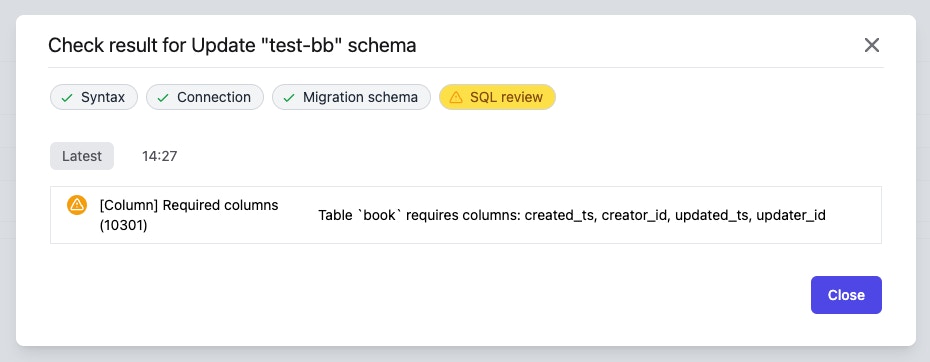
When you create a Plan, SQL Review automatically validates the statements and flags any violations:
 ## Review Results
SQL Review results appear directly in the Plan interface, showing:
* **Errors**: Must be fixed before the change can proceed
* **Warnings**: Should be reviewed but won't block execution
* **Passed checks**: Confirmations that rules are satisfied
## Configuring Review Policies
Review policies determine which rules are enforced for your database changes. You can configure these policies at the environment or project level.
Learn how to set up and customize SQL Review policies for your environments and projects
## Review Rules Reference
Bytebase provides comprehensive review rules for each database engine, covering:
* Schema design best practices
* Performance optimization
* Security requirements
* Naming conventions
Browse the complete list of available review rules for each database engine
## Handling Review Feedback
When SQL Review identifies issues:
1. **Review the findings**: Click on each issue to understand what needs to be fixed
2. **Update your SQL**: Modify the statements to comply with the rules
3. **Re-run the review**: The review automatically runs again when you save changes
4. **Proceed when cleared**: Once all errors are resolved, continue with the approval process
## Integration with Approval Flow
SQL Review acts as the first gate in your change management process:
* Review must pass before human approvers are notified
* Failed reviews can be configured to block automatic rollout
* Review results are included in approval notifications
This automated validation reduces the burden on reviewers and ensures consistent quality standards across all database changes.
## Review Results
SQL Review results appear directly in the Plan interface, showing:
* **Errors**: Must be fixed before the change can proceed
* **Warnings**: Should be reviewed but won't block execution
* **Passed checks**: Confirmations that rules are satisfied
## Configuring Review Policies
Review policies determine which rules are enforced for your database changes. You can configure these policies at the environment or project level.
Learn how to set up and customize SQL Review policies for your environments and projects
## Review Rules Reference
Bytebase provides comprehensive review rules for each database engine, covering:
* Schema design best practices
* Performance optimization
* Security requirements
* Naming conventions
Browse the complete list of available review rules for each database engine
## Handling Review Feedback
When SQL Review identifies issues:
1. **Review the findings**: Click on each issue to understand what needs to be fixed
2. **Update your SQL**: Modify the statements to comply with the rules
3. **Re-run the review**: The review automatically runs again when you save changes
4. **Proceed when cleared**: Once all errors are resolved, continue with the approval process
## Integration with Approval Flow
SQL Review acts as the first gate in your change management process:
* Review must pass before human approvers are notified
* Failed reviews can be configured to block automatic rollout
* Review results are included in approval notifications
This automated validation reduces the burden on reviewers and ensures consistent quality standards across all database changes.