> ## Documentation Index
> Fetch the complete documentation index at: https://docs.bytebase.com/llms.txt
> Use this file to discover all available pages before exploring further.
# Data Rollback
Bytebase provides **Prior Backup** functionality that captures a snapshot of data before changes are applied. This safety mechanism stores the original state of affected rows, enabling you to revert data changes with **1-Click** when necessary. You can perform **multi-task rollbacks** to efficiently revert multiple related changes across databases in one operation.
Backup data is stored within your own database instance in a dedicated `bbdataarchive` location. Bytebase does not automatically purge this backup data, so you can manually clean up the `bbdataarchive` database or schema as needed.
## Supported Databases
| Database | Prerequisites | Prior Backup | 1-click Rollback |
| ---------- | ------------------------------------------------------------------------------------- | ------------ | ---------------- |
| MySQL | Create a `bbdataarchive` **database** on the instance where your database is located. | ✅ | ✅ |
| MariaDB | Create a `bbdataarchive` **database** on the instance where your database is located. | ✅ | ✅ |
| TiDB | Create a `bbdataarchive` **database** on the instance where your database is located. | ✅ | ✅ |
| PostgreSQL | Create a `bbdataarchive` **schema** on the database. | ✅ | ✅ |
| Oracle | Create a `bbdataarchive` **schema** on the database. | ✅ | ✅ |
| SQL Server | Create a `bbdataarchive` **database** on the instance where your database is located. | ✅ | ✅ |
## Supported Operations
Prior backup is feasible when meeting **all** of the following conditions:
* `UPDATE` or `DELETE`
* No mixed `UPDATE`/`DELETE` on the same table.
* The SQL statement size is less than 2M.
* No mixed DDL/DML.
1-click rollback is feasible when meeting **all** of the following conditions:
* For `UPDATE`, the changed table has primary key and primary key columns are not updated.
## Enable Prior Backup
You can enable the **Prior Backup** option either before or after creating a database change issue.
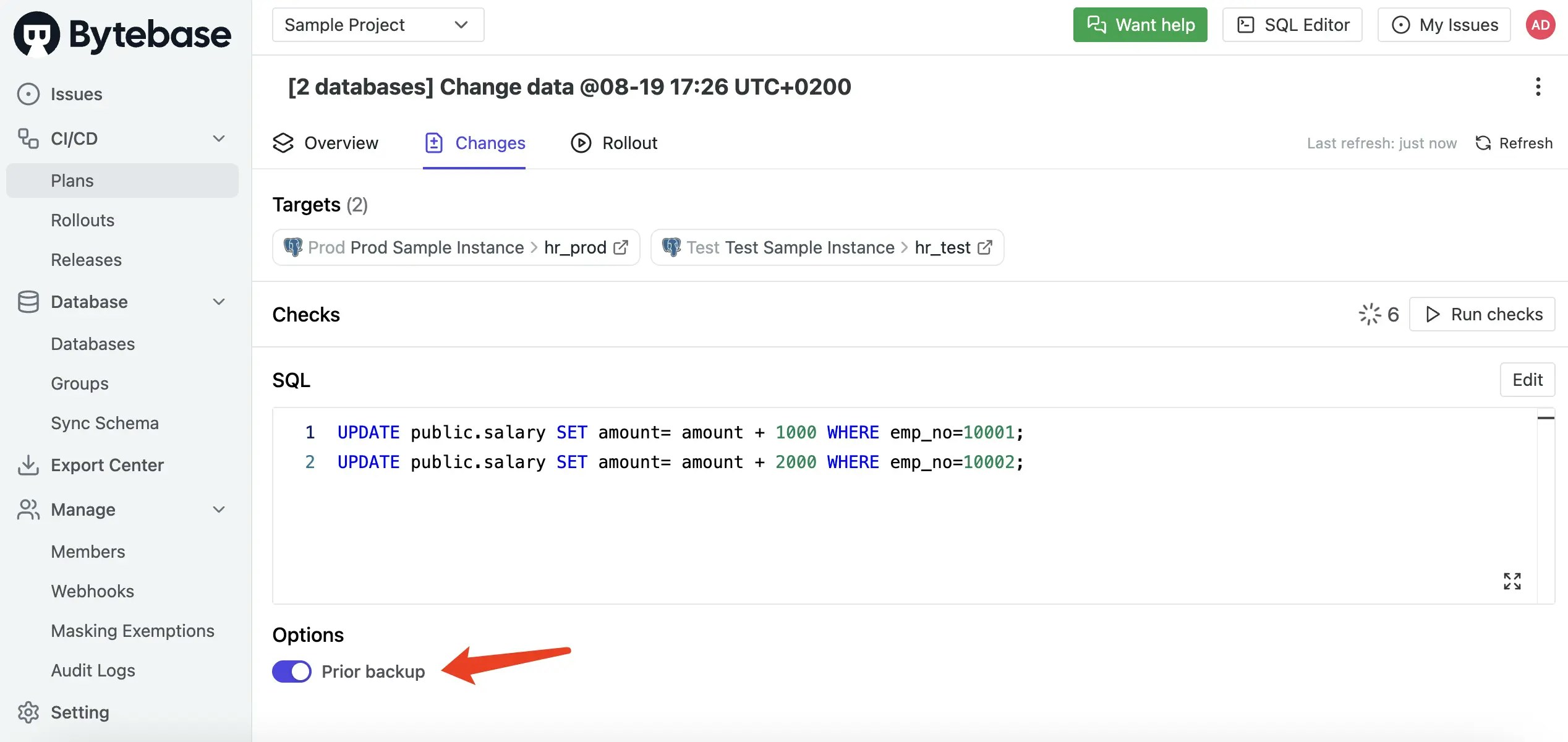 If the Prior Backup switch appears disabled, navigate to the database page and click **Sync
instance** to refresh the database metadata.
## Perform 1-Click and Multi-Task Rollback
1. After your database change has been successfully deployed, click the **Rollback available** link to initiate the rollback process.
If the Prior Backup switch appears disabled, navigate to the database page and click **Sync
instance** to refresh the database metadata.
## Perform 1-Click and Multi-Task Rollback
1. After your database change has been successfully deployed, click the **Rollback available** link to initiate the rollback process.
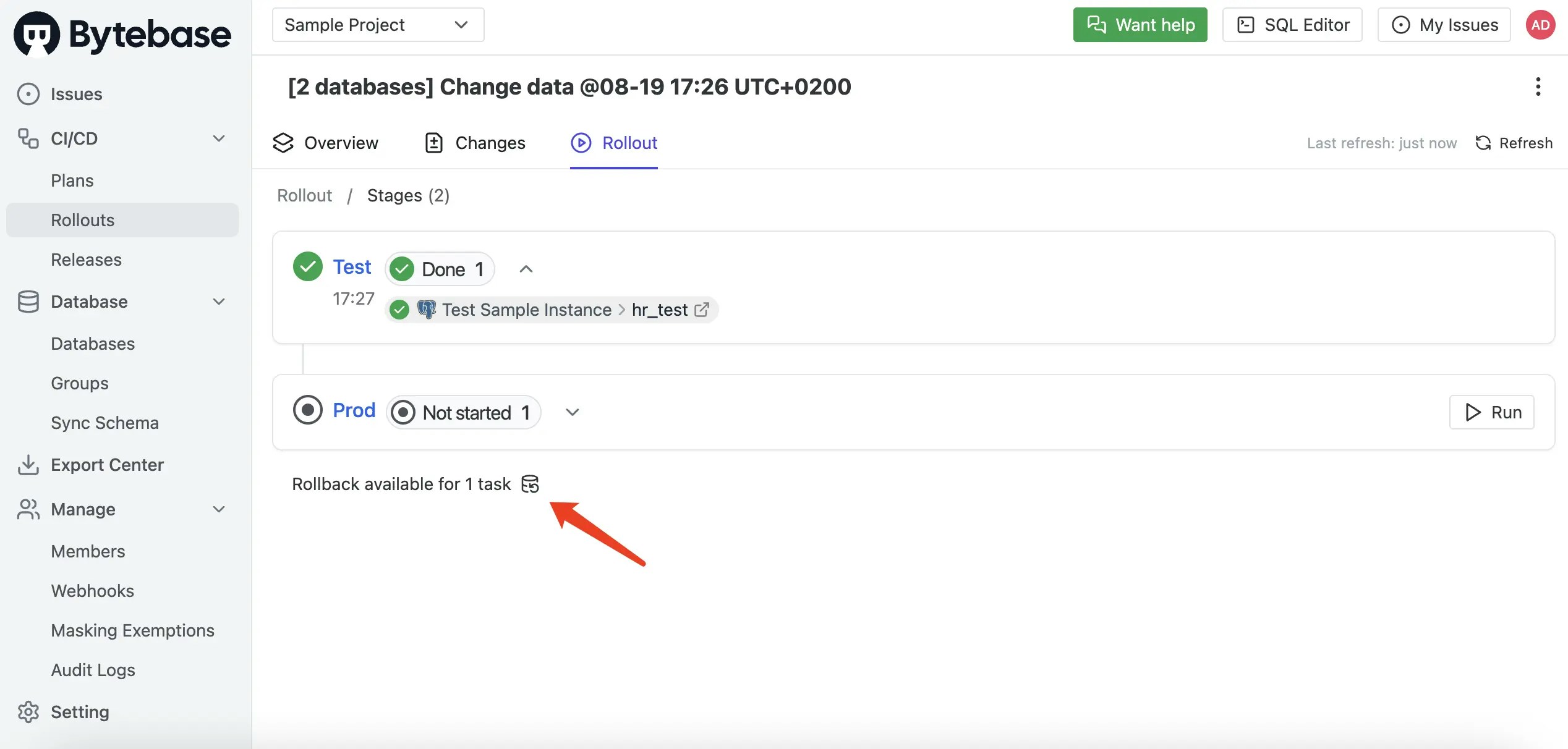 2. You may see multiple rollbackable changes available, depending on your deployment scenario.
This could include a single change applied to multiple databases, multiple changes to one
database, or a combination of both scenarios.
2. You may see multiple rollbackable changes available, depending on your deployment scenario.
This could include a single change applied to multiple databases, multiple changes to one
database, or a combination of both scenarios.
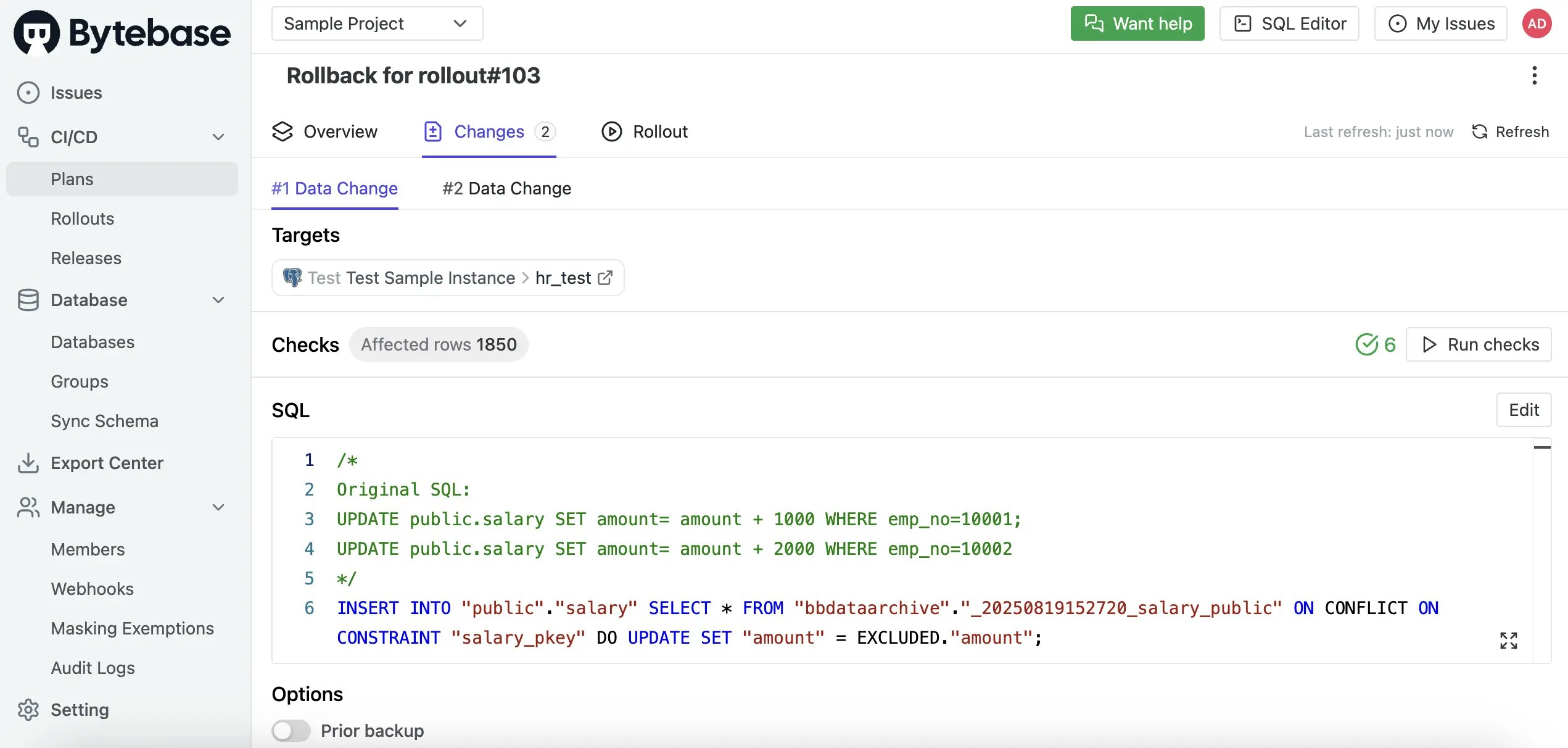
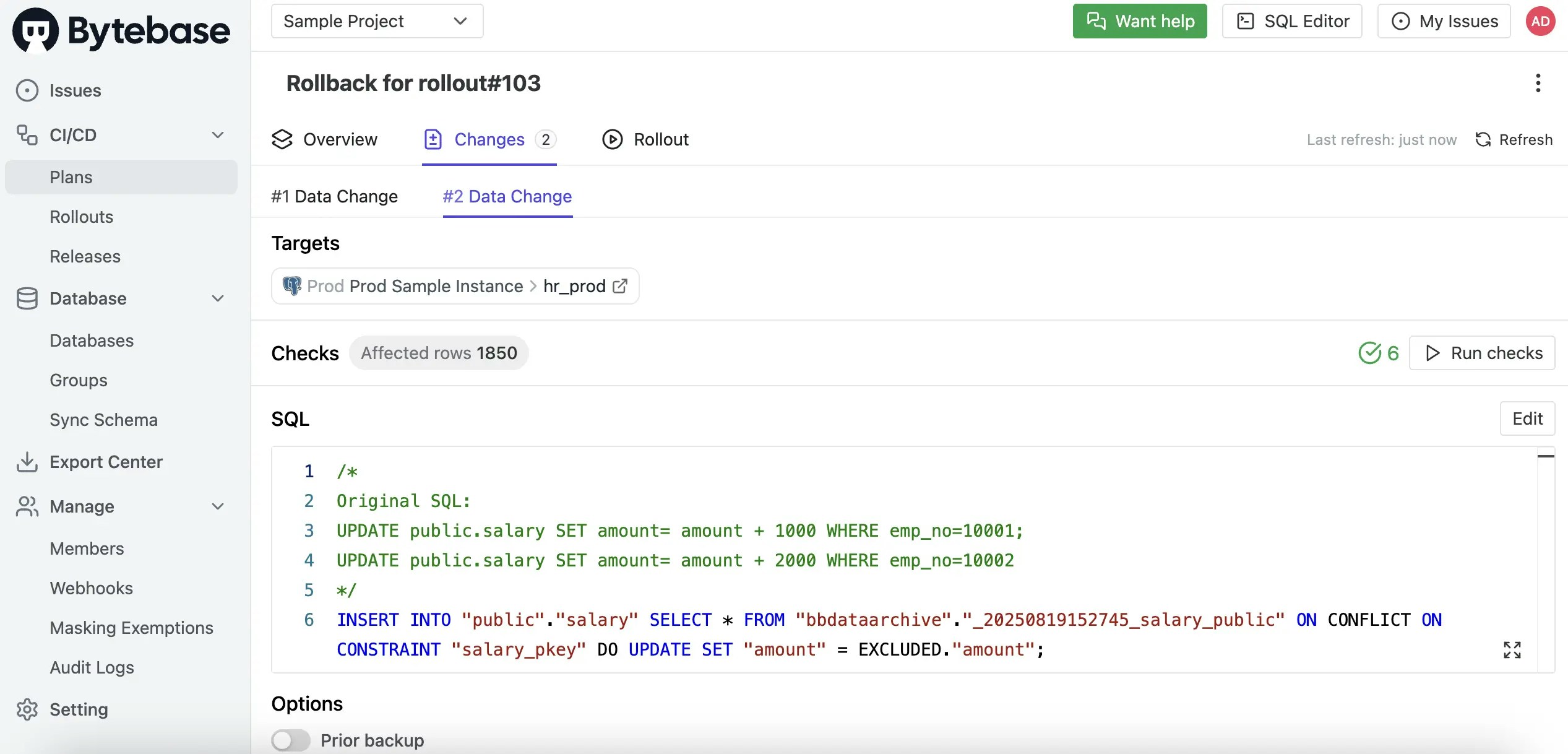
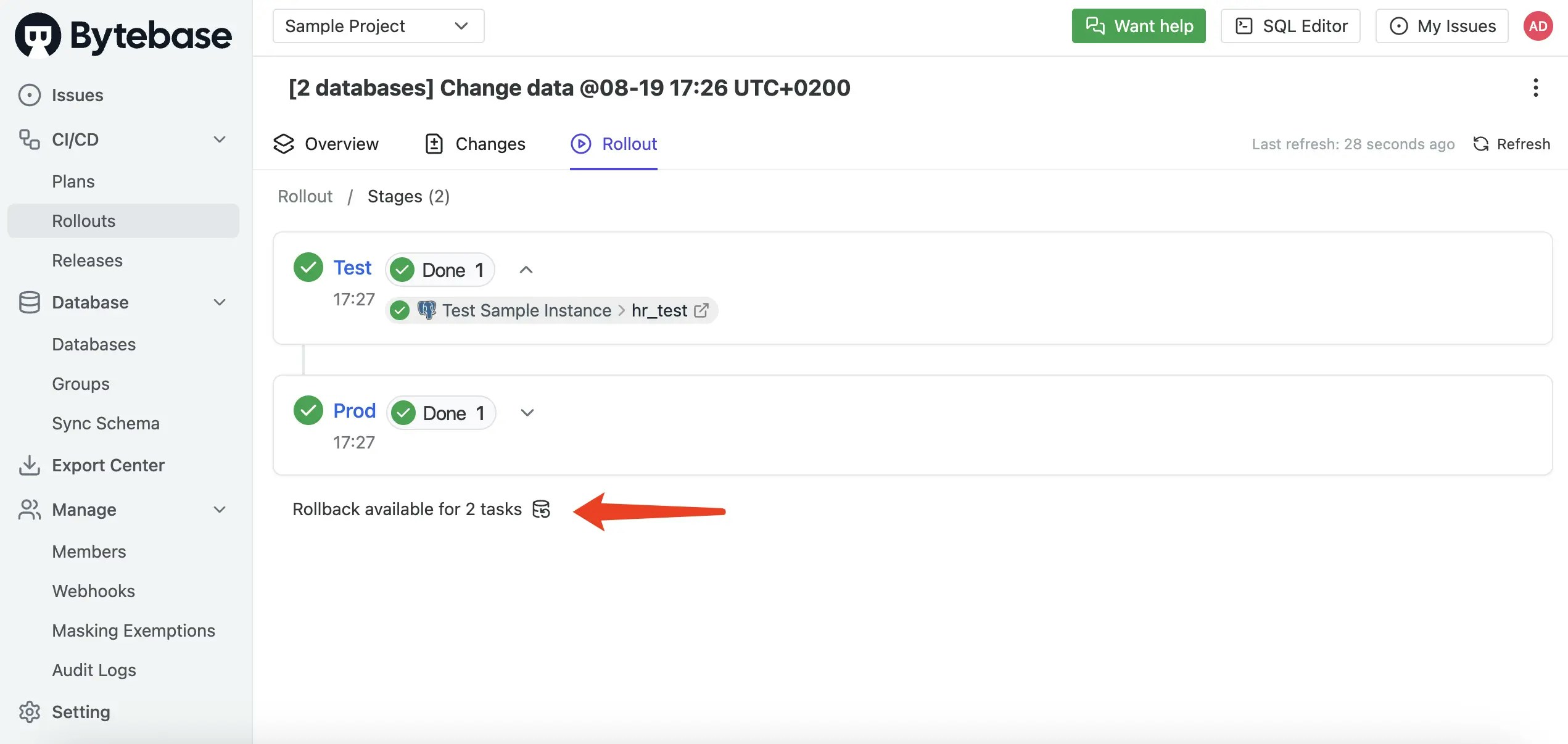 3. Select which changes you want to rollback - you can choose individual changes or rollback all of them at once. This **multi-task rollback** capability allows you to efficiently revert multiple related changes in a single operation.
 4. Bytebase automatically generates the appropriate rollback SQL statements based on the backup data.
 ## Inspect Backup Data
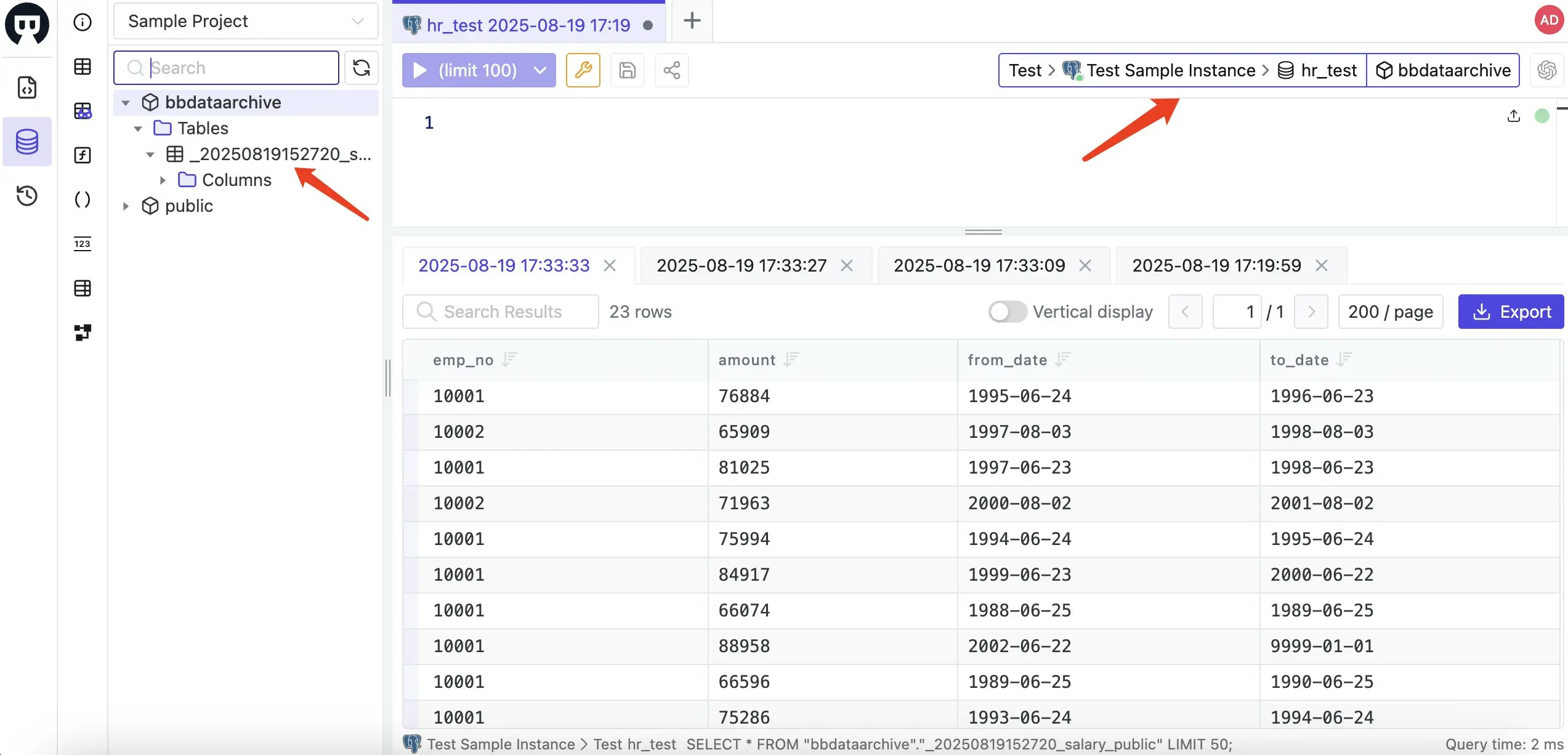
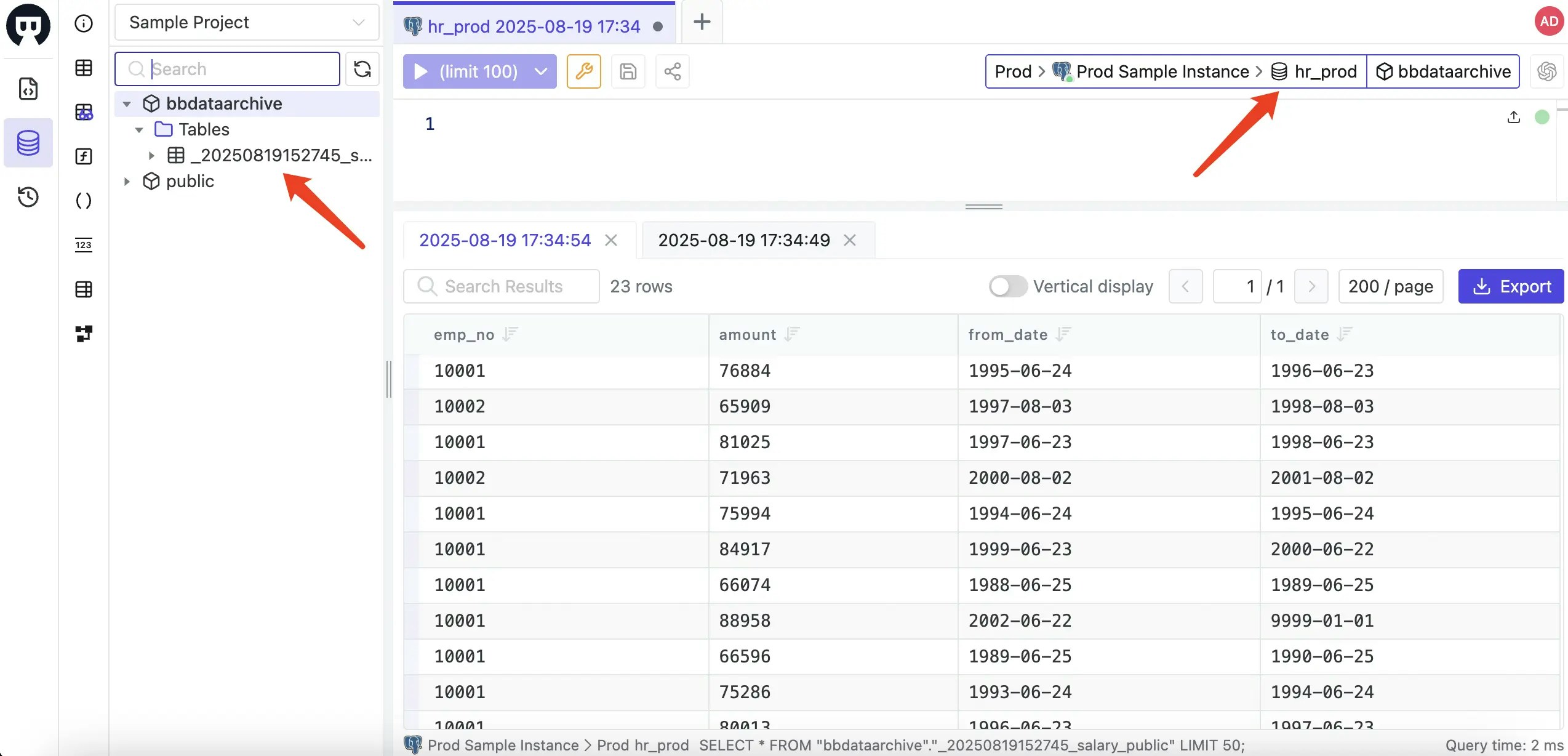
You can examine the stored backup data using Bytebase's SQL Editor to verify what information has been preserved.
## Inspect Backup Data
You can examine the stored backup data using Bytebase's SQL Editor to verify what information has been preserved.
 ## Appendix: Setting Up `bbdataarchive`
Before using Prior Backup functionality, you must create the `bbdataarchive` storage location in your database instance. Follow the instructions for your specific database engine:
### MySQL, MariaDB, and TiDB
These MySQL-compatible engines share the same setup.
1. **Create the backup database:**
```sql theme={null}
CREATE DATABASE bbdataarchive;
```
2. **Grant necessary privileges:**
Replace `your_user` with the actual username that Bytebase uses to connect to your database.
```sql theme={null}
GRANT ALL PRIVILEGES ON bbdataarchive.* TO 'your_user'@'%';
FLUSH PRIVILEGES;
```
### PostgreSQL
1. **Create the backup schema:**
```sql theme={null}
CREATE SCHEMA bbdataarchive;
```
2. **Grant necessary privileges:**
Replace `your_user` with the actual username that Bytebase uses to connect to your database.
```sql theme={null}
GRANT ALL PRIVILEGES ON SCHEMA bbdataarchive TO your_user;
GRANT ALL PRIVILEGES ON ALL TABLES IN SCHEMA bbdataarchive TO your_user;
```
3. **If using `SET ROLE`, grant permissions to that role:**
Replace `your_role` with the role used in `SET ROLE`.
```sql theme={null}
GRANT USAGE, CREATE ON SCHEMA bbdataarchive TO your_role;
```
### Oracle
1. **Create the backup user:**
```sql theme={null}
CREATE USER bbdataarchive IDENTIFIED BY password;
```
2. **Grant connection privileges:**
```sql theme={null}
GRANT CREATE SESSION TO bbdataarchive;
```
3. **Grant unlimited space quota:**
Replace `tablespace_name` with your actual tablespace name.
```sql theme={null}
GRANT QUOTA UNLIMITED ON tablespace_name TO bbdataarchive;
```
4. **Grant privileges to the instance administrator:**
Replace `admin_user` with the actual username that Bytebase uses as the instance administrator.
```sql theme={null}
GRANT CREATE ANY TABLE TO admin_user;
GRANT SELECT ANY TABLE TO admin_user;
```
### SQL Server
1. **Create the backup database:**
```sql theme={null}
CREATE DATABASE bbdataarchive;
```
2. **Grant necessary privileges:**
Replace `your_user` with the actual username that Bytebase uses to connect to your database.
```sql theme={null}
USE bbdataarchive;
GRANT CONTROL ON DATABASE::bbdataarchive TO your_user;
```
## Appendix: Setting Up `bbdataarchive`
Before using Prior Backup functionality, you must create the `bbdataarchive` storage location in your database instance. Follow the instructions for your specific database engine:
### MySQL, MariaDB, and TiDB
These MySQL-compatible engines share the same setup.
1. **Create the backup database:**
```sql theme={null}
CREATE DATABASE bbdataarchive;
```
2. **Grant necessary privileges:**
Replace `your_user` with the actual username that Bytebase uses to connect to your database.
```sql theme={null}
GRANT ALL PRIVILEGES ON bbdataarchive.* TO 'your_user'@'%';
FLUSH PRIVILEGES;
```
### PostgreSQL
1. **Create the backup schema:**
```sql theme={null}
CREATE SCHEMA bbdataarchive;
```
2. **Grant necessary privileges:**
Replace `your_user` with the actual username that Bytebase uses to connect to your database.
```sql theme={null}
GRANT ALL PRIVILEGES ON SCHEMA bbdataarchive TO your_user;
GRANT ALL PRIVILEGES ON ALL TABLES IN SCHEMA bbdataarchive TO your_user;
```
3. **If using `SET ROLE`, grant permissions to that role:**
Replace `your_role` with the role used in `SET ROLE`.
```sql theme={null}
GRANT USAGE, CREATE ON SCHEMA bbdataarchive TO your_role;
```
### Oracle
1. **Create the backup user:**
```sql theme={null}
CREATE USER bbdataarchive IDENTIFIED BY password;
```
2. **Grant connection privileges:**
```sql theme={null}
GRANT CREATE SESSION TO bbdataarchive;
```
3. **Grant unlimited space quota:**
Replace `tablespace_name` with your actual tablespace name.
```sql theme={null}
GRANT QUOTA UNLIMITED ON tablespace_name TO bbdataarchive;
```
4. **Grant privileges to the instance administrator:**
Replace `admin_user` with the actual username that Bytebase uses as the instance administrator.
```sql theme={null}
GRANT CREATE ANY TABLE TO admin_user;
GRANT SELECT ANY TABLE TO admin_user;
```
### SQL Server
1. **Create the backup database:**
```sql theme={null}
CREATE DATABASE bbdataarchive;
```
2. **Grant necessary privileges:**
Replace `your_user` with the actual username that Bytebase uses to connect to your database.
```sql theme={null}
USE bbdataarchive;
GRANT CONTROL ON DATABASE::bbdataarchive TO your_user;
```