> ## Documentation Index
> Fetch the complete documentation index at: https://docs.bytebase.com/llms.txt
> Use this file to discover all available pages before exploring further.
# Schema Synchronization
Bytebase supports synchronizing a specified schema version of one source database to one or multiple target databases.
You can use Schema Synchronization to:
* Propagate the schema changes from the one database to others.
* Revert the database schema to an old version.
The overall workflow:
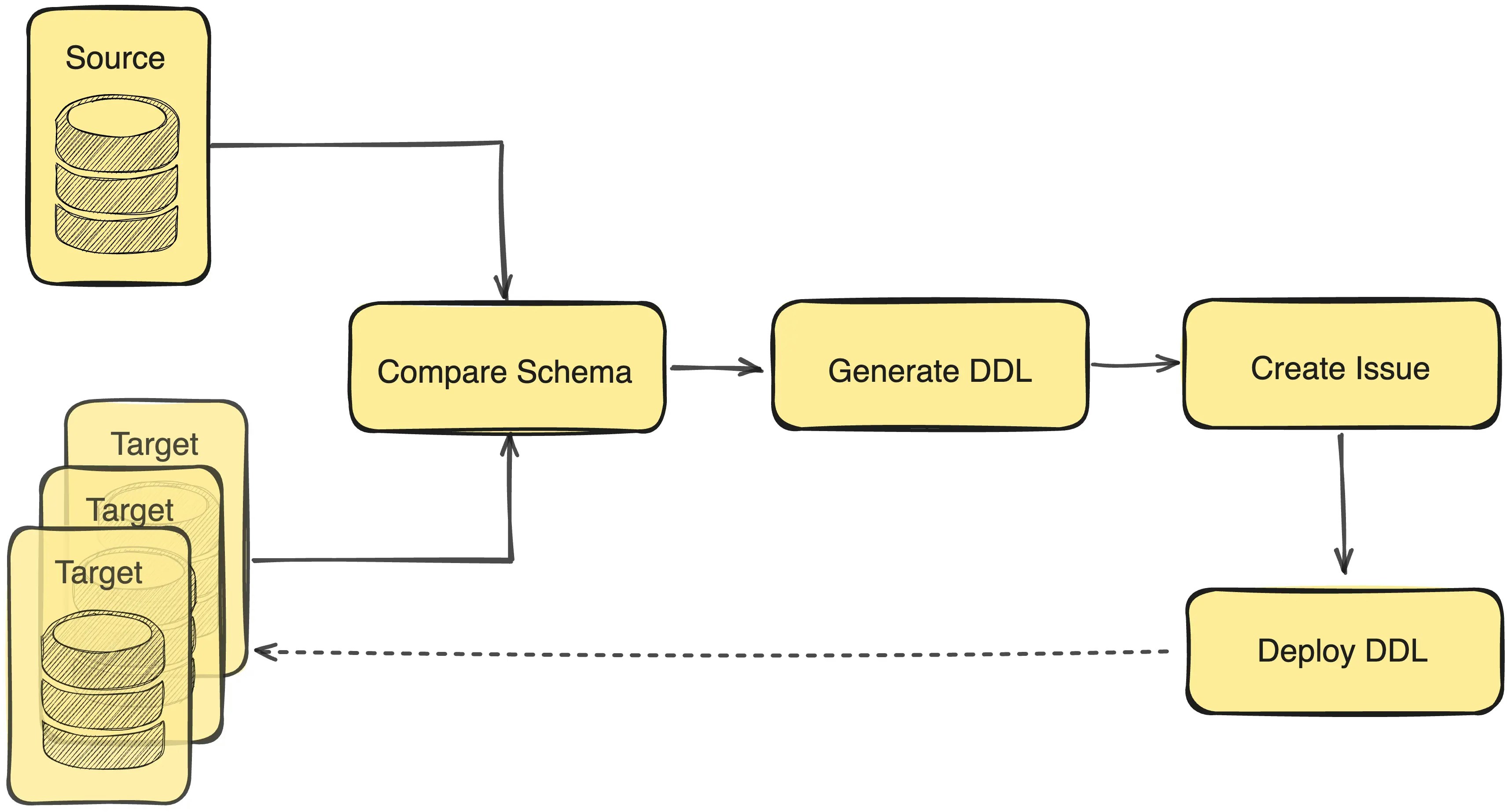 1. Compare a source database schema with one or multiple target databases' schema.
2. Generate the suggested DDL statements (e.g. `ALTER TABLE`) to transit the source database schema state to each of the target database schema.
3. Create an issue.
4. Deploy the DDL statements to the targeted databases.
## Supported Objects
| Object | MySQL | PostgreSQL | TiDB | Oracle | SQL Server |
| ----------------------------- | ------------------------------------ | -------------------------------- | ---------------------------- | ----------------------------------------- | -------------------------- |
| **Schema** | — | ✅ | — | ✅ | ✅ |
| **Table** | ✅ | ✅ | ✅ | ✅ | ✅ |
| **Column** | ✅ | ✅ | ✅ | ✅ | ✅ |
| **Primary Key** | ✅ | ✅ | ✅ | ✅ | ✅ |
| **Foreign Key** | ✅ | ✅ | ✅ | ✅ | ✅ |
| **Index** | ✅ Regular, Unique, Fulltext, Spatial | ✅ Including Expression & Partial | ✅ | ✅ Regular, Unique, Bitmap, Function-based | ✅ Clustered, Non-clustered |
| **Check Constraint** | ✅ (8.0+) | ✅ | ❌ (metadata sync limitation) | ✅ | ✅ |
| **View** | ✅ | ✅ | ✅ | ✅ | ✅ |
| **Materialized View** | — | ✅ | — | ✅ | ❌ |
| **Generated/Computed Column** | ✅ STORED/VIRTUAL | ✅ STORED | ✅ | ✅ Virtual | ✅ Computed |
| **Identity/Auto Column** | ✅ AUTO\_INCREMENT | ✅ SERIAL/IDENTITY | ✅ AUTO\_RANDOM | ✅ IDENTITY (12c+) | ✅ IDENTITY |
| **Partitioning** | ✅ KEY, HASH, RANGE, LIST | ✅ | ✅ | ✅ RANGE, LIST, HASH, COMPOSITE | ❌ |
| **Sequence** | — | ✅ | — | ✅ | ✅ |
| **Trigger** | ✅ | ✅ | — | ✅ | ✅ |
| **Function** | ✅ | ✅ | — | ✅ | ✅ |
| **Procedure** | ✅ | ✅ | — | ✅ | ✅ |
| **Package** | — | — | — | ✅ | — |
| **Custom Type** | — | ✅ Enum only | — | ✅ | ✅ |
| **Extension** | — | ✅ | — | — | — |
| **Comments** | ✅ | ✅ | ✅ | ✅ | ✅ |
## How to use
### Step 1 - Go to the **Sync Schema** page
Click the **Database > Sync Schema** button in the left navigation bar.
### Step 2 - Select source schema
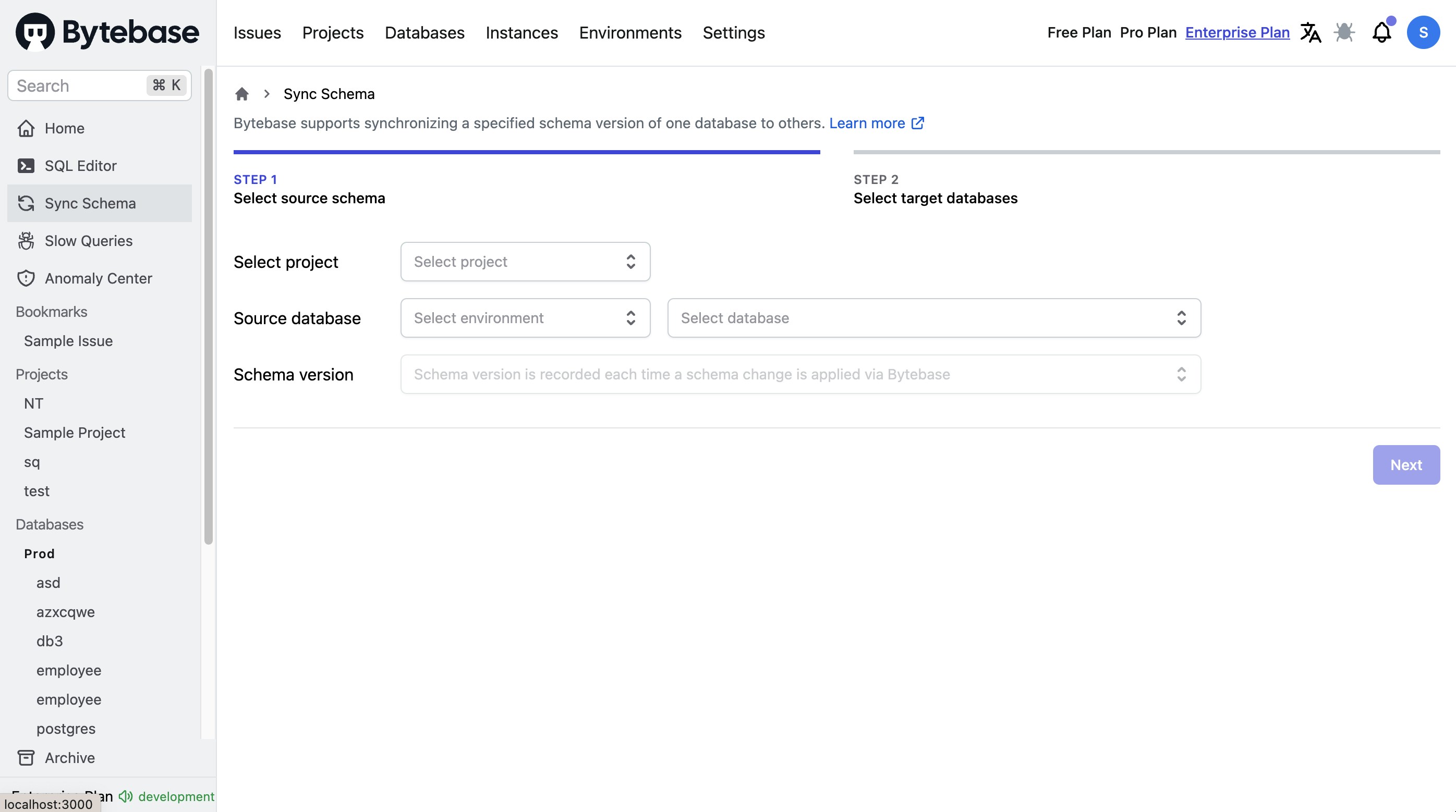
You need to select the project and source database schema version that you want to synchronize.
1. Compare a source database schema with one or multiple target databases' schema.
2. Generate the suggested DDL statements (e.g. `ALTER TABLE`) to transit the source database schema state to each of the target database schema.
3. Create an issue.
4. Deploy the DDL statements to the targeted databases.
## Supported Objects
| Object | MySQL | PostgreSQL | TiDB | Oracle | SQL Server |
| ----------------------------- | ------------------------------------ | -------------------------------- | ---------------------------- | ----------------------------------------- | -------------------------- |
| **Schema** | — | ✅ | — | ✅ | ✅ |
| **Table** | ✅ | ✅ | ✅ | ✅ | ✅ |
| **Column** | ✅ | ✅ | ✅ | ✅ | ✅ |
| **Primary Key** | ✅ | ✅ | ✅ | ✅ | ✅ |
| **Foreign Key** | ✅ | ✅ | ✅ | ✅ | ✅ |
| **Index** | ✅ Regular, Unique, Fulltext, Spatial | ✅ Including Expression & Partial | ✅ | ✅ Regular, Unique, Bitmap, Function-based | ✅ Clustered, Non-clustered |
| **Check Constraint** | ✅ (8.0+) | ✅ | ❌ (metadata sync limitation) | ✅ | ✅ |
| **View** | ✅ | ✅ | ✅ | ✅ | ✅ |
| **Materialized View** | — | ✅ | — | ✅ | ❌ |
| **Generated/Computed Column** | ✅ STORED/VIRTUAL | ✅ STORED | ✅ | ✅ Virtual | ✅ Computed |
| **Identity/Auto Column** | ✅ AUTO\_INCREMENT | ✅ SERIAL/IDENTITY | ✅ AUTO\_RANDOM | ✅ IDENTITY (12c+) | ✅ IDENTITY |
| **Partitioning** | ✅ KEY, HASH, RANGE, LIST | ✅ | ✅ | ✅ RANGE, LIST, HASH, COMPOSITE | ❌ |
| **Sequence** | — | ✅ | — | ✅ | ✅ |
| **Trigger** | ✅ | ✅ | — | ✅ | ✅ |
| **Function** | ✅ | ✅ | — | ✅ | ✅ |
| **Procedure** | ✅ | ✅ | — | ✅ | ✅ |
| **Package** | — | — | — | ✅ | — |
| **Custom Type** | — | ✅ Enum only | — | ✅ | ✅ |
| **Extension** | — | ✅ | — | — | — |
| **Comments** | ✅ | ✅ | ✅ | ✅ | ✅ |
## How to use
### Step 1 - Go to the **Sync Schema** page
Click the **Database > Sync Schema** button in the left navigation bar.
### Step 2 - Select source schema
You need to select the project and source database schema version that you want to synchronize.
 ### Step 3 - Select target databases
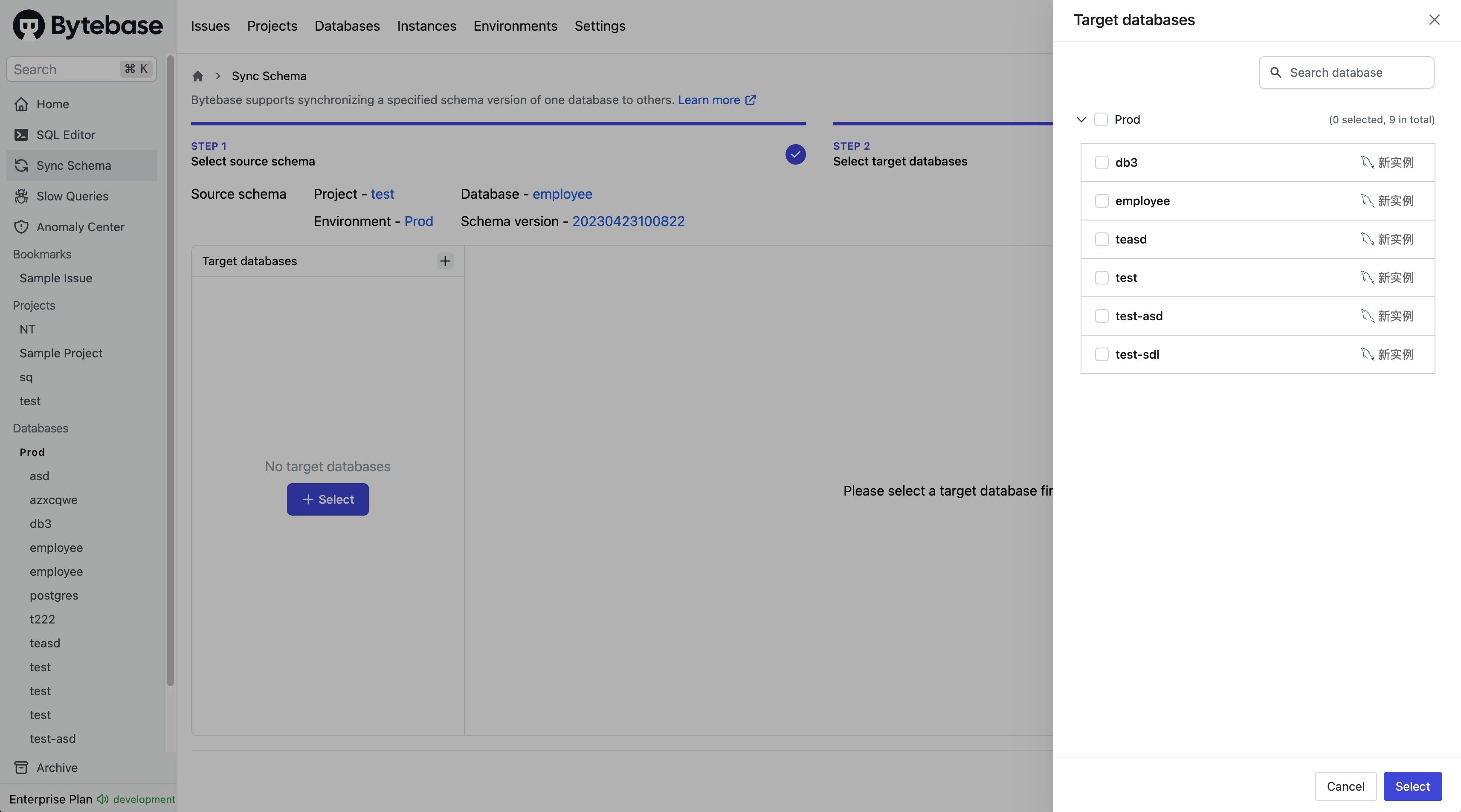
Select the target databases that will be synchronized with the chosen schema version in the previous step.
### Step 3 - Select target databases
Select the target databases that will be synchronized with the chosen schema version in the previous step.
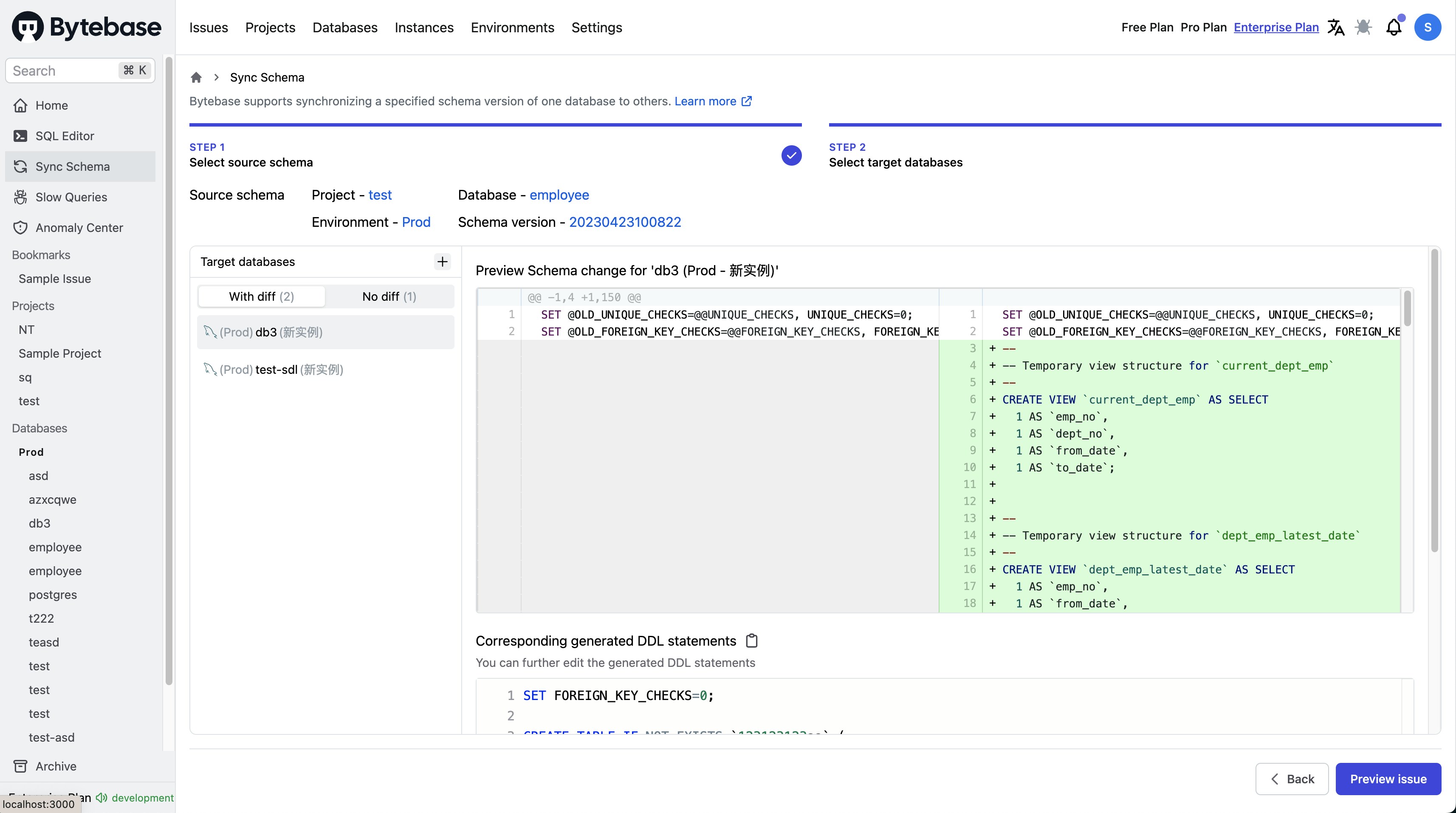
 After you have selected a target database, Bytebase will show a schema diff between the two databases and generate the DDL statements. And you can further edit the generated content.
 ### Step 4 - Preview issue
With the generated DDL statements, you can preview and create an **Edit Schema** issue. This kicks off the [change workflow](/change-database/change-workflow) for the applied database.
### Step 4 - Preview issue
With the generated DDL statements, you can preview and create an **Edit Schema** issue. This kicks off the [change workflow](/change-database/change-workflow) for the applied database.