> ## Documentation Index
> Fetch the complete documentation index at: https://docs.bytebase.com/llms.txt
> Use this file to discover all available pages before exploring further.
# Bytebase 1.0.4 - Apr 28, 2022
> Support `--pg` option to boot Bytebase. bb CLI Support `--dsn` option in CLI. Add installation script of bb CLI. Add dashboard page to manage all SQL sheets. Admin page to view all projects. Added /healthz health check endpoint for supporting serverless platform.
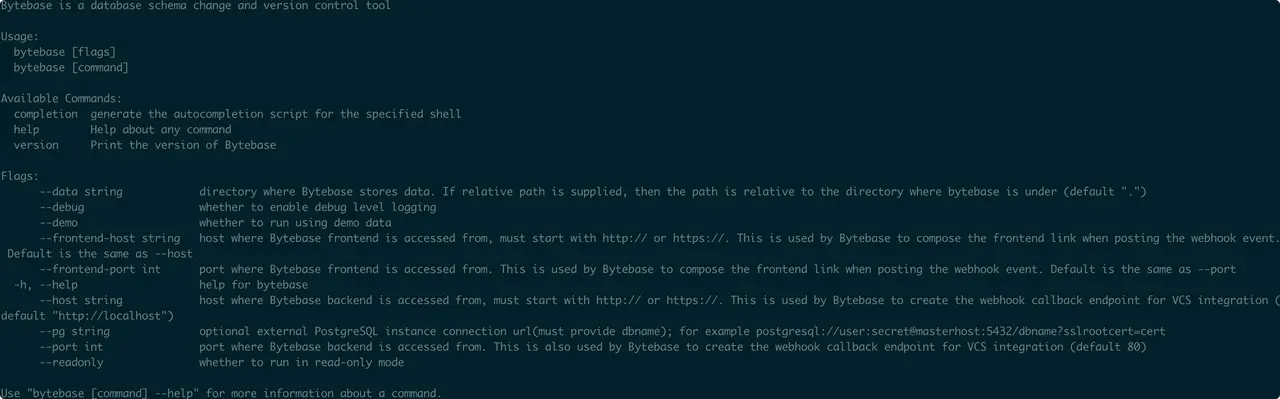
## Support storing Bytebase metadata in the external PostgreSQL
Use the `--pg` option to specify the database endpoint upon launching Bytebase.
 ## 🚀 Features
### bb CLI Support `--dsn` option in CLI
Support data source name (DSN) formats to connect databases in CLI, e.g. `--dsn mysql://user:passwd@host:port/dbname?opt1=val1&opt2=val2`
### Add installation script of bb CLI
User can install `bb` CLI with only one command.
```bash theme={null}
/bin/bash -c "$(curl -fsSL https://raw.githubusercontent.com/bytebase/bytebase/HEAD/scripts/install_bb.sh)"
```
Previously, users needed to go through several steps from downloading on GitHub Release, decompressing and manually moving the files to executable file directory.
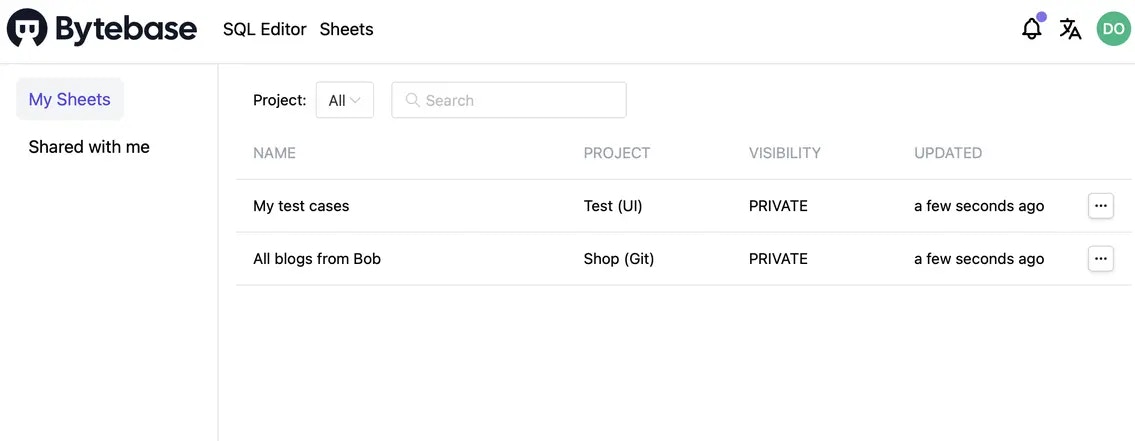
### Add dashboard page to manage all SQL sheets
Introducing the SQL sheet dashboard page as users can view all related sheets in a table view.
## 🚀 Features
### bb CLI Support `--dsn` option in CLI
Support data source name (DSN) formats to connect databases in CLI, e.g. `--dsn mysql://user:passwd@host:port/dbname?opt1=val1&opt2=val2`
### Add installation script of bb CLI
User can install `bb` CLI with only one command.
```bash theme={null}
/bin/bash -c "$(curl -fsSL https://raw.githubusercontent.com/bytebase/bytebase/HEAD/scripts/install_bb.sh)"
```
Previously, users needed to go through several steps from downloading on GitHub Release, decompressing and manually moving the files to executable file directory.
### Add dashboard page to manage all SQL sheets
Introducing the SQL sheet dashboard page as users can view all related sheets in a table view.
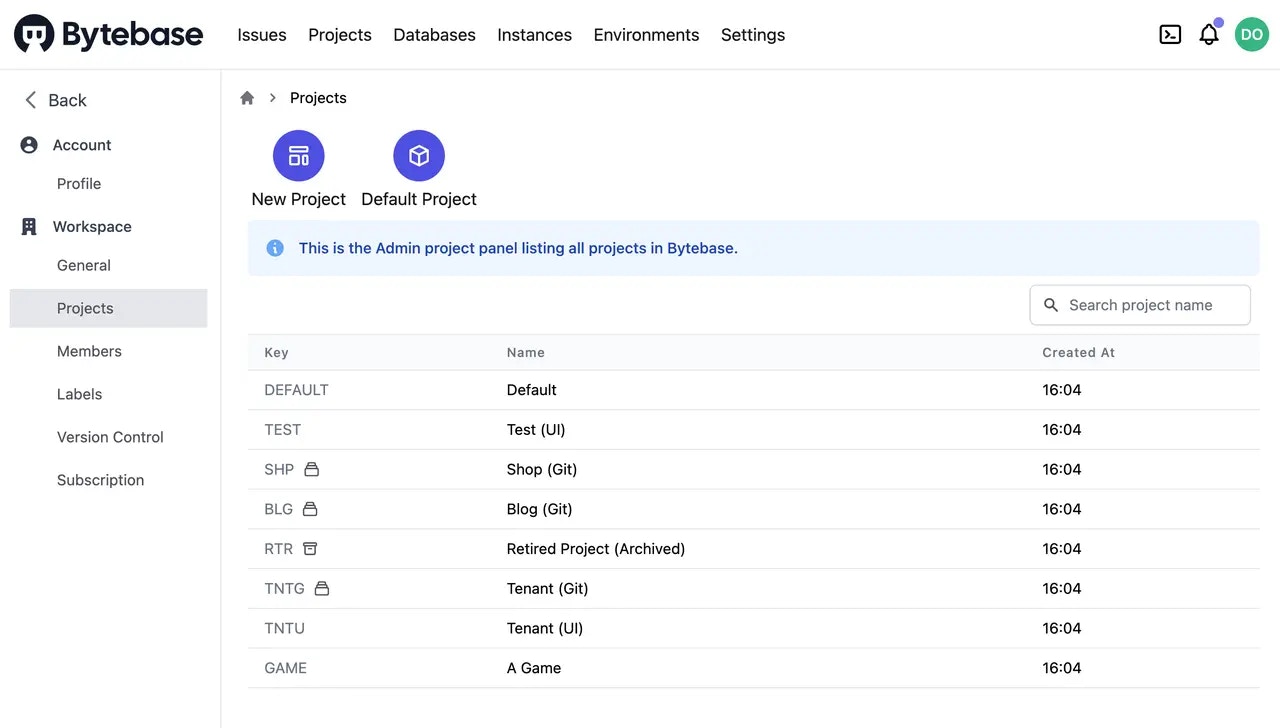
 ### Admin page to view all projects
Users whose roles are Owner and DBA in Workspace can view all projects under `Settings`.
### Admin page to view all projects
Users whose roles are Owner and DBA in Workspace can view all projects under `Settings`.
 ### Added /healthz health check endpoint
This enables serverless platforms like [render.com](https://render.com) to point its health check endpoint to /healthy.
## 🎄 Enhancement
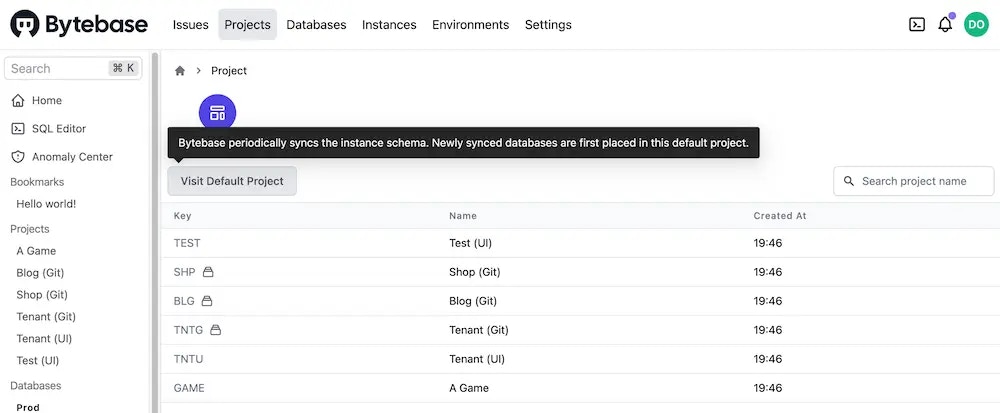
### Expose `Visit Default Project` button explicitly
The `Default Project` is the special project holding the databases synced from the database instance. Users usually need to visit this project to transfer the database to their own projects.
### Added /healthz health check endpoint
This enables serverless platforms like [render.com](https://render.com) to point its health check endpoint to /healthy.
## 🎄 Enhancement
### Expose `Visit Default Project` button explicitly
The `Default Project` is the special project holding the databases synced from the database instance. Users usually need to visit this project to transfer the database to their own projects.
 ## 🎠 Community
* Thanks to [@cluas](https://github.com/Cluas) for the PR [docs: update schema-update-guide link #1104](https://github.com/bytebase/bytebase/pull/1104), PR [style: error no capitalized && switch && De Morgan's laws #1125](https://github.com/bytebase/bytebase/pull/1125), PR [fix: should use request context #1131](https://github.com/bytebase/bytebase/pull/1131), Pr [fix: handle gitlab error case #1132](https://github.com/bytebase/bytebase/pull/1132), PR [fix: wrong type cause role\_provider missing #1136](https://github.com/bytebase/bytebase/pull/1136)、
* Thanks to [@sagungargs15](https://github.com/sagungargs15) for the Issue [Docker on AWS Fargate | database "bytebase" does not exist | database "bb" does not exist #1135](https://github.com/bytebase/bytebase/issues/1135)
* Thanks to [@Austin Ziegler](https://github.com/halostatue) for Issue [No linux/arm64 docker image #1119](https://github.com/bytebase/bytebase/issues/1119)
## ⚙️ Install and Upgrade
* [Fresh install](/get-started/self-host/deploy-with-docker)
* [Upgrade](/get-started/self-host/upgrade)
*Before upgrading: 1) Back up the [metadata](https://www.bytebase.com/docs/administration/back-up-restore-metadata/) — in-place downgrade is not supported. 2) Do not run multiple containers on the same data directory. 3) Terraform users: upgrade Bytebase server first, then apply the new Terraform config.*
## 🎠 Community
* Thanks to [@cluas](https://github.com/Cluas) for the PR [docs: update schema-update-guide link #1104](https://github.com/bytebase/bytebase/pull/1104), PR [style: error no capitalized && switch && De Morgan's laws #1125](https://github.com/bytebase/bytebase/pull/1125), PR [fix: should use request context #1131](https://github.com/bytebase/bytebase/pull/1131), Pr [fix: handle gitlab error case #1132](https://github.com/bytebase/bytebase/pull/1132), PR [fix: wrong type cause role\_provider missing #1136](https://github.com/bytebase/bytebase/pull/1136)、
* Thanks to [@sagungargs15](https://github.com/sagungargs15) for the Issue [Docker on AWS Fargate | database "bytebase" does not exist | database "bb" does not exist #1135](https://github.com/bytebase/bytebase/issues/1135)
* Thanks to [@Austin Ziegler](https://github.com/halostatue) for Issue [No linux/arm64 docker image #1119](https://github.com/bytebase/bytebase/issues/1119)
## ⚙️ Install and Upgrade
* [Fresh install](/get-started/self-host/deploy-with-docker)
* [Upgrade](/get-started/self-host/upgrade)
*Before upgrading: 1) Back up the [metadata](https://www.bytebase.com/docs/administration/back-up-restore-metadata/) — in-place downgrade is not supported. 2) Do not run multiple containers on the same data directory. 3) Terraform users: upgrade Bytebase server first, then apply the new Terraform config.*