> ## Documentation Index
> Fetch the complete documentation index at: https://docs.bytebase.com/llms.txt
> Use this file to discover all available pages before exploring further.
# Terraform Provider
The Bytebase Provider itself is free to use. Some advanced resource operations require Pro or Enterprise Plan.
Bytebase Terraform Provider handles control plane configuration such as settings, policies, access controls.
It does not handle data plane operations such as database creation, schema migrations, DML execution, query.
Bytebase provides the [Terraform Provider](https://registry.terraform.io/providers/bytebase/bytebase) to let you manage your Bytebase resources via Terraform.
```plain theme={null}
Terraform Provider → Bytebase Configuration
├── Instances, Projects & Environments
├── Access Policies
└── Settings such as Approval Workflows
Bytebase UI/API → Database Operations
├── Database Creation
├── Schema Migrations (DDL)
├── Data Changes (DML)
└── Query
```
## Create Service Account
The Terraform Provider uses [service account](/integrations/api/authentication/#service-account) to call the Bytebase API to manage the resources and settings.
After creating the service account with the `Workspace Admin` role, you can copy the service key as `service_key` and the email as `service_account` to initialize the Terraform provider in the next step.
 ### Optional: Separate Accounts for Plan and Apply
If you prefer to use different service accounts for `terraform plan` and `terraform apply`, you can:
* **For `terraform apply`**:
Assign the `Workspace Admin` role.
* **For `terraform plan`**:
Create a **custom role** with only read permissions under **IAM & Admin > Custom Roles**, then assign it to the plan-only service account.
The read-only role should include the following permissions:
* All `.list` and `.get` permissions
* `bb.databases.export`
* `bb.databases.query`
* `bb.databases.getSchema`
* `bb.databases.getSecrets`
* `bb.auditLogs.export`
* `bb.auditLogs.search`
* `bb.issues.subscribe`
* `bb.projects.getIamPolicy`
## Tutorials
**Resources**
**Access Control**
**Workspace Settings**
## Troubleshoot
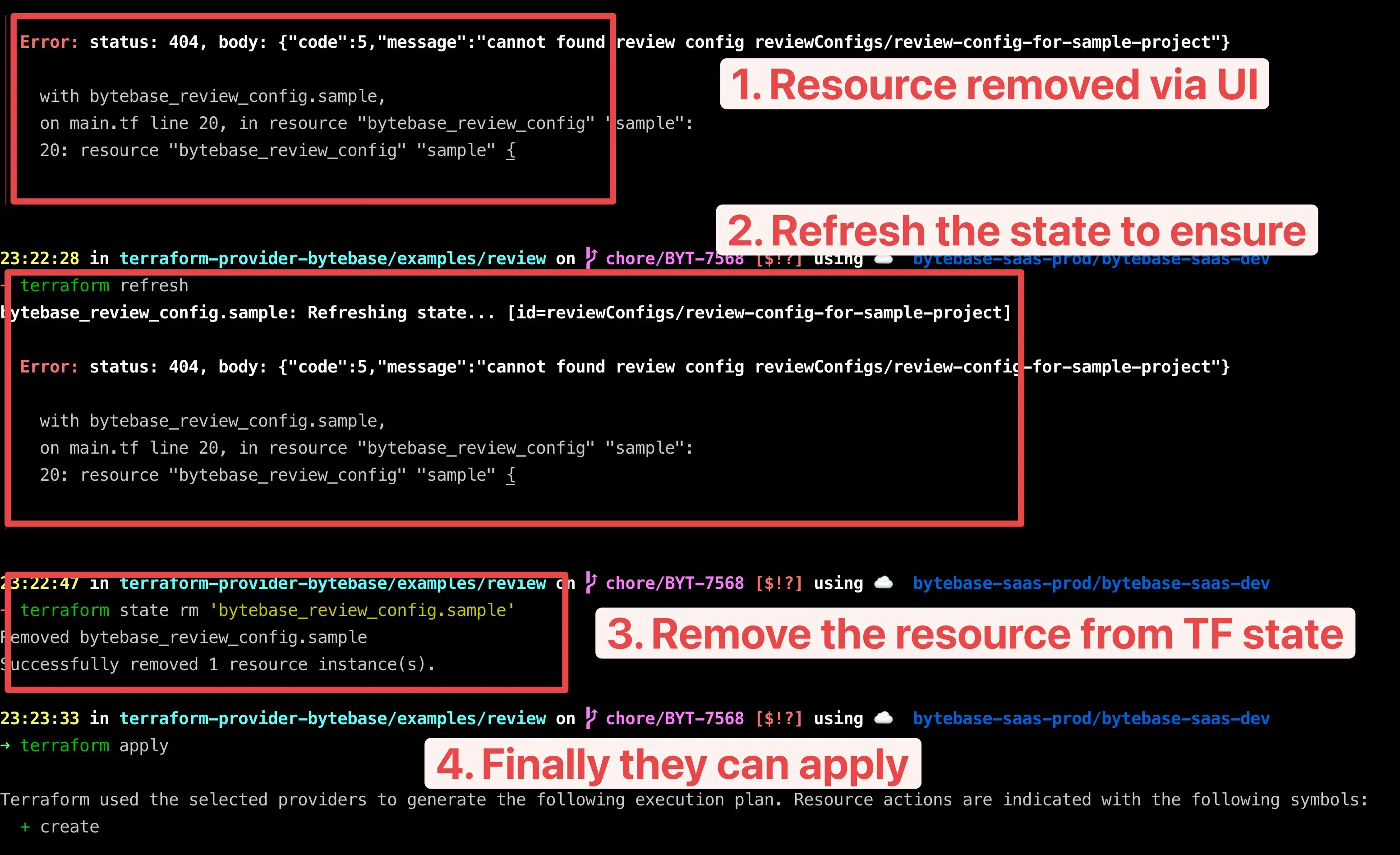
### status: 404
This often happens when someone deletes the resources from the Bytebase UI and then attempts to
run `terraform apply`.
To recover, please run `terraform refresh` to refresh the state first.
### Optional: Separate Accounts for Plan and Apply
If you prefer to use different service accounts for `terraform plan` and `terraform apply`, you can:
* **For `terraform apply`**:
Assign the `Workspace Admin` role.
* **For `terraform plan`**:
Create a **custom role** with only read permissions under **IAM & Admin > Custom Roles**, then assign it to the plan-only service account.
The read-only role should include the following permissions:
* All `.list` and `.get` permissions
* `bb.databases.export`
* `bb.databases.query`
* `bb.databases.getSchema`
* `bb.databases.getSecrets`
* `bb.auditLogs.export`
* `bb.auditLogs.search`
* `bb.issues.subscribe`
* `bb.projects.getIamPolicy`
## Tutorials
**Resources**
**Access Control**
**Workspace Settings**
## Troubleshoot
### status: 404
This often happens when someone deletes the resources from the Bytebase UI and then attempts to
run `terraform apply`.
To recover, please run `terraform refresh` to refresh the state first.