> ## Documentation Index
> Fetch the complete documentation index at: https://docs.bytebase.com/llms.txt
> Use this file to discover all available pages before exploring further.
# SQL Editor Data Access Control
## Background
Traditional local SQL clients like DBeaver and Navicat carries security limitations that Bytebase's centralized approach solves:
| Traditional SQL Clients | Bytebase Solution |
| --------------------------------------------------------------------------------------------- | --------------------------------------------------------------------------------------------------------- |
| **Distributed Credentials**: Stored locally in plain text, manual revocation, multiple copies | **Centralized Credentials**: Never leave platform, SSO authentication, directory sync, instant revocation |
| **No Fine-Grained Access**: All-or-nothing database access, no table/column restrictions | **Granular Control**: Database, schema, table-level restrictions with column masking |
| **Missing Audit Trails**: Zero visibility, no centralized logging, compliance violations | **Complete Auditing**: Every query, change, and admin action logged with full context |
| **Time-Based Access Gaps**: No temporary access, permanent until revoked | **Just-in-Time Access**: Request-based temporary access with approval workflows |
## Test vs Production Setup
Below we demonstrate a two environment setup, one for test and one for production. The principle is to provide maximum security for production while keeping developer productivity for test.
### DDL and DML Execution
[Statement execution mode](/change-database/environment-policy/overview/#statement-execution-mode) controls
whether users can run DDL and DML directly in the SQL Editor at the environment level.
| | Test | Prod |
| -------------------------------- | ---- | ---- |
| Allow running DDL | ✅ | ❌ |
| Allow running data-modifying DML | ✅ | ❌ |
For the production environment, we disable both DDL and DML execution and require all changes to go through the [approval workflow](/change-database/change-workflow).
### Fine-Grained Query
Users need to be granted explicit permissions to query the data from SQL Editor. The most straightforward way is to grant the `SQL Editor User` role to the user inside
the project.
1. Specify `SQL Editor User` as the role.
2. Specify a reason.
3. Grant the access to all databases in the project or fine-grained to specific databases, schemas, and tables.
4. Specify an expiration date.
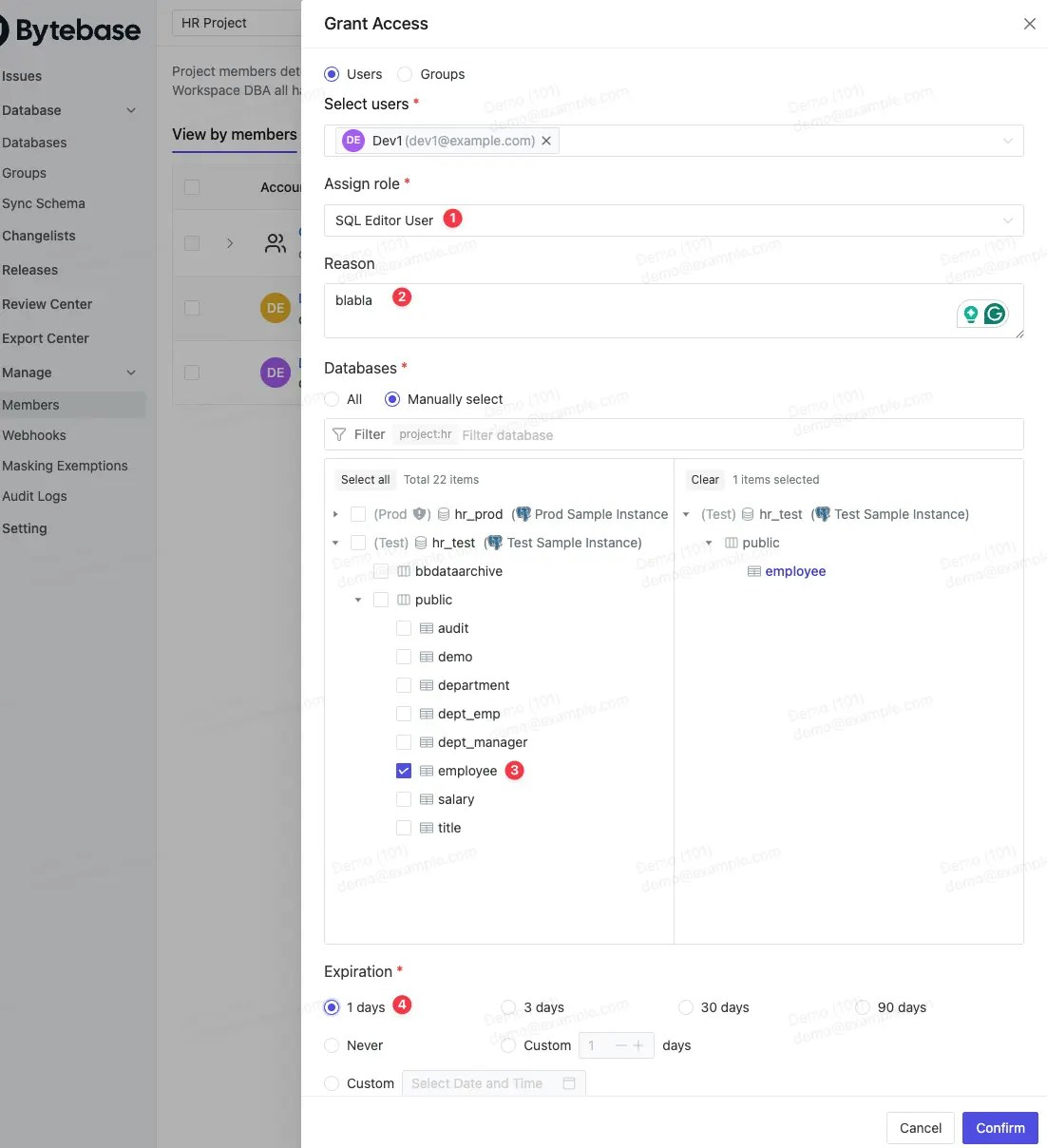 `SQL Editor User` is a built-in role that allows users to run `EXPLAIN`, `SELECT` and export data. If you want to allow users to run `EXPLAIN` only, you can create a [custom role](/administration/roles) with `bb.sql.explain` permission.
### Just-In-Time Access
You may disallow any production access by default and only allow temporary access on-demand. Users can this request temporary access
via the SQL Editor. You will configure the [custom approval policy](/change-database/approval) to designate the approvers.
### Audit Logging
For data privacy reasons, Bytebase does not log the actual data in the query result.
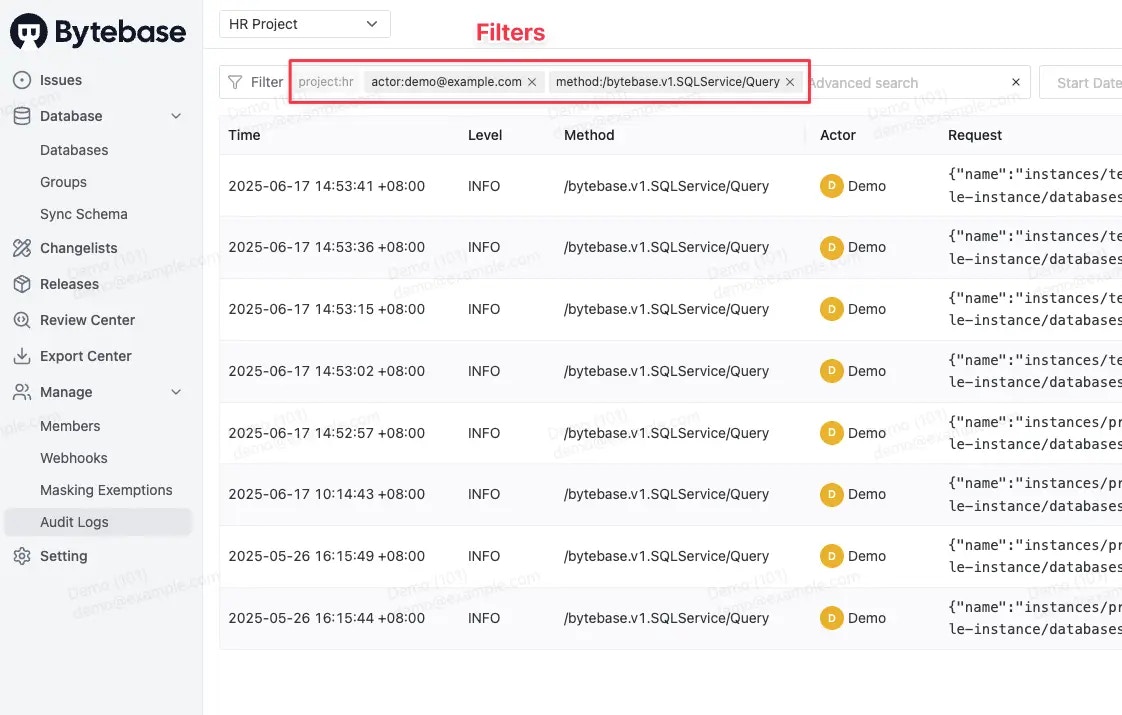
Every query is [audit logged](/security/audit-log). From the audit logging view, you can see the actor, the database, the SQL statement, and the result.
and the returned columns.
`SQL Editor User` is a built-in role that allows users to run `EXPLAIN`, `SELECT` and export data. If you want to allow users to run `EXPLAIN` only, you can create a [custom role](/administration/roles) with `bb.sql.explain` permission.
### Just-In-Time Access
You may disallow any production access by default and only allow temporary access on-demand. Users can this request temporary access
via the SQL Editor. You will configure the [custom approval policy](/change-database/approval) to designate the approvers.
### Audit Logging
For data privacy reasons, Bytebase does not log the actual data in the query result.
Every query is [audit logged](/security/audit-log). From the audit logging view, you can see the actor, the database, the SQL statement, and the result.
and the returned columns.

 ## Summary
Below is a summary of the access control settings for the test and production environments.
| | Test | Prod |
| ----------------------------------- | ---- | ---- |
| Allow running DDL | ✅ | ❌ |
| Allow running data-modifying DML | ✅ | ❌ |
| Fine-grained EXPLAIN, Query, Export | ✅ | ✅ |
| Just-in-Time Access | ✅ | ✅ |
| Audit Logging | ✅ | ✅ |
You can extend the solution by exploring the following features:
* Create [user groups](/administration/user-groups) and enable [directory sync](/administration/scim/overview) to automate the role assignment.
* Configure [data masking](/security/data-masking/overview) to mask sensitive data.
* Use [Terraform](/integrations/terraform/overview) to codify all the settings.
## Summary
Below is a summary of the access control settings for the test and production environments.
| | Test | Prod |
| ----------------------------------- | ---- | ---- |
| Allow running DDL | ✅ | ❌ |
| Allow running data-modifying DML | ✅ | ❌ |
| Fine-grained EXPLAIN, Query, Export | ✅ | ✅ |
| Just-in-Time Access | ✅ | ✅ |
| Audit Logging | ✅ | ✅ |
You can extend the solution by exploring the following features:
* Create [user groups](/administration/user-groups) and enable [directory sync](/administration/scim/overview) to automate the role assignment.
* Configure [data masking](/security/data-masking/overview) to mask sensitive data.
* Use [Terraform](/integrations/terraform/overview) to codify all the settings.