> ## Documentation Index
> Fetch the complete documentation index at: https://docs.bytebase.com/llms.txt
> Use this file to discover all available pages before exploring further.
# Overview
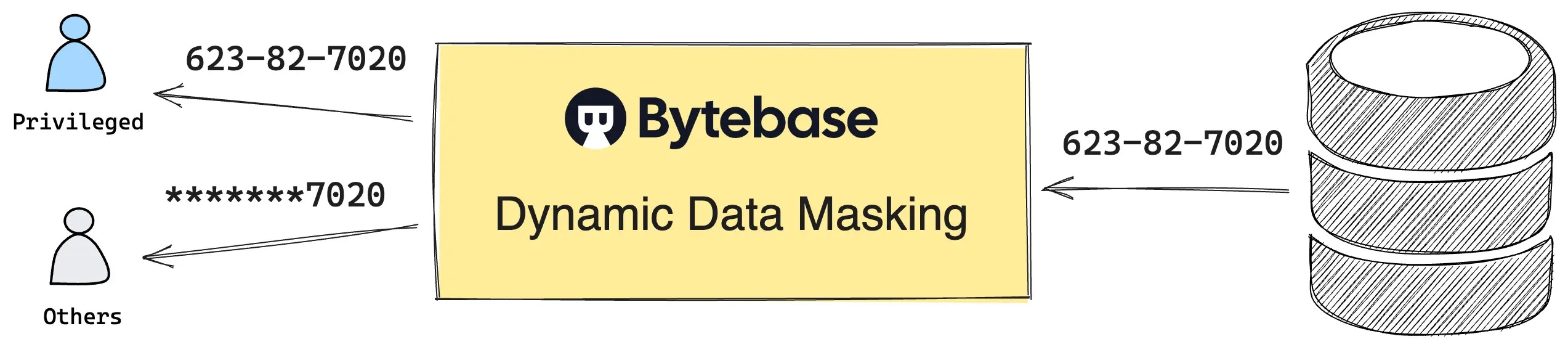 Dynamic Data Masking (DDM) can mask sensitive data in the [SQL Editor](/sql-editor/overview) query result based on the context. It helps
organizations to protect sensitive data from being exposed to unauthorized users.
You can configure the masking policies from UI or via API. Check out [this GitOps example](https://github.com/bytebase/example-database-security) to see how to codify the masking policies.
## Configure Dynamic Data Masking
* Workspace-level admins configure the [Global Masking Rule](/security/data-masking/global-masking-rule), [Semantic Types](/security/data-masking/semantic-types), and [Masking Algorithm](/security/data-masking/masking-algorithm).
* Project-level owners configure the [Column Masking](/security/data-masking/column-masking) on the table column. This is only needed when the global masking rule is not applicable to a particular project.
* Workspace-level admins or project-level owners grant [Masking Exemption](/security/data-masking/access-unmasked-data) to the users to access the unmasked data.
* For document databases (**MongoDB** and **Elasticsearch**), masking is configured per-collection through the Catalog — see [Document Database Masking](/security/data-masking/document-database-masking). Global masking rules and masking exemption are not supported for document databases.
## Determine whether to mask data
Dynamic Data Masking (DDM) can mask sensitive data in the [SQL Editor](/sql-editor/overview) query result based on the context. It helps
organizations to protect sensitive data from being exposed to unauthorized users.
You can configure the masking policies from UI or via API. Check out [this GitOps example](https://github.com/bytebase/example-database-security) to see how to codify the masking policies.
## Configure Dynamic Data Masking
* Workspace-level admins configure the [Global Masking Rule](/security/data-masking/global-masking-rule), [Semantic Types](/security/data-masking/semantic-types), and [Masking Algorithm](/security/data-masking/masking-algorithm).
* Project-level owners configure the [Column Masking](/security/data-masking/column-masking) on the table column. This is only needed when the global masking rule is not applicable to a particular project.
* Workspace-level admins or project-level owners grant [Masking Exemption](/security/data-masking/access-unmasked-data) to the users to access the unmasked data.
* For document databases (**MongoDB** and **Elasticsearch**), masking is configured per-collection through the Catalog — see [Document Database Masking](/security/data-masking/document-database-masking). Global masking rules and masking exemption are not supported for document databases.
## Determine whether to mask data
 ### Masking precedence
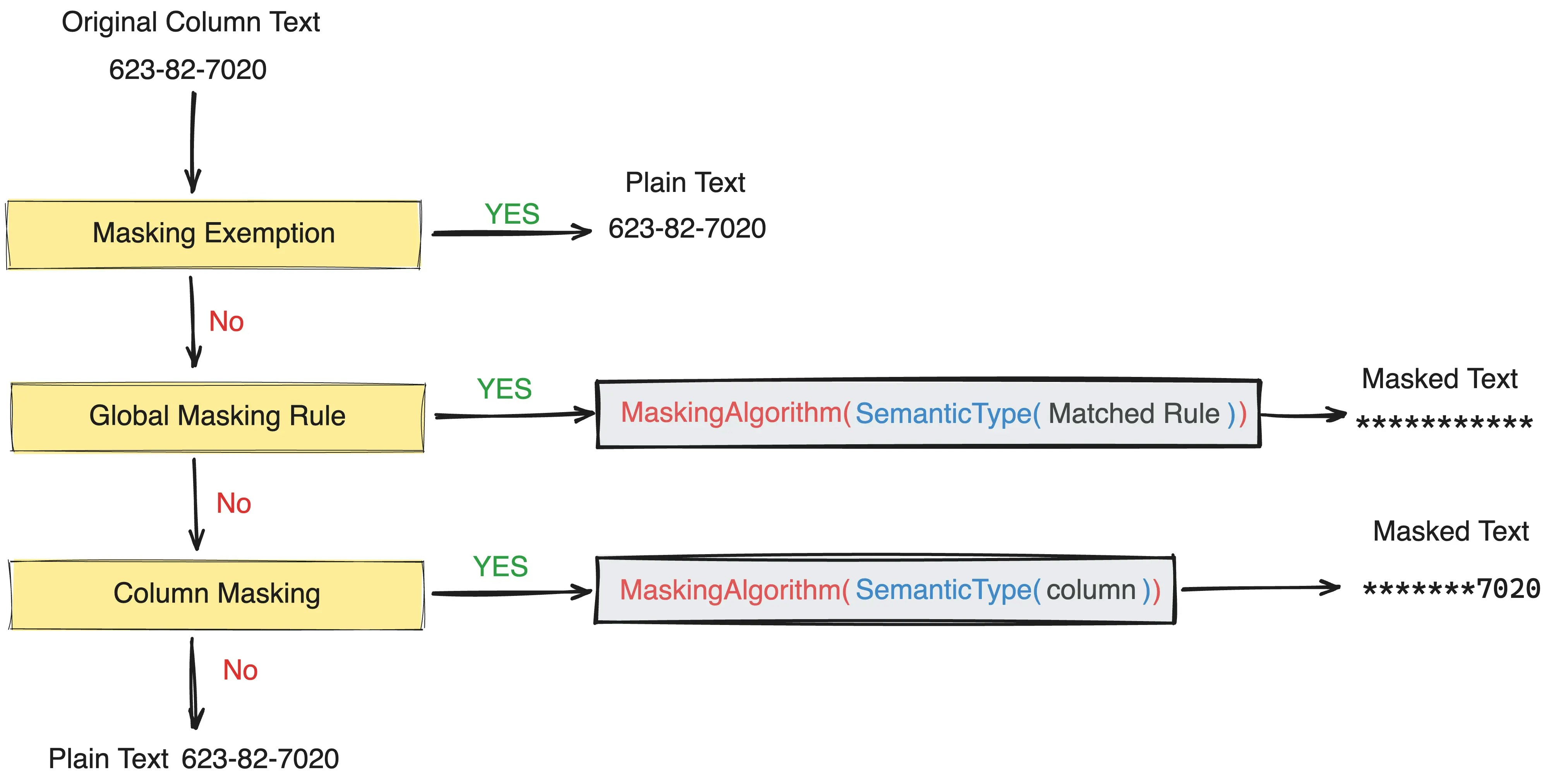
1. [Masking Exemption](/security/data-masking/access-unmasked-data). If user has been granted exemption, the data will not be masked.
2. [Global Masking Rule](/security/data-masking/global-masking-rule). If no exemption is granted, the global masking rule will be applied.
3. [Column Masking](/security/data-masking/column-masking). If no global masking rule is configured, the column masking will be applied.
### Masking algorithm
The global masking rule and column masking are both mapped to the [Semantic Types](/security/data-masking/semantic-types). The semantic type determines the masking algorithm.
### Masking propagation
When a column in a database table is masked, the masking effect is **infectious** in the sense that it propagates to any views or derived structures that depend on that column. This ensures that the protection applied to the underlying data is consistently enforced, even when accessed through alternative pathways like views.
### Masking precedence
1. [Masking Exemption](/security/data-masking/access-unmasked-data). If user has been granted exemption, the data will not be masked.
2. [Global Masking Rule](/security/data-masking/global-masking-rule). If no exemption is granted, the global masking rule will be applied.
3. [Column Masking](/security/data-masking/column-masking). If no global masking rule is configured, the column masking will be applied.
### Masking algorithm
The global masking rule and column masking are both mapped to the [Semantic Types](/security/data-masking/semantic-types). The semantic type determines the masking algorithm.
### Masking propagation
When a column in a database table is masked, the masking effect is **infectious** in the sense that it propagates to any views or derived structures that depend on that column. This ensures that the protection applied to the underlying data is consistently enforced, even when accessed through alternative pathways like views.