> ## Documentation Index
> Fetch the complete documentation index at: https://docs.bytebase.com/llms.txt
> Use this file to discover all available pages before exploring further.
# Review Rules
Bytebase provides customizable SQL lint rules to check common issues in database change and query process.
Different sets of rules can form different [SQL Review Policies](/sql-review/review-policy) for the respective environment.
## Supported rules
* Engine
* [Require InnoDB](/sql-review/review-rules#engine.mysql.use-innodb)
* Naming
* [Fully qualified object name](/sql-review/review-rules#naming.fully-qualified)
* [Table naming convention](/sql-review/review-rules#naming.table)
* [Column naming convention](/sql-review/review-rules#naming.column)
* [Auto-increment column naming convention](/sql-review/review-rules#naming.column.auto-increment)
* [Index naming convention](/sql-review/review-rules#naming.index.idx)
* [Primary key naming convention](/sql-review/review-rules#naming.index.pk)
* [Unique key naming convention](/sql-review/review-rules#naming.index.uk)
* [Foreign key naming convention](/sql-review/review-rules#naming.index.fk)
* Statement
* [Disallow SELECT \*](/sql-review/review-rules#statement.select.no-select-all)
* [Require WHERE](/sql-review/review-rules#statement.where.require)
* [Disallow leading % in LIKE](/sql-review/review-rules#statement.where.no-leading-wildcard-like)
* [Disallow COMMIT](/sql-review/review-rules#statement.disallow-commit)
* [Disallow LIMIT](/sql-review/review-rules#statement.disallow-limit)
* [Disallow ORDER BY](/sql-review/review-rules#statement.disallow-order-by)
* [Merge ALTER TABLE](/sql-review/review-rules#statement.merge-alter-table)
* [INSERT statements must specify columns](/sql-review/review-rules#statement.insert.must-specify-column)
* [Disallow ORDER BY RAND in INSERT statements](/sql-review/review-rules#statement.insert.disallow-order-by-rand)
* [Limit the inserted rows](/sql-review/review-rules#statement.insert.row-limit)
* [Limit affected rows](/sql-review/review-rules#statement.affected-row-limit)
* [Dry run DML statements](/sql-review/review-rules#statement.dml-dry-run)
* [Disallow add column with default](/sql-review/review-rules#statement.disallow-add-column-with-default)
* [Add CHECK constraints with NOT VALID option](/sql-review/review-rules#statement.add-check-not-valid)
* [Disallow add NOT NULL constraints to an existing column](/sql-review/review-rules#statement.disallow-add-not-null)
* Table
* [Limit DDL operations on tables with large data volumes](/sql-review/review-rules#table.limit-size)
* [Require primary key](/sql-review/review-rules#table.require-pk)
* [Disallow foreign key](/sql-review/review-rules#table.no-foreign-key)
* [Drop naming convention](/sql-review/review-rules#table.drop-naming-convention)
* [Disallow partition table](/sql-review/review-rules#table.disallow-partition)
* [Table comment convention](/sql-review/review-rules#table.comment)
* Schema
* [Backward incompatible schema change](/sql-review/review-rules#schema.backward-compatibility)
* Column
* [Enforce the required columns in each table](/sql-review/review-rules#column.required)
* [Column type disallow list](/sql-review/review-rules#column.type-disallow-list)
* [Columns no NULL value](/sql-review/review-rules#column.no-null)
* [Disallow changing column type](/sql-review/review-rules#column.disallow-change-type)
* [Set DEFAULT value for NOT NULL columns](/sql-review/review-rules#column.set-default-for-not-null)
* [Disallow ALTER TABLE CHANGE COLUMN statements](/sql-review/review-rules#column.disallow-change)
* [Disallow changing column order](/sql-review/review-rules#column.disallow-changing-order)
* [Use integer for auto-increment columns](/sql-review/review-rules#column.auto-increment-must-integer)
* [Disallow set charset for columns](/sql-review/review-rules#column.disallow-set-charset)
* [Set unsigned attribute on auto-increment columns](/sql-review/review-rules#column.auto-increment-must-unsigned)
* [Column comment convention](/sql-review/review-rules#column.comment)
* [Maximum CHAR length](/sql-review/review-rules#column.maximum-character-length)
* [Auto-increment initial value](/sql-review/review-rules#column.auto-increment-initial-value)
* [Limit the count of current time columns](/sql-review/review-rules#column.current-time-count-limit)
* [Require column default value](/sql-review/review-rules#column.require-default)
* [Prohibit dropping columns in indexes](/sql-review/review-rules#column.disallow-drop-in-index)
* Index
* [Disallow duplicate column in index keys](/sql-review/review-rules#index.no-duplicate-column)
* [Limit the count of index keys](/sql-review/review-rules#index.key-number-limit)
* [Limit key type for primary keys](/sql-review/review-rules#index.pk-type-limit)
* [Disallow BLOB and TEXT for index keys](/sql-review/review-rules#index.type-no-blob)
* [Index count limit](/sql-review/review-rules#index.total-number-limit)
* [Primary key type allowlist](/sql-review/review-rules#index.primary-key-type-allowlist)
* [Create index concurrently](/sql-review/review-rules#index.create-concurrently)
* Database
* [Drop database restriction](/sql-review/review-rules#database.drop-empty-database)
* System
* [Charset allow list](/sql-review/review-rules#system.charset.allowlist)
* [Collation allow list](/sql-review/review-rules#system.collation.allowlist)
* [Comment length limit](/sql-review/review-rules#system.comment.length)
* Built-in Rules
* [Prior backup feasibility check](/sql-review/review-rules#builtin.prior-backup-check)
## Engine
### Require InnoDB
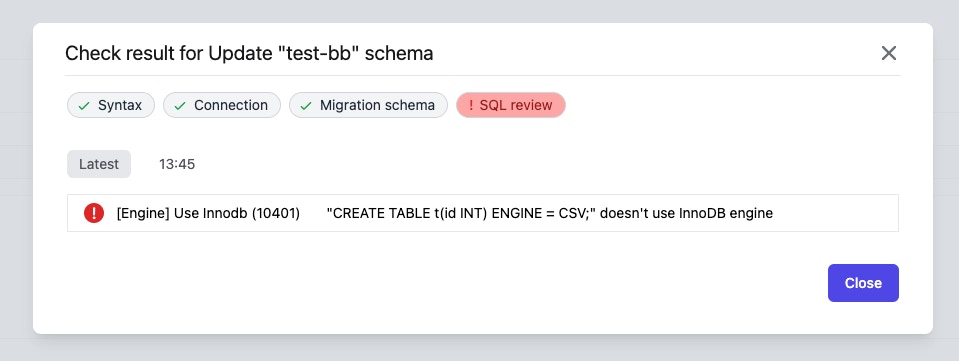
InnoDB is the default storage engine of MySQL 5.5+. It provides powerful transaction features. Normally, using InnoDB as the storage engine is the only option. Bytebase provides this rule to catch all scenarios where other engines are attempted.
 #### How the rule works
Bytebase defaults MySQL to use InnoDB storage engine.
So if the following situation occurs, Bytebase considers this rule to be violated:
* Explicitly specify other storage engines when creating tables. e.g. `CREATE TABLE t(id int) ENGINE = CSV`
* Explicitly specify other storage engines when `ALTER TABLE`. e.g. `ALTER TABLE t ENGINE = CSV`
* Try to set `default_storage_engine` other than InnoDB. e.g. `SET default_storage_engine = CSV`
#### Support database engine
* MySQL
## Naming
### Fully qualified object name
Using fully qualified object names in SQL ensures clarity and precision. It helps the database system to quickly locate and distinguish between objects, even if they have the same name but exist in different schemas or databases. This practice can improve performance by reducing ambiguity and aiding in the efficient execution of queries.
#### How the rule works
Bytebase checks whether the object name appearing in the SQL statement is fully qualified. The exception is that bytebase does not check pseudo table names in common table expressions (CTE), such as `foo` in `WITH foo AS (SELECT * FROM public.pokes) SELECT * FROM foo`.
##### Some typical format
| Object Name | Fully qualified |
| --------------------------------------- | --------------- |
| table\_name | no |
| schema\_name.table\_name | yes |
| database\_name.schema\_name.table\_name | yes |
#### Support database engine
* PostgreSQL
### Table naming convention
The unified naming convention is desired by developers. And the same applies to the database space. Bytebase provides this rule to unify the table naming convention.
#### About convention format
`Table Naming Convention` uses [regular expression](https://en.wikipedia.org/wiki/Regular_expression) as the format for naming pattern, and also limits the naming max length. The default maximum length is 64 characters. Length limit does not support PostgreSQL.
##### Some typical format
| Name | Regular Expression |
| ------------------ | ------------------------ |
| snake\_lower\_case | `^[a-z]+(_[a-z]+)*$` |
| CamelCase | `^([A-Z][a-z]*)+$` |
| lowerCamelCase | `^[a-z]+([A-Z][a-z]*)*$` |
| kebab-case | `^[a-z]+(-[a-z]+)*$` |
#### How the rule works
Bytebase defaults MySQL to use InnoDB storage engine.
So if the following situation occurs, Bytebase considers this rule to be violated:
* Explicitly specify other storage engines when creating tables. e.g. `CREATE TABLE t(id int) ENGINE = CSV`
* Explicitly specify other storage engines when `ALTER TABLE`. e.g. `ALTER TABLE t ENGINE = CSV`
* Try to set `default_storage_engine` other than InnoDB. e.g. `SET default_storage_engine = CSV`
#### Support database engine
* MySQL
## Naming
### Fully qualified object name
Using fully qualified object names in SQL ensures clarity and precision. It helps the database system to quickly locate and distinguish between objects, even if they have the same name but exist in different schemas or databases. This practice can improve performance by reducing ambiguity and aiding in the efficient execution of queries.
#### How the rule works
Bytebase checks whether the object name appearing in the SQL statement is fully qualified. The exception is that bytebase does not check pseudo table names in common table expressions (CTE), such as `foo` in `WITH foo AS (SELECT * FROM public.pokes) SELECT * FROM foo`.
##### Some typical format
| Object Name | Fully qualified |
| --------------------------------------- | --------------- |
| table\_name | no |
| schema\_name.table\_name | yes |
| database\_name.schema\_name.table\_name | yes |
#### Support database engine
* PostgreSQL
### Table naming convention
The unified naming convention is desired by developers. And the same applies to the database space. Bytebase provides this rule to unify the table naming convention.
#### About convention format
`Table Naming Convention` uses [regular expression](https://en.wikipedia.org/wiki/Regular_expression) as the format for naming pattern, and also limits the naming max length. The default maximum length is 64 characters. Length limit does not support PostgreSQL.
##### Some typical format
| Name | Regular Expression |
| ------------------ | ------------------------ |
| snake\_lower\_case | `^[a-z]+(_[a-z]+)*$` |
| CamelCase | `^([A-Z][a-z]*)+$` |
| lowerCamelCase | `^[a-z]+([A-Z][a-z]*)*$` |
| kebab-case | `^[a-z]+(-[a-z]+)*$` |
 #### How the rule works
Bytebase checks that all table names in DDL conform to the naming conventions.
Specifically, Bytebase checks:
* `CREATE TABLE` statements
* `ALTER TABLE RENAME TO` statements
* `RENAME TABLE` statements
#### Support database engine
* MySQL
* TiDB
* PostgreSQL
* Oracle
* OceanBase
* Snowflake
### Column naming convention
The unified naming convention is desired by developers. And the same applies to the database space. Bytebase provides this rule to unify the column naming convention.
#### About convention format
`Column Naming Convention` uses [regular expression](https://en.wikipedia.org/wiki/Regular_expression) format for naming pattern, and also limits the naming max length. The default maximum length is 64 characters. Length limit does not support PostgreSQL.
##### Some typical format
| Name | Regular Expression |
| ------------------ | ------------------------ |
| snake\_lower\_case | `^[a-z]+(_[a-z]+)*$` |
| CamelCase | `^([A-Z][a-z]*)+$` |
| lowerCamelCase | `^[a-z]+([A-Z][a-z]*)*$` |
| kebab-case | `^[a-z]+(-[a-z]+)*$` |
#### How the rule works
Bytebase checks that all table names in DDL conform to the naming conventions.
Specifically, Bytebase checks:
* `CREATE TABLE` statements
* `ALTER TABLE RENAME TO` statements
* `RENAME TABLE` statements
#### Support database engine
* MySQL
* TiDB
* PostgreSQL
* Oracle
* OceanBase
* Snowflake
### Column naming convention
The unified naming convention is desired by developers. And the same applies to the database space. Bytebase provides this rule to unify the column naming convention.
#### About convention format
`Column Naming Convention` uses [regular expression](https://en.wikipedia.org/wiki/Regular_expression) format for naming pattern, and also limits the naming max length. The default maximum length is 64 characters. Length limit does not support PostgreSQL.
##### Some typical format
| Name | Regular Expression |
| ------------------ | ------------------------ |
| snake\_lower\_case | `^[a-z]+(_[a-z]+)*$` |
| CamelCase | `^([A-Z][a-z]*)+$` |
| lowerCamelCase | `^[a-z]+([A-Z][a-z]*)*$` |
| kebab-case | `^[a-z]+(-[a-z]+)*$` |
 #### How the rule works
Bytebase checks that all column names in DDL conform to the naming conventions.
Specifically, Bytebase checks:
* `CREATE TABLE` statements
* `ALTER TABLE RENAME COLUMN` statements
* `ALTER TABLE ADD COLUMNS` statements
* `ALTER TABLE CHANGE COLUMN` statements
#### Support database engine
* MySQL
* TiDB
* PostgreSQL
* OceanBase
### Auto-increment column naming convention
The unified naming convention is desired by developers. And the same applies to the database space. Bytebase provides this rule to unify the auto-increment column naming convention.
#### About convention format
`Auto-increment Column Naming Convention` uses [regular expression](https://en.wikipedia.org/wiki/Regular_expression) format for naming pattern, and also limits the naming maximum length. The default maximum length is 64 characters.
##### Some typical format
| Name | Regular Expression |
| ---- | ------------------ |
| id | `^id$` |
#### How the rule works
Bytebase checks that all column names in DDL conform to the naming conventions.
Specifically, Bytebase checks:
* `CREATE TABLE` statements
* `ALTER TABLE RENAME COLUMN` statements
* `ALTER TABLE ADD COLUMNS` statements
* `ALTER TABLE CHANGE COLUMN` statements
#### Support database engine
* MySQL
* TiDB
* PostgreSQL
* OceanBase
### Auto-increment column naming convention
The unified naming convention is desired by developers. And the same applies to the database space. Bytebase provides this rule to unify the auto-increment column naming convention.
#### About convention format
`Auto-increment Column Naming Convention` uses [regular expression](https://en.wikipedia.org/wiki/Regular_expression) format for naming pattern, and also limits the naming maximum length. The default maximum length is 64 characters.
##### Some typical format
| Name | Regular Expression |
| ---- | ------------------ |
| id | `^id$` |
 #### How the rule works
Bytebase checks all auto-increment column names in DDL conforming to the naming conventions.
Specifically, Bytebase checks:
* `CREATE TABLE` statements
* `ALTER TABLE` statements
#### Support database engine
* MySQL
* TiDB
* OceanBase
### Index naming convention
The unified naming convention is desired by developers. And the same applies to the database space. Bytebase provides this rule to unify the index naming convention.
#### About convention format
`Index Naming Convention` uses `template` format. Specifically, the `template` is an extended [regular expression](https://en.wikipedia.org/wiki/Regular_expression). The rest follows the regular expression rules except the part with curly braces.
For example, `^idx_{{table}}_{{column_list}}$` is a `template` where `{{table}}` is the table name and `{{column_list}}` is the list of the column name. So for index on `user(id, name)`, the legal name is `idx_user_id_name`.
It also limits the naming max length. The default maximum length is 64 characters. Length limit does not support PostgreSQL.
#### How the rule works
Bytebase checks all auto-increment column names in DDL conforming to the naming conventions.
Specifically, Bytebase checks:
* `CREATE TABLE` statements
* `ALTER TABLE` statements
#### Support database engine
* MySQL
* TiDB
* OceanBase
### Index naming convention
The unified naming convention is desired by developers. And the same applies to the database space. Bytebase provides this rule to unify the index naming convention.
#### About convention format
`Index Naming Convention` uses `template` format. Specifically, the `template` is an extended [regular expression](https://en.wikipedia.org/wiki/Regular_expression). The rest follows the regular expression rules except the part with curly braces.
For example, `^idx_{{table}}_{{column_list}}$` is a `template` where `{{table}}` is the table name and `{{column_list}}` is the list of the column name. So for index on `user(id, name)`, the legal name is `idx_user_id_name`.
It also limits the naming max length. The default maximum length is 64 characters. Length limit does not support PostgreSQL.
 #### How the rule works
Bytebase checks that all index names in DDL conform to the naming conventions.
`Index Naming Convention` rule is only valid for index, which means it does **NOT** work for unique key, foreign key and primary key.
Also see primary key naming, unique key naming convention and foreign key naming convention.
Specifically, Bytebase checks:
* `CREATE TABLE` statements
* `ALTER TABLE RENAME INDEX` statements
* `ALTER TABLE ADD CONSTRAINT` statements
* `CREATE INDEX` statements
#### Support database engine
* MySQL
* TiDB
* PostgreSQL
* OceanBase
### Primary key naming convention
The unified naming convention is desired by developers. And the same applies to the database space. Bytebase provides this rule to unify the primary key naming convention.
This rule does **NOT** support MySQL and TiDB. Because the name of a PRIMARY KEY is always PRIMARY in MySQL and TiDB.
#### About convention format
`Primary Key Naming Convention` uses `template` format. Specifically, the `template` is an extended [regular expression](https://en.wikipedia.org/wiki/Regular_expression). The rest follows the regular expression rules except the part with curly braces.
For example, `^pk_{{table}}_{{column_list}}$` is a `template` where `{{table}}` is the table name and `{{column_list}}` is the list of the column name. So for primary key on `user(id, name)`, the legal name is `pk_user_id_name`.
#### How the rule works
Bytebase checks that all index names in DDL conform to the naming conventions.
`Index Naming Convention` rule is only valid for index, which means it does **NOT** work for unique key, foreign key and primary key.
Also see primary key naming, unique key naming convention and foreign key naming convention.
Specifically, Bytebase checks:
* `CREATE TABLE` statements
* `ALTER TABLE RENAME INDEX` statements
* `ALTER TABLE ADD CONSTRAINT` statements
* `CREATE INDEX` statements
#### Support database engine
* MySQL
* TiDB
* PostgreSQL
* OceanBase
### Primary key naming convention
The unified naming convention is desired by developers. And the same applies to the database space. Bytebase provides this rule to unify the primary key naming convention.
This rule does **NOT** support MySQL and TiDB. Because the name of a PRIMARY KEY is always PRIMARY in MySQL and TiDB.
#### About convention format
`Primary Key Naming Convention` uses `template` format. Specifically, the `template` is an extended [regular expression](https://en.wikipedia.org/wiki/Regular_expression). The rest follows the regular expression rules except the part with curly braces.
For example, `^pk_{{table}}_{{column_list}}$` is a `template` where `{{table}}` is the table name and `{{column_list}}` is the list of the column name. So for primary key on `user(id, name)`, the legal name is `pk_user_id_name`.
 #### How the rule works
Bytebase checks that all index names in DDL conform to the naming conventions.
`Primary Key Naming Convention` rule is only valid for primary key, which means it does **NOT** work for unique key, foreign key and normal index.
Also see index naming convention, unique key naming convention and foreign key naming convention.
Specifically, Bytebase checks:
* `CREATE TABLE` statements
* `ALTER INDEX RENAME TO` statements
* `ALTER TABLE ADD CONSTRAINT` statements
#### Support database engine
* PostgreSQL
### Unique key naming convention
The unified naming convention is desired by developers. And the same applies to the database space. Bytebase provides this rule to unify the unique key naming convention.
#### About convention format
`Unique Key Naming Convention` uses `template` format. Specifically, the `template` is an extended [regular expression](https://en.wikipedia.org/wiki/Regular_expression). The rest follows the regular expression rules except the part with curly braces.
For example, `^uk_{{table}}_{{column_list}}$` is a `template` where `{{table}}` is the table name and `{{column_list}}` is the list of the column name. So for unique key on `user(id, name)`, the legal name is `uk_user_id_name`.
It also limits the naming max length. The default maximum length is 64 characters. Length limit does not support PostgreSQL.
#### How the rule works
Bytebase checks that all index names in DDL conform to the naming conventions.
`Primary Key Naming Convention` rule is only valid for primary key, which means it does **NOT** work for unique key, foreign key and normal index.
Also see index naming convention, unique key naming convention and foreign key naming convention.
Specifically, Bytebase checks:
* `CREATE TABLE` statements
* `ALTER INDEX RENAME TO` statements
* `ALTER TABLE ADD CONSTRAINT` statements
#### Support database engine
* PostgreSQL
### Unique key naming convention
The unified naming convention is desired by developers. And the same applies to the database space. Bytebase provides this rule to unify the unique key naming convention.
#### About convention format
`Unique Key Naming Convention` uses `template` format. Specifically, the `template` is an extended [regular expression](https://en.wikipedia.org/wiki/Regular_expression). The rest follows the regular expression rules except the part with curly braces.
For example, `^uk_{{table}}_{{column_list}}$` is a `template` where `{{table}}` is the table name and `{{column_list}}` is the list of the column name. So for unique key on `user(id, name)`, the legal name is `uk_user_id_name`.
It also limits the naming max length. The default maximum length is 64 characters. Length limit does not support PostgreSQL.
 #### How the rule works
Bytebase checks that all unique key names in DDL conform to the naming conventions.
`Unique Key Naming Convention` rule is only valid for unique key, which means it does **NOT** work for index, foreign key and primary key.
Also see index naming convention, primary key naming convention and foreign key naming convention.
Specifically, Bytebase checks:
* `CREATE TABLE` statements
* `ALTER TABLE RENAME INDEX` statements
* `ALTER TABLE ADD CONSTRAINT` statements
* `CREATE INDEX` statements
#### Support database engine
* MySQL
* TiDB
* PostgreSQL
* OceanBase
### Foreign key naming convention
The unified naming convention is desired by developers. And the same applies to the database space. Bytebase provides this rule to unify the foreign key naming convention.
#### About convention format
`Foreign Key Naming Convention` uses `template` format. Specifically, the `template` is an extended [regular expression](https://en.wikipedia.org/wiki/Regular_expression). The rest follows the regular expression rules except the part with curly braces.
For example, `^fk_{{referencing_table}}_{{referencing_column}}_{{referenced_table}}_{{referenced_column}}$` is a `template` where `{{referencing_table}}` is the name of the referencing table, `{{referencing_column}}` is the list of the referencing column name, `{{referenced_table}}` is the name of the referenced table and `{{referenced_column}}` is the list of the referencing column name. So for unique key on `user(id, name)`, the legal name is `uk_user_id_name`.
It also limits the naming max length. The default maximum length is 64 characters. Length limit does not support PostgreSQL.
#### How the rule works
Bytebase checks that all unique key names in DDL conform to the naming conventions.
`Unique Key Naming Convention` rule is only valid for unique key, which means it does **NOT** work for index, foreign key and primary key.
Also see index naming convention, primary key naming convention and foreign key naming convention.
Specifically, Bytebase checks:
* `CREATE TABLE` statements
* `ALTER TABLE RENAME INDEX` statements
* `ALTER TABLE ADD CONSTRAINT` statements
* `CREATE INDEX` statements
#### Support database engine
* MySQL
* TiDB
* PostgreSQL
* OceanBase
### Foreign key naming convention
The unified naming convention is desired by developers. And the same applies to the database space. Bytebase provides this rule to unify the foreign key naming convention.
#### About convention format
`Foreign Key Naming Convention` uses `template` format. Specifically, the `template` is an extended [regular expression](https://en.wikipedia.org/wiki/Regular_expression). The rest follows the regular expression rules except the part with curly braces.
For example, `^fk_{{referencing_table}}_{{referencing_column}}_{{referenced_table}}_{{referenced_column}}$` is a `template` where `{{referencing_table}}` is the name of the referencing table, `{{referencing_column}}` is the list of the referencing column name, `{{referenced_table}}` is the name of the referenced table and `{{referenced_column}}` is the list of the referencing column name. So for unique key on `user(id, name)`, the legal name is `uk_user_id_name`.
It also limits the naming max length. The default maximum length is 64 characters. Length limit does not support PostgreSQL.
 #### How the rule works
Bytebase checks that all foreign key names in DDL conform to the naming conventions.
`Foreign Key Naming Convention` rule is only valid for foreign key, which means it does **NOT** work for index, unique key and primary key.
Also see index naming convention, primary key naming convention and unique key naming convention.
Specifically, Bytebase checks:
* `CREATE TABLE` statements
* `ALTER TABLE ADD CONSTRAINT` statements
#### Support database engine
* MySQL
* TiDB
* PostgreSQL
* OceanBase
### Disallow keywords as table names
Using keywords as table names in Oracle, or any other database management system, is generally not recommended for several reasons:
1. Reserved Keywords: Database systems have a set of reserved keywords that are used for defining the structure and operations of the database. These keywords have specific meanings and functionalities within the system. If you use a reserved keyword as a table name, it can lead to conflicts and ambiguity when executing queries or performing operations on the table.
2. Query Conflicts: When you use a reserved keyword as a table name, it can cause conflicts and confusion when constructing SQL queries. The database may interpret the keyword as a command or function instead of a table name, resulting in unexpected behavior or errors. It becomes necessary to use special techniques or syntax to differentiate the table name from the keyword, which can make the queries more complex and error-prone.
3. Code Readability: Using keywords as table names can make the code less readable and maintainable. Table names are meant to represent the entities or concepts they represent in the system. Choosing descriptive and meaningful names for tables improves code clarity and understanding. When keywords are used, it can be challenging for developers, administrators, or future maintainers to grasp the purpose and usage of the tables quickly.
4. Portability: If you decide to migrate your database from one DBMS to another in the future, using keywords as table names can cause compatibility issues. Different database systems have different sets of reserved keywords, and these keywords may vary in meaning and functionality. Migrating a database containing table names that are keywords in the target DBMS may require modifying the table names or using workarounds, which can be time-consuming and error-prone.
#### How the rule works
Bytebase checks that all foreign key names in DDL conform to the naming conventions.
`Foreign Key Naming Convention` rule is only valid for foreign key, which means it does **NOT** work for index, unique key and primary key.
Also see index naming convention, primary key naming convention and unique key naming convention.
Specifically, Bytebase checks:
* `CREATE TABLE` statements
* `ALTER TABLE ADD CONSTRAINT` statements
#### Support database engine
* MySQL
* TiDB
* PostgreSQL
* OceanBase
### Disallow keywords as table names
Using keywords as table names in Oracle, or any other database management system, is generally not recommended for several reasons:
1. Reserved Keywords: Database systems have a set of reserved keywords that are used for defining the structure and operations of the database. These keywords have specific meanings and functionalities within the system. If you use a reserved keyword as a table name, it can lead to conflicts and ambiguity when executing queries or performing operations on the table.
2. Query Conflicts: When you use a reserved keyword as a table name, it can cause conflicts and confusion when constructing SQL queries. The database may interpret the keyword as a command or function instead of a table name, resulting in unexpected behavior or errors. It becomes necessary to use special techniques or syntax to differentiate the table name from the keyword, which can make the queries more complex and error-prone.
3. Code Readability: Using keywords as table names can make the code less readable and maintainable. Table names are meant to represent the entities or concepts they represent in the system. Choosing descriptive and meaningful names for tables improves code clarity and understanding. When keywords are used, it can be challenging for developers, administrators, or future maintainers to grasp the purpose and usage of the tables quickly.
4. Portability: If you decide to migrate your database from one DBMS to another in the future, using keywords as table names can cause compatibility issues. Different database systems have different sets of reserved keywords, and these keywords may vary in meaning and functionality. Migrating a database containing table names that are keywords in the target DBMS may require modifying the table names or using workarounds, which can be time-consuming and error-prone.
 #### Support database engine
* Oracle
* Snowflake
### Disallow keywords as identifiers
The same reason as `Disallow keywords as table names` above.
#### Support database engine
* Oracle
* Snowflake
### Disallow keywords as identifiers
The same reason as `Disallow keywords as table names` above.
 #### Support database engine
* Oracle
* Snowfake
### Identifier case
Bytebase provides this rule to unify the identifier case.
For Oracle, if the identifier is not quoted, it is converted to uppercase. In order to unify the identifier case, you can use this rule to disallow the lowercase identifier.
#### Support database engine
* Oracle
* Snowfake
### Identifier case
Bytebase provides this rule to unify the identifier case.
For Oracle, if the identifier is not quoted, it is converted to uppercase. In order to unify the identifier case, you can use this rule to disallow the lowercase identifier.
 #### Support database engine
* Oracle
* Snowflake
## Statement
### Disallow SELECT \*
`SELECT *` introduces additional performance cost or ambiguous semantics.
For scenarios where all columns are not required, you should SELECT the columns you need to avoid getting unneeded data.
For scenarios where all columns are required, you should list all column names to avoid semantic ambiguity. Otherwise, the data consumer cannot know the column information. And `SELECT *` may bring additional modifications and errors when modifying the table schema.
#### Support database engine
* Oracle
* Snowflake
## Statement
### Disallow SELECT \*
`SELECT *` introduces additional performance cost or ambiguous semantics.
For scenarios where all columns are not required, you should SELECT the columns you need to avoid getting unneeded data.
For scenarios where all columns are required, you should list all column names to avoid semantic ambiguity. Otherwise, the data consumer cannot know the column information. And `SELECT *` may bring additional modifications and errors when modifying the table schema.
 #### How the rule works
Bytebase considers this rule to be violated if the SQL has `SELECT *`.
#### Support database engine
* MySQL
* TiDB
* PostgreSQL
* Oracle
* OceanBase
### Require WHERE
There are countless stories about people forgetting the WHERE clause in an UPDATE or DELETE and losing data. In queries, not using WHERE can also cause performance issues.
If you are sure you need to act on all data, use `WHERE 1=1` to remind yourself of the consequences of that action.
#### How the rule works
Bytebase considers this rule to be violated if the SQL has `SELECT *`.
#### Support database engine
* MySQL
* TiDB
* PostgreSQL
* Oracle
* OceanBase
### Require WHERE
There are countless stories about people forgetting the WHERE clause in an UPDATE or DELETE and losing data. In queries, not using WHERE can also cause performance issues.
If you are sure you need to act on all data, use `WHERE 1=1` to remind yourself of the consequences of that action.
 #### How the rule works
Bytebase considers this rule to be violated if the SQL has no WHERE clause.
#### Support database engine
* MySQL
* TiDB
* PostgreSQL
* Oracle
* OceanBase
* Snowflake
### Disallow leading % in LIKE
Database cannot use an index to match entries when there is a leading wildcard. It can cause serious performance problems because it may scan the entire table.
#### How the rule works
Bytebase considers this rule to be violated if the SQL has no WHERE clause.
#### Support database engine
* MySQL
* TiDB
* PostgreSQL
* Oracle
* OceanBase
* Snowflake
### Disallow leading % in LIKE
Database cannot use an index to match entries when there is a leading wildcard. It can cause serious performance problems because it may scan the entire table.
 #### How the rule works
Bytebase considers this rule to be violated if the SQL has leading wildcard LIKE.
#### Support database engine
* MySQL
* TiDB
* PostgreSQL
* Oracle
* OceanBase
### Disallow COMMIT
Disallow using COMMIT statement.
#### How the rule works
Bytebase considers this rule to be violated if the SQL has leading wildcard LIKE.
#### Support database engine
* MySQL
* TiDB
* PostgreSQL
* Oracle
* OceanBase
### Disallow COMMIT
Disallow using COMMIT statement.
 #### How the rule works
Bytebase alerts users if there exists COMMIT statement.
#### Support database engine
* MySQL
* TiDB
* PostgreSQL
* OceanBase
### Disallow LIMIT
Disallow LIMIT clause for INSERT, UPDATE and DELETE statements.
#### How the rule works
Bytebase alerts users if there exists COMMIT statement.
#### Support database engine
* MySQL
* TiDB
* PostgreSQL
* OceanBase
### Disallow LIMIT
Disallow LIMIT clause for INSERT, UPDATE and DELETE statements.
 #### How the rule works
Specifically, Bytebase checks:
* `INSERT` statements
* `UPDATE` statements
* `DELETE` statements
#### Support database engine
* MySQL
* TiDB
* OceanBase
Support for PostgreSQL is coming soon.
### Disallow ORDER BY
Disallow ORDER BY clause for UPDATE and DELETE statements.
#### How the rule works
Specifically, Bytebase checks:
* `INSERT` statements
* `UPDATE` statements
* `DELETE` statements
#### Support database engine
* MySQL
* TiDB
* OceanBase
Support for PostgreSQL is coming soon.
### Disallow ORDER BY
Disallow ORDER BY clause for UPDATE and DELETE statements.
 #### How the rule works
Specifically, Bytebase checks:
* `UPDATE` statements
* `DELETE` statements
#### Support database engine
* MySQL
* TiDB
* OceanBase
Support for PostgreSQL is coming soon.
### Merge ALTER TABLE
For readability, it's better not to use multiple `ALTER TABLE` statements for the same table.
#### How the rule works
Specifically, Bytebase checks:
* `UPDATE` statements
* `DELETE` statements
#### Support database engine
* MySQL
* TiDB
* OceanBase
Support for PostgreSQL is coming soon.
### Merge ALTER TABLE
For readability, it's better not to use multiple `ALTER TABLE` statements for the same table.
 #### How the rule works
Specifically, Bytebase checks:
* `CREATE TABLE` statements
* `ALTER TABLE` statements
#### Support database engine
* MySQL
* TiDB
* PostgreSQL
* OceanBase
### INSERT statements must specify columns
For readability, it's better to explicitly specify columns for INSERT statements, such as `INSERT INTO table_t(id, name) VALUES(...)`.
#### How the rule works
Specifically, Bytebase checks:
* `CREATE TABLE` statements
* `ALTER TABLE` statements
#### Support database engine
* MySQL
* TiDB
* PostgreSQL
* OceanBase
### INSERT statements must specify columns
For readability, it's better to explicitly specify columns for INSERT statements, such as `INSERT INTO table_t(id, name) VALUES(...)`.
 #### How the rule works
Specifically, Bytebase checks:
* `INSERT` statements
#### Support database engine
* MySQL
* TiDB
* PostgreSQL
* Oracle
* OceanBase
### Disallow ORDER BY RAND in INSERT statements
The `ORDER BY RAND()` clause is not necessary for INSERT statements.
#### How the rule works
Specifically, Bytebase checks:
* `INSERT` statements
#### Support database engine
* MySQL
* TiDB
* PostgreSQL
* Oracle
* OceanBase
### Disallow ORDER BY RAND in INSERT statements
The `ORDER BY RAND()` clause is not necessary for INSERT statements.
 #### How the rule works
Specifically, Bytebase checks:
* `INSERT` statements
#### Support database engine
* MySQL
* TiDB
* PostgreSQL
* OceanBase
### Limit the inserted rows
Alert users if the inserted rows exceed the limit.
#### How the rule works
Specifically, Bytebase checks:
* `INSERT` statements
#### Support database engine
* MySQL
* TiDB
* PostgreSQL
* OceanBase
### Limit the inserted rows
Alert users if the inserted rows exceed the limit.
 #### How the rule works
* For `INSERT INTO ... VALUES(...)` statements, Bytebase checks the count of value list.
* For `INSERT INTO ... SELECT ...` statements, Bytebase runs `EXPLAIN` statements for them and check the rows in `EXPLAIN` statement results.
#### Support database engine
* MySQL
* PostgreSQL
* OceanBase
### Limit affected row limit
Alert users if the affected rows in `UPDATE` or `DELETE` exceed the limit.
#### How the rule works
* For `INSERT INTO ... VALUES(...)` statements, Bytebase checks the count of value list.
* For `INSERT INTO ... SELECT ...` statements, Bytebase runs `EXPLAIN` statements for them and check the rows in `EXPLAIN` statement results.
#### Support database engine
* MySQL
* PostgreSQL
* OceanBase
### Limit affected row limit
Alert users if the affected rows in `UPDATE` or `DELETE` exceed the limit.
 #### How the rule works
For `UPDATE` and `DELETE` statements, Bytebase runs `EXPLAIN` statements for them and check the rows in `EXPLAIN` statement results.
#### Support database engine
* MySQL
* PostgreSQL
* OceanBase
### Dry run DML statements
Dry run DML statements for validation.
#### How the rule works
For `UPDATE` and `DELETE` statements, Bytebase runs `EXPLAIN` statements for them and check the rows in `EXPLAIN` statement results.
#### Support database engine
* MySQL
* PostgreSQL
* OceanBase
### Dry run DML statements
Dry run DML statements for validation.
 #### How the rule works
Dry run DML statements by `EXPLAIN` statements. Specifically, Bytebase checks:
* `INSERT` statements
* `UPDATE` statements
* `DELETE` statements
#### Support database engine
* MySQL
* TiDB
* PostgreSQL
* OceanBase
### Disallow add column with default
The PostgreSQL will lock the table and rewrite the whole table when you adding column with default value. You can separate the adding column, setting default value and backfilling all existing rows.
#### How the rule works
Dry run DML statements by `EXPLAIN` statements. Specifically, Bytebase checks:
* `INSERT` statements
* `UPDATE` statements
* `DELETE` statements
#### Support database engine
* MySQL
* TiDB
* PostgreSQL
* OceanBase
### Disallow add column with default
The PostgreSQL will lock the table and rewrite the whole table when you adding column with default value. You can separate the adding column, setting default value and backfilling all existing rows.
 #### How the rule works
Bytebase checks all `ALTER TABLE ADD COLUMN` statements.
#### Support database engine
* PostgreSQL
### Add CHECK constraints with NOT VALID option
Adding CHECK constraints without NOT VALID can cause downtime because it blocks reads and writes. You can manually verify all rows and validate the constraint after creating.
#### How the rule works
Bytebase checks all `ALTER TABLE ADD COLUMN` statements.
#### Support database engine
* PostgreSQL
### Add CHECK constraints with NOT VALID option
Adding CHECK constraints without NOT VALID can cause downtime because it blocks reads and writes. You can manually verify all rows and validate the constraint after creating.
 #### How the rule works
Bytebase checks all `ALTER TABLE ADD CONSTRAINT` statements.
#### Support database engine
* PostgreSQL
### Disallow add NOT NULL constraints to an existing column
It can cause downtime because it blocks reads and writes. You can add CHECK(column IS NOT NULL) constraints with NOT VALID option to avoid this.
#### How the rule works
Bytebase checks all `ALTER TABLE ADD CONSTRAINT` statements.
#### Support database engine
* PostgreSQL
### Disallow add NOT NULL constraints to an existing column
It can cause downtime because it blocks reads and writes. You can add CHECK(column IS NOT NULL) constraints with NOT VALID option to avoid this.
 #### How the rule works
Bytebase checks all `ALTER TABLE ADD CONSTRAINT` statements.
#### Support database engine
* PostgreSQL
## Table
### Limit DDL operations on tables with large data volumes
DDL operations on large tables can cause long locks because they need exclusive access to update the table’s structure and metadata, which takes more time for bigger tables.
#### How the rule works
Bytebase considers this rule to be violated if the SQL tries to apply DDL operations on a table with sizes exceeding the set value.
#### Support database engine
* MySQL
### Require primary key
In almost all cases, each table needs a primary key.
e.g. in MySQL, [the InnoDB storage engine always creates a primary key](https://dev.mysql.com/doc/refman/8.0/en/innodb-index-types.html) if you didn't specify it explicitly or didn't create a unique key, thus making an extra column you don't have access to.
#### How the rule works
Bytebase checks all `ALTER TABLE ADD CONSTRAINT` statements.
#### Support database engine
* PostgreSQL
## Table
### Limit DDL operations on tables with large data volumes
DDL operations on large tables can cause long locks because they need exclusive access to update the table’s structure and metadata, which takes more time for bigger tables.
#### How the rule works
Bytebase considers this rule to be violated if the SQL tries to apply DDL operations on a table with sizes exceeding the set value.
#### Support database engine
* MySQL
### Require primary key
In almost all cases, each table needs a primary key.
e.g. in MySQL, [the InnoDB storage engine always creates a primary key](https://dev.mysql.com/doc/refman/8.0/en/innodb-index-types.html) if you didn't specify it explicitly or didn't create a unique key, thus making an extra column you don't have access to.
 #### How the rule works
Bytebase considers this rule to be violated if the SQL tries to create a no primary key table or drop the primary key. If the SQL drops all columns in the primary key, Bytebase also considers that this SQL drops the primary key.
#### Support database engine
* MySQL
* TiDB
* PostgreSQL
* Oracle
* OceanBase
* Snowflake
### Disallow foreign key
This rule disallows users to create foreign key in the table.
A foreign key is a logical association of rows between two tables, in a parent-child relationship. A row in a "parent" table may be referenced by one or more rows in a "child" table.
`FOREIGN KEY` constraints are impossible to maintain once your data grows and is split over multiple database servers. This typically happens when you introduce functional partitioning/sharding and/or horizontal sharding.
#### How the rule works
Bytebase considers this rule to be violated if the SQL tries to create a no primary key table or drop the primary key. If the SQL drops all columns in the primary key, Bytebase also considers that this SQL drops the primary key.
#### Support database engine
* MySQL
* TiDB
* PostgreSQL
* Oracle
* OceanBase
* Snowflake
### Disallow foreign key
This rule disallows users to create foreign key in the table.
A foreign key is a logical association of rows between two tables, in a parent-child relationship. A row in a "parent" table may be referenced by one or more rows in a "child" table.
`FOREIGN KEY` constraints are impossible to maintain once your data grows and is split over multiple database servers. This typically happens when you introduce functional partitioning/sharding and/or horizontal sharding.
 #### How the rule works
Bytebase considers this rule to be violated if the SQL tries to:
* `CREATE TABLE` statement with foreign key
* `ALTER TABLE ADD CONSTRAINT FOREIGN KEY` statement
#### Support database engine
* MySQL
* TiDB
* PostgreSQL
* Oracle
* OceanBase
* Snowflake
### Drop naming convention
Only tables named with specific naming patterns can be deleted. This requires users to do a rename and then drop the table.
The naming convention uses [regular expression](https://en.wikipedia.org/wiki/Regular_expression) format. By default the table name must have `_del` suffix.
#### How the rule works
Bytebase considers this rule to be violated if the SQL tries to:
* `CREATE TABLE` statement with foreign key
* `ALTER TABLE ADD CONSTRAINT FOREIGN KEY` statement
#### Support database engine
* MySQL
* TiDB
* PostgreSQL
* Oracle
* OceanBase
* Snowflake
### Drop naming convention
Only tables named with specific naming patterns can be deleted. This requires users to do a rename and then drop the table.
The naming convention uses [regular expression](https://en.wikipedia.org/wiki/Regular_expression) format. By default the table name must have `_del` suffix.
 #### How the rule works
Bytebase checks that the table names in DDL conform to the naming conventions.
Specifically, Bytebase checks:
* `DROP TABLE` statements
#### Support database engine
* MySQL
* TiDB
* PostgreSQL
* OceanBase
### Disallow partition table
#### How the rule works
Bytebase checks that the table names in DDL conform to the naming conventions.
Specifically, Bytebase checks:
* `DROP TABLE` statements
#### Support database engine
* MySQL
* TiDB
* PostgreSQL
* OceanBase
### Disallow partition table
 #### How the rule works
Bytebase checks if the SQL statement will create the partition table.
Specifically, Bytebase checks:
* `CREATE TABLE` statements
* `ALTER TABLE` statements
#### Support database engine
* MySQL
* TiDB
* PostgreSQL
* OceanBase
### Table comment convention
Configure whether the table requires comments and the maximum comment length.
#### How the rule works
Bytebase checks if the SQL statement will create the partition table.
Specifically, Bytebase checks:
* `CREATE TABLE` statements
* `ALTER TABLE` statements
#### Support database engine
* MySQL
* TiDB
* PostgreSQL
* OceanBase
### Table comment convention
Configure whether the table requires comments and the maximum comment length.
 #### How the rule works
Bytebase checks the table comment convention.
Specifically, Bytebase checks:
* `CREATE TABLE` statements
* `ALTER TABLE` statements
#### Support database engine
* MySQL
* TiDB
* OceanBase
## Schema
### Backward incompatible schema change
Introducing backward incompatible schema changes is one of the most common mistakes made by developers. And enforcing backward compatible schema change is the standard practice adopted by many engineering organizations. Bytebase provides the built-in backward compatible check to catch all common incompatible schema change [scenarios](https://www.bytebase.com/docs/sql-review/error-codes/#compatibility).
#### How the rule works
Bytebase checks the table comment convention.
Specifically, Bytebase checks:
* `CREATE TABLE` statements
* `ALTER TABLE` statements
#### Support database engine
* MySQL
* TiDB
* OceanBase
## Schema
### Backward incompatible schema change
Introducing backward incompatible schema changes is one of the most common mistakes made by developers. And enforcing backward compatible schema change is the standard practice adopted by many engineering organizations. Bytebase provides the built-in backward compatible check to catch all common incompatible schema change [scenarios](https://www.bytebase.com/docs/sql-review/error-codes/#compatibility).
 #### How the rule works
If the following situation occurs, Bytebase considers this rule to be violated:
* Drop database
* Rename table/view
* Drop table/view
* Rename column
* Drop column
* Add primary key
* Add Unique key
* Add Foreign key
* Add check enforced
* Alter check enforced
* Modify column
* Change column
#### Support database engine
* MySQL
* TiDB
* PostgreSQL
* OceanBase
## Column
### Enforce the required columns in each table
For most projects, you may want to enforce some columns for every table. For example, need `id` as identification and the primary key for each table or need `created_ts` and `updated_ts` to record creation and modification times.
You can customize which columns are required.
#### How the rule works
If the following situation occurs, Bytebase considers this rule to be violated:
* Drop database
* Rename table/view
* Drop table/view
* Rename column
* Drop column
* Add primary key
* Add Unique key
* Add Foreign key
* Add check enforced
* Alter check enforced
* Modify column
* Change column
#### Support database engine
* MySQL
* TiDB
* PostgreSQL
* OceanBase
## Column
### Enforce the required columns in each table
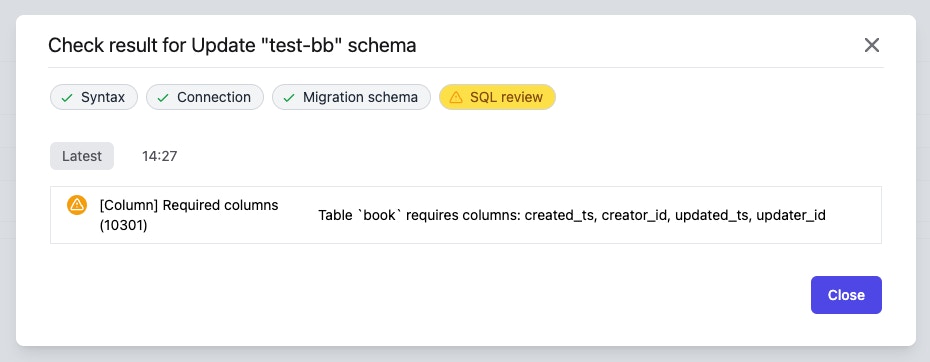
For most projects, you may want to enforce some columns for every table. For example, need `id` as identification and the primary key for each table or need `created_ts` and `updated_ts` to record creation and modification times.
You can customize which columns are required.
 #### How the rule works
Bytebase defaults all tables to meet the requirements. If the SQL tries to define a table not having all the required columns or attempts to drop the required column, Bytebase considers this rule to be violated.
#### Support database engine
* MySQL
* TiDB
* PostgreSQL
* Oracle
* OceanBase
* Snowflake
### Column type disallow list
Set column type disallow list to ban column types.
#### How the rule works
Bytebase defaults all tables to meet the requirements. If the SQL tries to define a table not having all the required columns or attempts to drop the required column, Bytebase considers this rule to be violated.
#### Support database engine
* MySQL
* TiDB
* PostgreSQL
* Oracle
* OceanBase
* Snowflake
### Column type disallow list
Set column type disallow list to ban column types.
 #### How the rule works
Bytebase checks if the SQL statement creates the column type in the disallow list.
Specifically, Bytebase checks:
* `CREATE TABLE` statements
* `ALTER TABLE` statements
#### Support database engine
* MySQL
* TiDB
* PostgreSQL
* Oracle
* OceanBase
### Columns no NULL value
NULL is a special value. It can cause confusion or performance issues. Bytebase provides this rule to enforce that all columns cannot have NULL value.
#### How the rule works
Bytebase checks if the SQL statement creates the column type in the disallow list.
Specifically, Bytebase checks:
* `CREATE TABLE` statements
* `ALTER TABLE` statements
#### Support database engine
* MySQL
* TiDB
* PostgreSQL
* Oracle
* OceanBase
### Columns no NULL value
NULL is a special value. It can cause confusion or performance issues. Bytebase provides this rule to enforce that all columns cannot have NULL value.
 #### How the rule works
Bytebase considers this rule to be violated if the SQL defines a column allowing NULL value.
#### Support database engine
* MySQL
* TiDB
* PostgreSQL
* Oracle
* OceanBase
* Snowflake
### Disallow changing column type
Changing column type may fail because the data cannot be converted. Bytebase provides this rule to alert you that the SQL statement would change the column type.
#### How the rule works
Bytebase considers this rule to be violated if the SQL defines a column allowing NULL value.
#### Support database engine
* MySQL
* TiDB
* PostgreSQL
* Oracle
* OceanBase
* Snowflake
### Disallow changing column type
Changing column type may fail because the data cannot be converted. Bytebase provides this rule to alert you that the SQL statement would change the column type.
 #### How the rule works
Bytebase checks if the SQL statement will change the column type.
Specifically, Bytebase checks:
* `ALTER TABLE` statements
#### Support database engine
* MySQL
* TiDB
* PostgreSQL
* OceanBase
### Set DEFAULT value for NOT NULL columns
NOT NULL columns have no default value. It requires users to manually set default values for NOT NULL columns.
#### How the rule works
Bytebase checks if the SQL statement will change the column type.
Specifically, Bytebase checks:
* `ALTER TABLE` statements
#### Support database engine
* MySQL
* TiDB
* PostgreSQL
* OceanBase
### Set DEFAULT value for NOT NULL columns
NOT NULL columns have no default value. It requires users to manually set default values for NOT NULL columns.
 #### How the rule works
Bytebase checks if setting default values for NOT NULL columns.
Specifically, Bytebase checks:
* `CREATE TABLE` statements
* `ALTER TABLE` statements
#### Support database engine
* MySQL
* TiDB
* Oracle
* OceanBase
Support for PostgreSQL is coming soon.
### Disallow ALTER TABLE CHANGE COLUMN statements
CHANGE COLUMN is a MySQL extension to standard SQL. CHANGE COLUMN can change column definition and names, or both.
Most of the time, you just want to change one of two. So you need to use RENAME COLUMN and MODIFY COLUMN instead of CHANGE COLUMN to avoid unexpected modifications.
#### How the rule works
Bytebase checks if setting default values for NOT NULL columns.
Specifically, Bytebase checks:
* `CREATE TABLE` statements
* `ALTER TABLE` statements
#### Support database engine
* MySQL
* TiDB
* Oracle
* OceanBase
Support for PostgreSQL is coming soon.
### Disallow ALTER TABLE CHANGE COLUMN statements
CHANGE COLUMN is a MySQL extension to standard SQL. CHANGE COLUMN can change column definition and names, or both.
Most of the time, you just want to change one of two. So you need to use RENAME COLUMN and MODIFY COLUMN instead of CHANGE COLUMN to avoid unexpected modifications.
 #### How the rule works
Bytebase checks if using `ALTER TABLE CHANGE COLUMN` statements.
#### Support database engine
* MySQL
* TiDB
* OceanBase
### Disallow changing column order
Changing column order may cause performance issues. Users should be cautious about this.
#### How the rule works
Bytebase checks if using `ALTER TABLE CHANGE COLUMN` statements.
#### Support database engine
* MySQL
* TiDB
* OceanBase
### Disallow changing column order
Changing column order may cause performance issues. Users should be cautious about this.
 #### How the rule works
Bytebase checks if changing column order.
Specifically, Bytebase checks:
* `ALTER TABLE` statements
#### Support database engine
* MySQL
* TiDB
* OceanBase
### Use integer for auto-increment columns
The auto-increment column must be integer.
#### How the rule works
Bytebase checks if changing column order.
Specifically, Bytebase checks:
* `ALTER TABLE` statements
#### Support database engine
* MySQL
* TiDB
* OceanBase
### Use integer for auto-increment columns
The auto-increment column must be integer.
 #### How the rule works
Bytebase checks the auto-increment column type.
Specifically, Bytebase checks:
* `CREATE TABLE` statements
* `ALTER TABLE` statements
#### Support database engine
* MySQL
* TiDB
* OceanBase
Support for PostgreSQL is coming soon.
### Disallow set charset for columns
It's better to set the charset in the table or database.
#### How the rule works
Bytebase checks the auto-increment column type.
Specifically, Bytebase checks:
* `CREATE TABLE` statements
* `ALTER TABLE` statements
#### Support database engine
* MySQL
* TiDB
* OceanBase
Support for PostgreSQL is coming soon.
### Disallow set charset for columns
It's better to set the charset in the table or database.
 #### How the rule works
Bytebase checks if setting charset for columns.
Specifically, Bytebase checks:
* `CREATE TABLE` statements
* `ALTER TABLE` statements
#### Support database engine
* MySQL
* TiDB
* OceanBase
### Set unsigned attribute on auto-increment columns
Setting unsigned attribute on auto-increment columns to avoid negative numbers.
#### How the rule works
Bytebase checks if setting charset for columns.
Specifically, Bytebase checks:
* `CREATE TABLE` statements
* `ALTER TABLE` statements
#### Support database engine
* MySQL
* TiDB
* OceanBase
### Set unsigned attribute on auto-increment columns
Setting unsigned attribute on auto-increment columns to avoid negative numbers.
 #### How the rule works
Bytebase checks the unsigned attribute for auto-increment columns.
Specifically, Bytebase checks:
* `CREATE TABLE` statements
* `ALTER TABLE` statements
#### Support database engine
* MySQL
* TiDB
* OceanBase
### Column comment convention
Configure whether the column requires comments and the maximum comment length.
#### How the rule works
Bytebase checks the unsigned attribute for auto-increment columns.
Specifically, Bytebase checks:
* `CREATE TABLE` statements
* `ALTER TABLE` statements
#### Support database engine
* MySQL
* TiDB
* OceanBase
### Column comment convention
Configure whether the column requires comments and the maximum comment length.
 #### How the rule works
Bytebase checks the column comment.
Specifically, Bytebase checks:
* `CREATE TABLE` statements
* `ALTER TABLE` statements
#### Support database engine
* MySQL
* TiDB
* OceanBase
### Maximum CHAR length
The CHAR type is the fixed-length type. A longer CHAR will require more storage space.
#### How the rule works
Bytebase checks the column comment.
Specifically, Bytebase checks:
* `CREATE TABLE` statements
* `ALTER TABLE` statements
#### Support database engine
* MySQL
* TiDB
* OceanBase
### Maximum CHAR length
The CHAR type is the fixed-length type. A longer CHAR will require more storage space.
 #### How the rule works
Bytebase checks the length for the CHAR type.
Specifically, Bytebase checks:
* `CREATE TABLE` statements
* `ALTER TABLE` statements
#### Support database engine
* MySQL
* TiDB
* PostgreSQL
* Oracle
* OceanBase
### Maximum VARCHAR length
#### How the rule works
Bytebase checks the length for the CHAR type.
Specifically, Bytebase checks:
* `CREATE TABLE` statements
* `ALTER TABLE` statements
#### Support database engine
* MySQL
* TiDB
* PostgreSQL
* Oracle
* OceanBase
### Maximum VARCHAR length
 #### How the rule works
Bytebase checks the length for the VARCHAR type.
Specifically, Bytebase checks:
* `CREATE TABLE` statements
* `ALTER TABLE` statements
#### Support database engine
* Oracle
* Snowflake
### Auto-increment initial value
Set initial value for auto-increment columns.
#### How the rule works
Bytebase checks the length for the VARCHAR type.
Specifically, Bytebase checks:
* `CREATE TABLE` statements
* `ALTER TABLE` statements
#### Support database engine
* Oracle
* Snowflake
### Auto-increment initial value
Set initial value for auto-increment columns.
 #### How the rule works
Bytebase checks the initial value for auto-increment columns.
Specifically, Bytebase checks:
* `CREATE TABLE` statements
#### Support database engine
* MySQL
* TiDB
* OceanBase
### Limit the count of current time columns
Limit the count of `NOW()`, `CURRENT_TIME()` and `CURRENT_TIMESTAMP()` columns.
#### How the rule works
Bytebase checks the initial value for auto-increment columns.
Specifically, Bytebase checks:
* `CREATE TABLE` statements
#### Support database engine
* MySQL
* TiDB
* OceanBase
### Limit the count of current time columns
Limit the count of `NOW()`, `CURRENT_TIME()` and `CURRENT_TIMESTAMP()` columns.
 #### How the rule works
This rule will count the two types of the columns:
1. the column with default current time , such as `DEFAULT NOW()`
2. the column with ON UPDATE current time, such as `ON UPDATE NOW()`
If the count of type one columns is more than two or the count of type two columns is more than one, this rule will alert users.
The meaning of the number is:
1. A table usually has `created_ts` and `updated_ts` column with `DEFAULT NOW()`.
2. A table usually has `updated_ts` column with `ON UPDATE NOW()`
Specifically, Bytebase checks:
* `CREATE TABLE` statements
* `ALTER TABLE` statements
#### Support database engine
* MySQL
* TiDB
* OceanBase
### Require column default value
Require default value for all columns, except PRIMARY KEY, JSON, BLOB, TEXT, GEOMETRY, AUTO\_INCREMENT, GENERATED columns.
#### How the rule works
This rule will count the two types of the columns:
1. the column with default current time , such as `DEFAULT NOW()`
2. the column with ON UPDATE current time, such as `ON UPDATE NOW()`
If the count of type one columns is more than two or the count of type two columns is more than one, this rule will alert users.
The meaning of the number is:
1. A table usually has `created_ts` and `updated_ts` column with `DEFAULT NOW()`.
2. A table usually has `updated_ts` column with `ON UPDATE NOW()`
Specifically, Bytebase checks:
* `CREATE TABLE` statements
* `ALTER TABLE` statements
#### Support database engine
* MySQL
* TiDB
* OceanBase
### Require column default value
Require default value for all columns, except PRIMARY KEY, JSON, BLOB, TEXT, GEOMETRY, AUTO\_INCREMENT, GENERATED columns.
 #### How the rule works
Bytebase checks the column default value.
Specifically, Bytebase checks:
* `CREATE TABLE` statements
* `ALTER TABLE` statements
#### Support database engine
* MySQL
* TiDB
* PostgreSQL
* Oracle
* OceanBase
### Prohibit dropping columns in indexes
Dropping columns in indexes may cause performance issues. Users should be cautious about this.
#### How the rule works
Bytebase checks the column default value.
Specifically, Bytebase checks:
* `CREATE TABLE` statements
* `ALTER TABLE` statements
#### Support database engine
* MySQL
* TiDB
* PostgreSQL
* Oracle
* OceanBase
### Prohibit dropping columns in indexes
Dropping columns in indexes may cause performance issues. Users should be cautious about this.
 #### How the rule works
Bytebase checks if dropping columns in indexes.
Specifically, Bytebase checks:
* `ALTER TABLE DROP COLUMN` statements
#### Support database engine
* MySQL
* TiDB
* OceanBase
### Disallow setting volatile default value on columns
Volatile functions, such as `clock_timestamp()`, update each row with the value at the time of `ALTER TABLE ADD COLUMN` execution. This can lead to lengthy updates and potential performance issues.
#### How the rule works
Bytebase checks if dropping columns in indexes.
Specifically, Bytebase checks:
* `ALTER TABLE DROP COLUMN` statements
#### Support database engine
* MySQL
* TiDB
* OceanBase
### Disallow setting volatile default value on columns
Volatile functions, such as `clock_timestamp()`, update each row with the value at the time of `ALTER TABLE ADD COLUMN` execution. This can lead to lengthy updates and potential performance issues.
 #### How the rule works
Bytebase checks if the default value of columns is volatile in `ALTER TABLE ADD COLUMN` statements.
#### Support database engine
* PostgreSQL
## Index
### Disallow duplicate column in index keys
#### How the rule works
Bytebase checks if the default value of columns is volatile in `ALTER TABLE ADD COLUMN` statements.
#### Support database engine
* PostgreSQL
## Index
### Disallow duplicate column in index keys
 #### How the rule works
Bytebase checks if there exists duplicate column in index keys.
Specifically, Bytebase checks:
* `CREATE TABLE` statements
* `ALTER TABLE` statements
* `CREATE INDEX` statements
#### Support database engine
* MySQL
* TiDB
* PostgreSQL
* OceanBase
### Limit the count of index keys
Limit the count of index keys in one index.
#### How the rule works
Bytebase checks if there exists duplicate column in index keys.
Specifically, Bytebase checks:
* `CREATE TABLE` statements
* `ALTER TABLE` statements
* `CREATE INDEX` statements
#### Support database engine
* MySQL
* TiDB
* PostgreSQL
* OceanBase
### Limit the count of index keys
Limit the count of index keys in one index.
 #### How the rule works
Bytebase checks the count of index keys in each index.
Specifically, Bytebase checks:
* `CREATE TABLE` statements
* `ALTER TABLE` statements
* `CREATE INDEX` statements
#### Support database engine
* MySQL
* TiDB
* PostgreSQL
* Oracle
* OceanBase
### Limit key type for primary keys
Alert users if key type is not INT or BIGINT in primary keys.
#### How the rule works
Bytebase checks the count of index keys in each index.
Specifically, Bytebase checks:
* `CREATE TABLE` statements
* `ALTER TABLE` statements
* `CREATE INDEX` statements
#### Support database engine
* MySQL
* TiDB
* PostgreSQL
* Oracle
* OceanBase
### Limit key type for primary keys
Alert users if key type is not INT or BIGINT in primary keys.
 #### How the rule works
Bytebase checks the key type for primary keys.
Specifically, Bytebase checks:
* `CREATE TABLE` statements
* `ALTER TABLE` statements
#### Support database engine
* MySQL
* TiDB
* OceanBase
Support for PostgreSQL is coming soon.
### Disallow BLOB and TEXT for index keys
Disallow using BLOB and TEXT type as index keys.
#### How the rule works
Bytebase checks the key type for primary keys.
Specifically, Bytebase checks:
* `CREATE TABLE` statements
* `ALTER TABLE` statements
#### Support database engine
* MySQL
* TiDB
* OceanBase
Support for PostgreSQL is coming soon.
### Disallow BLOB and TEXT for index keys
Disallow using BLOB and TEXT type as index keys.
 #### How the rule works
Bytebase checks the key type for index keys.
Specifically, Bytebase checks:
* `CREATE TABLE` statements
* `ALTER TABLE` statements
* `CREATE INDEX` statements
#### Support database engine
* MySQL
* TiDB
* OceanBase
Support for PostgreSQL is coming soon.
### Index count limit
Limit the index count in one table.
#### How the rule works
Bytebase checks the key type for index keys.
Specifically, Bytebase checks:
* `CREATE TABLE` statements
* `ALTER TABLE` statements
* `CREATE INDEX` statements
#### Support database engine
* MySQL
* TiDB
* OceanBase
Support for PostgreSQL is coming soon.
### Index count limit
Limit the index count in one table.
 #### How the rule works
Bytebase checks the index count for each table.
Specifically, Bytebase checks:
* `CREATE TABLE` statements
* `ALTER TABLE` statements
* `CREATE INDEX` statements
#### Support database engine
* MySQL
* TiDB
* PostgreSQL
* OceanBase
### Primary key type allowlist
Limit the data type for primary key.
#### How the rule works
Bytebase checks the index count for each table.
Specifically, Bytebase checks:
* `CREATE TABLE` statements
* `ALTER TABLE` statements
* `CREATE INDEX` statements
#### Support database engine
* MySQL
* TiDB
* PostgreSQL
* OceanBase
### Primary key type allowlist
Limit the data type for primary key.
 #### How the rule works
Bytebase checks the data type for each primary key.
Specifically, Bytebase checks:
* `CREATE TABLE` statements
* `ALTER TABLE ADD CONSTRAINT` statements
#### Support database engine
* PostgreSQL
* MySQL
* TiDB
* OceanBase
### Create index concurrently
Creating indexes blocks writes (but not reads) on the table until it's done. Use CONCURRENTLY when creates indexes can allow writes to continue.
#### How the rule works
Bytebase checks the data type for each primary key.
Specifically, Bytebase checks:
* `CREATE TABLE` statements
* `ALTER TABLE ADD CONSTRAINT` statements
#### Support database engine
* PostgreSQL
* MySQL
* TiDB
* OceanBase
### Create index concurrently
Creating indexes blocks writes (but not reads) on the table until it's done. Use CONCURRENTLY when creates indexes can allow writes to continue.
 #### How the rule works
Specifically, Bytebase checks:
* `CREATE INDEX` statements
#### Support database engine
* PostgreSQL
## Database
### Drop database restriction
Can only drop the database if there's no table in it.
It requires users to drop all containing tables first before dropping the database.
#### How the rule works
Specifically, Bytebase checks:
* `CREATE INDEX` statements
#### Support database engine
* PostgreSQL
## Database
### Drop database restriction
Can only drop the database if there's no table in it.
It requires users to drop all containing tables first before dropping the database.
 #### How the rule works
Bytebase checks if there exists any table in the specific database.
Specifically, Bytebase checks:
* `DROP DATABASE` statements
#### Support database engine
* MySQL
* TiDB
* OceanBase
Support for PostgreSQL is coming soon.
## System
### Charset allow list
#### How the rule works
Bytebase checks if there exists any table in the specific database.
Specifically, Bytebase checks:
* `DROP DATABASE` statements
#### Support database engine
* MySQL
* TiDB
* OceanBase
Support for PostgreSQL is coming soon.
## System
### Charset allow list
 #### How the rule works
Bytebase checks if the SQL statement uses the charset outside of the allow list.
Specifically, Bytebase checks:
* `CREATE TABLE` statements
* `ALTER TABLE` statements
#### Support database engine
* MySQL
* TiDB
* PostgreSQL
* OceanBase
### Collation allow list
#### How the rule works
Bytebase checks if the SQL statement uses the charset outside of the allow list.
Specifically, Bytebase checks:
* `CREATE TABLE` statements
* `ALTER TABLE` statements
#### Support database engine
* MySQL
* TiDB
* PostgreSQL
* OceanBase
### Collation allow list
 #### How the rule works
Bytebase checks if the SQL statement uses the collation outside of the allow list.
Specifically, Bytebase checks:
* `CREATE TABLE` statements
* `ALTER TABLE` statements
#### Support database engine
* MySQL
* TiDB
* PostgreSQL
* OceanBase
### Comment length limit
#### How the rule works
Bytebase checks if the SQL statement uses the collation outside of the allow list.
Specifically, Bytebase checks:
* `CREATE TABLE` statements
* `ALTER TABLE` statements
#### Support database engine
* MySQL
* TiDB
* PostgreSQL
* OceanBase
### Comment length limit
 #### How the rule works
Bytebase checks all `COMMENT ON` statements.
#### Support database engine
* PostgreSQL
## Built-in rules
### Prior backup feasibility check
Check [Data Rollback](/change-database/rollback-data-changes) for details.
#### How the rule works
Bytebase checks all `COMMENT ON` statements.
#### Support database engine
* PostgreSQL
## Built-in rules
### Prior backup feasibility check
Check [Data Rollback](/change-database/rollback-data-changes) for details.