> ## Documentation Index
> Fetch the complete documentation index at: https://docs.bytebase.com/llms.txt
> Use this file to discover all available pages before exploring further.
# Manage Projects with Terraform
This tutorial is part of the **Bytebase Terraform Provider** series:
* Part 1: [Manage Environments with Terraform](/tutorials/manage-environments-with-terraform) - Set up environments with policies
* Part 2: [Manage Databases with Terraform](/tutorials/manage-databases-with-terraform) - Register database instances
* Part 3: Manage Projects with Terraform 👈
* Part 4: [Manage Bytebase Settings with Terraform](/tutorials/manage-general-settings-with-terraform) - Configure workspace profile and approval policies
* Part 5: [Manage SQL Review Rules with Terraform](/tutorials/manage-sql-review-rules-with-terraform) - Define SQL review policies
* Part 6: [Manage Users and Groups with Terraform](/tutorials/manage-users-and-groups-with-terraform) - Configure users and groups
* Part 7: [Manage Database Access Control with Terraform](/tutorials/manage-database-access-control-with-terraform) - Grant database permissions
* Part 8: [Manage Data Masking with Terraform](/tutorials/manage-data-masking-with-terraform) - Protect sensitive data
This tutorial series uses separate Terraform files for better organization. Files are numbered by tutorial part and sub-step (e.g., [1-1-env-setting.tf](https://github.com/bytebase/terraform-provider-bytebase/blob/main/tutorials/1-1-env-setting.tf), [1-2-env-policy-rollout.tf](https://github.com/bytebase/terraform-provider-bytebase/blob/main/tutorials/1-2-env-policy-rollout.tf) for Part 1, [2-instances.tf](https://github.com/bytebase/terraform-provider-bytebase/blob/main/tutorials/2-instances.tf) for Part 2, etc.). Terraform automatically handles dependencies between files.
## What You'll Learn
In this tutorial, you'll learn how to:
* **Organize** databases into logical project groups for better management
* **Configure** project-specific settings and policies
* **Set up** webhooks for project notifications
* **Choose** between dynamic and explicit database assignment patterns
## Prerequisites
Before starting this tutorial, ensure you have:
* Completed [Part 1: Manage Environments with Terraform](/tutorials/manage-environments-with-terraform) and [Part 2: Manage Databases with Terraform](/tutorials/manage-databases-with-terraform)
* Access to the built-in `Test Sample Instance` and `Prod Sample Instance` from Bytebase sample data
* Your Terraform workspace from the previous tutorials
## Step 1 - Understand Current Setup
From the previous tutorials, your Bytebase workspace contains:
* **Test instance**: Contains `hr_test` and `postgres` databases
* **Prod instance**: Contains `hr_prod` and `postgres` databases
Currently, the `hr_test` and `hr_prod` databases are assigned to the default `Sample Project`, while the `postgres` databases remain unassigned. You can verify this by navigating to **Databases** in the left sidebar. We'll now organize these databases into dedicated projects for better management.
## Step 2 - Create Projects
| | |
| ------------------ | ------------------------------------------------------------------------------------------------------------ |
| Terraform resource | [bytebase\_project](https://registry.terraform.io/providers/bytebase/bytebase/latest/docs/resources/project) |
| Sample file | [3-projects.tf](https://github.com/bytebase/terraform-provider-bytebase/blob/main/tutorials/3-projects.tf) |
Create `3-projects.tf`:
```hcl 3-projects.tf theme={null}
# Project One - Development/Test Environment
# Uses dynamic assignment to automatically include all test databases
resource "bytebase_project" "project-one" {
depends_on = [bytebase_instance.test]
resource_id = "project-one"
title = "Project One"
# Project-level governance
enforce_sql_review = true
require_issue_approval = true
require_plan_check_no_error = true
allow_request_role = true
allow_just_in_time_access = true
force_issue_labels = false
# Issue labels available in this project
issue_labels {
value = "schema-change"
color = "#0066CC"
group = "type"
}
issue_labels {
value = "data-change"
color = "#CC6600"
group = "type"
}
# Project-level labels
labels = {
environment = "test"
team = "platform"
}
# Dynamically include all databases from the test instance
databases = bytebase_instance.test.databases
# Configure Slack notifications for team collaboration
webhooks {
title = "Sample webhook 1"
type = "SLACK"
url = "https://webhook.site/91fcd52a-39f1-4e7b-a43a-ddf72796d6b1"
notification_types = [
"ISSUE_CREATED",
"ISSUE_APPROVAL_REQUESTED",
"PIPELINE_COMPLETED",
]
}
}
# Project Two - Production Environment
# Uses explicit assignment for precise control over production databases
resource "bytebase_project" "project-two" {
depends_on = [bytebase_instance.prod]
resource_id = "project-two"
title = "Project Two"
# Explicitly specify which production databases to include
databases = [
"instances/prod-sample-instance/databases/hr_prod"
]
}
```
The configuration above demonstrates project-level settings including webhook notifications. For a complete list of available project configurations, refer to the [Terraform provider documentation](https://registry.terraform.io/providers/bytebase/bytebase/latest/docs/data-sources/project).
You can also configure SQL review policies at the project level. Learn more in [Part 5: Manage SQL Review Rules with Terraform](/tutorials/manage-sql-review-rules-with-terraform).
### Database Assignment Patterns
Choose the appropriate pattern based on your project's needs:
#### Dynamic Assignment
```hcl theme={null}
databases = bytebase_instance.test.databases
```
* **Automatically includes** all databases from a specified instance
* **Best for**: Development and testing environments where databases change frequently
* **Benefit**: Self-maintaining as new databases are automatically included
#### Explicit Assignment
```hcl theme={null}
databases = ["instances/prod-sample-instance/databases/hr_prod"]
```
* **Manually specify** each database by its full path
* **Best for**: Production environments requiring precise control
* **Benefit**: Granular control over which databases belong to the project
## Step 3 - Apply Configuration
```bash theme={null}
terraform plan
terraform apply
```
## Step 4 - Verify Projects
1. Navigate to **Projects** in the Bytebase GUI.
2. You should now see three projects organized as follows:
* **Sample Project** (original default project, now empty after database migration)
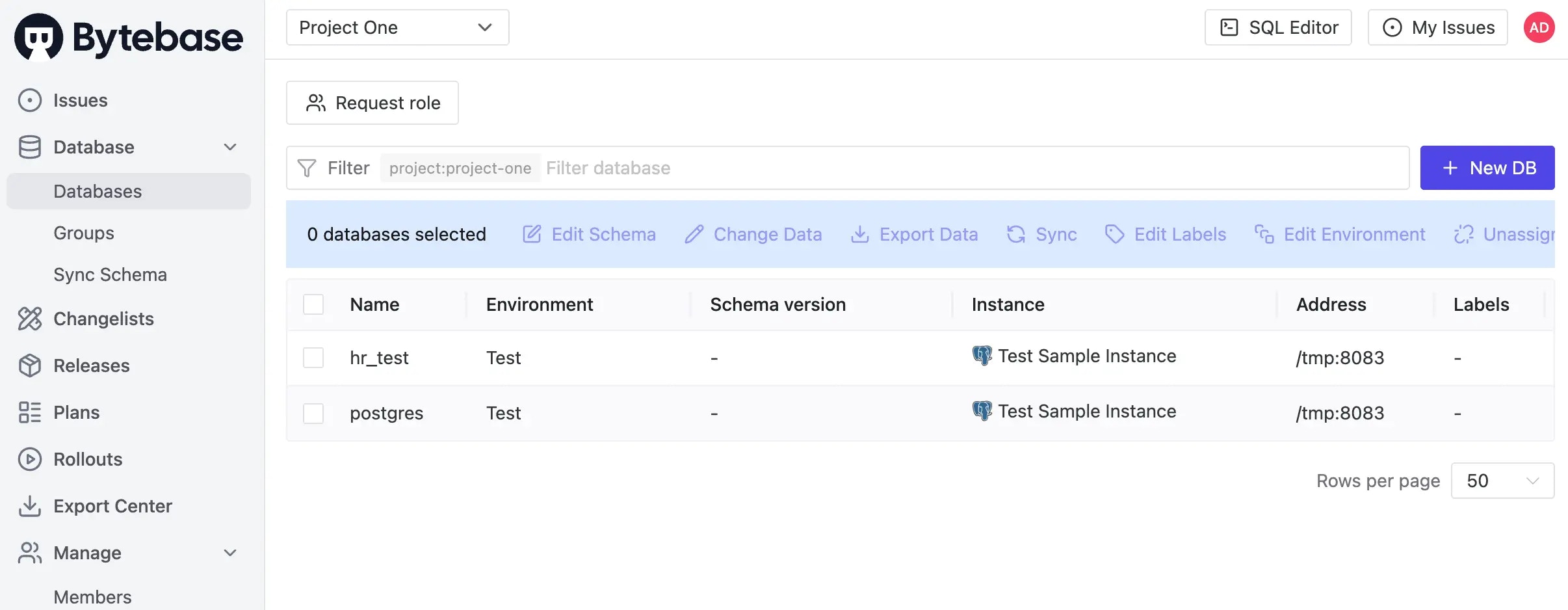
* **Project One** (contains both `hr_test` and `postgres` databases from `Test Sample Instance`)
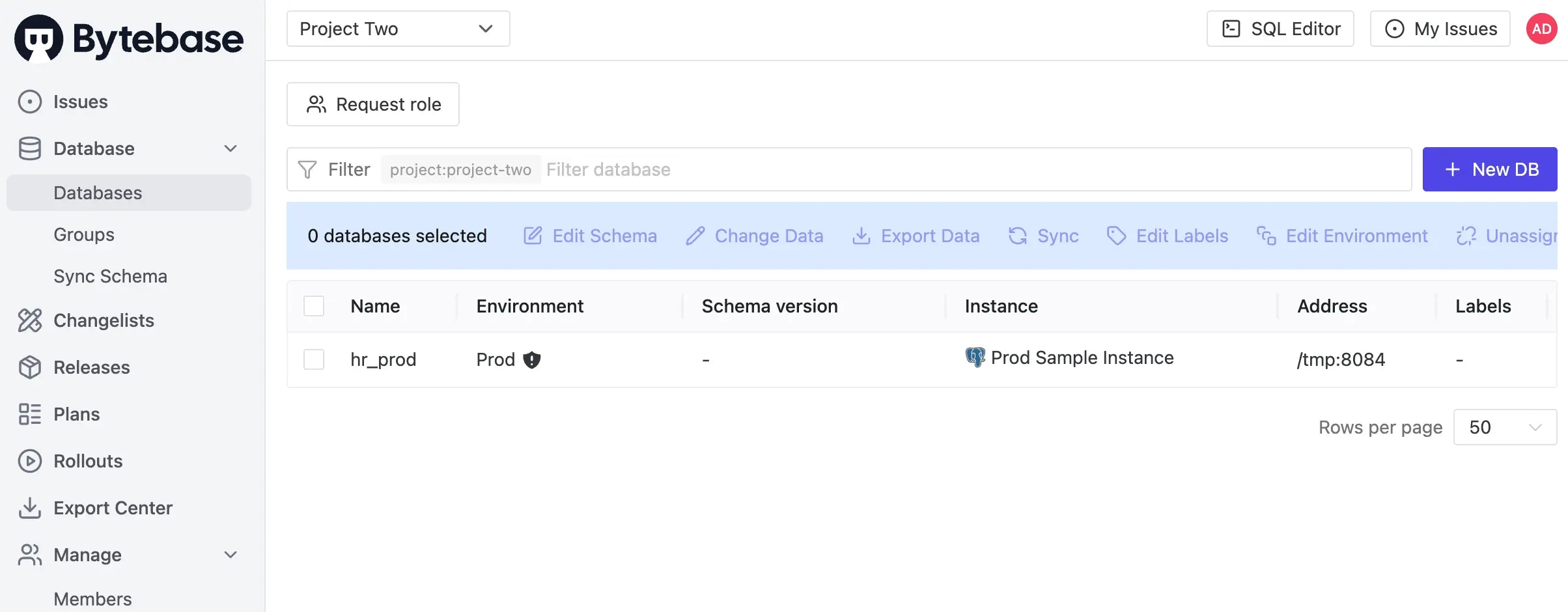
 * **Project Two** (contains the `hr_prod` database from `Prod Sample Instance`)
 3. Click on **Project One** and navigate to **Settings** to review the configurations you've applied.
4. Click **Webhooks** and you'll see the webhook you set.
## Summary and Next Steps
Congratulations! You've successfully organized your databases into logical projects. Here are the key concepts you've learned:
* **Project Organization**: Projects serve as logical containers that group related databases for improved management and governance
* **Assignment Flexibility**: Choose between dynamic assignment (automatic inclusion) for development environments or explicit assignment (manual control) for production
* **Cross-Environment Projects**: Projects can span multiple environments, though it's often better to separate test and production databases into different projects
* **Project Configuration**: Customize project behavior with settings like SQL review enforcement, issue approval requirements, and access controls
* **Notification Integration**: Set up webhooks to keep your team informed about project activities through Slack or other channels
3. Click on **Project One** and navigate to **Settings** to review the configurations you've applied.
4. Click **Webhooks** and you'll see the webhook you set.
## Summary and Next Steps
Congratulations! You've successfully organized your databases into logical projects. Here are the key concepts you've learned:
* **Project Organization**: Projects serve as logical containers that group related databases for improved management and governance
* **Assignment Flexibility**: Choose between dynamic assignment (automatic inclusion) for development environments or explicit assignment (manual control) for production
* **Cross-Environment Projects**: Projects can span multiple environments, though it's often better to separate test and production databases into different projects
* **Project Configuration**: Customize project behavior with settings like SQL review enforcement, issue approval requirements, and access controls
* **Notification Integration**: Set up webhooks to keep your team informed about project activities through Slack or other channels