> ## Documentation Index
> Fetch the complete documentation index at: https://docs.bytebase.com/llms.txt
> Use this file to discover all available pages before exploring further.
# Manage SQL Review Rules with Terraform
This tutorial is part of the **Bytebase Terraform Provider** series:
* Part 1: [Manage Environments with Terraform](/tutorials/manage-environments-with-terraform) - Set up environments with policies
* Part 2: [Manage Databases with Terraform](/tutorials/manage-databases-with-terraform) - Register database instances
* Part 3: [Manage Projects with Terraform](/tutorials/manage-projects-with-terraform) - Organize databases into projects
* Part 4: [Manage Bytebase Settings with Terraform](/tutorials/manage-general-settings-with-terraform) - Configure workspace profile and approval policies
* Part 5: Manage SQL Review Rules with Terraform 👈
* Part 6: [Manage Users and Groups with Terraform](/tutorials/manage-users-and-groups-with-terraform) - Configure users and groups
* Part 7: [Manage Database Access Control with Terraform](/tutorials/manage-database-access-control-with-terraform) - Grant database permissions
* Part 8: [Manage Data Masking with Terraform](/tutorials/manage-data-masking-with-terraform) - Protect sensitive data
This tutorial series uses separate Terraform files for better organization. Files are numbered by tutorial part and sub-step (e.g., [1-1-env-setting.tf](https://github.com/bytebase/terraform-provider-bytebase/blob/main/tutorials/1-1-env-setting.tf), [1-2-env-policy-rollout.tf](https://github.com/bytebase/terraform-provider-bytebase/blob/main/tutorials/1-2-env-policy-rollout.tf) for Part 1, [2-instances.tf](https://github.com/bytebase/terraform-provider-bytebase/blob/main/tutorials/2-instances.tf) for Part 2, etc.). Terraform automatically handles dependencies between files.
## What You'll Learn
In this tutorial, you'll learn how to:
* **Set up** automated SQL review rules to maintain schema standards
* **Implement** naming conventions and structural requirements across your databases
* **Configure** severity levels (`ERROR`, `WARNING`) to control validation strictness
* **Apply** review policies to specific environments for targeted governance
* **Test** your SQL review rules to ensure they work as intended
## Prerequisites
Before starting this tutorial, ensure you have:
* Completed [Part 4: Manage Bytebase Settings with Terraform](/tutorials/manage-general-settings-with-terraform)
* Bytebase running with service account configured
* Your Terraform files from the previous tutorials
## Setup
From the previous tutorials, you should have:
* Bytebase workspaces and projects configured
* Environments (`Test` and `Prod`) set up
* Workspace settings and approval flows configured
## Configure SQL Review Rules
[SQL Review rules](/sql-review/review-rules) automatically validate SQL statements against predefined standards, ensuring code
quality and schema consistency before changes enter the approval workflow.
| | |
| ------------------ | ------------------------------------------------------------------------------------------------------------------------- |
| Terraform resource | [bytebase\_review\_config](https://registry.terraform.io/providers/bytebase/bytebase/latest/docs/resources/review_config) |
| Sample file | [5-sql-review.tf](https://github.com/bytebase/terraform-provider-bytebase/blob/main/tutorials/5-sql-review.tf) |
### Step 1 - Create Review Configuration
The examples below demonstrate some SQL Review rules. For a comprehensive list of available rules and their configuration options, refer to the Terraform provider resource documentation linked above.
Create `5-sql-review.tf` with the SQL review configuration:
```hcl 5-sql-review.tf theme={null}
# SQL review configuration for production environment
resource "bytebase_review_config" "sample" {
depends_on = [
bytebase_setting.environments
]
resource_id = "review-config-sample"
title = "Sample SQL Review Config"
enabled = true
# Apply rules to production environment only
resources = toset([
bytebase_setting.environments.environment_setting[0].environment[1].name
])
# Rule 1: Column nullability - warn about nullable columns to improve data integrity
rules {
type = "COLUMN_NO_NULL"
engine = "POSTGRES"
level = "WARNING"
}
# Rule 2: Required audit columns - enforce standard tracking fields
rules {
type = "COLUMN_REQUIRED"
engine = "POSTGRES"
level = "ERROR"
string_array_payload = ["id", "created_ts", "updated_ts", "creator_id", "updater_id"]
}
# Rule 3: Primary key requirement - ensure all tables have primary keys
rules {
type = "TABLE_REQUIRE_PK"
engine = "POSTGRES"
level = "ERROR"
}
# Rule 4: Column naming standards - enforce snake_case naming convention
rules {
type = "NAMING_COLUMN"
engine = "POSTGRES"
level = "ERROR"
naming_payload {
format = "^[a-z]+(_[a-z]+)*$"
max_length = 64
}
}
# Rule 5: Write safety - limit how many rows a single INSERT can add
rules {
type = "STATEMENT_INSERT_ROW_LIMIT"
engine = "POSTGRES"
level = "ERROR"
number_payload = 1000
}
}
```
The configuration above applies SQL Review rules specifically to the `Prod` environment. Alternatively, you can scope rules to a specific project by using `bytebase_project.sample_project.name` in the `resources` attribute.
### Step 2 - Apply Configuration
```bash theme={null}
terraform plan
terraform apply
```
### Step 3 - Verify in Bytebase
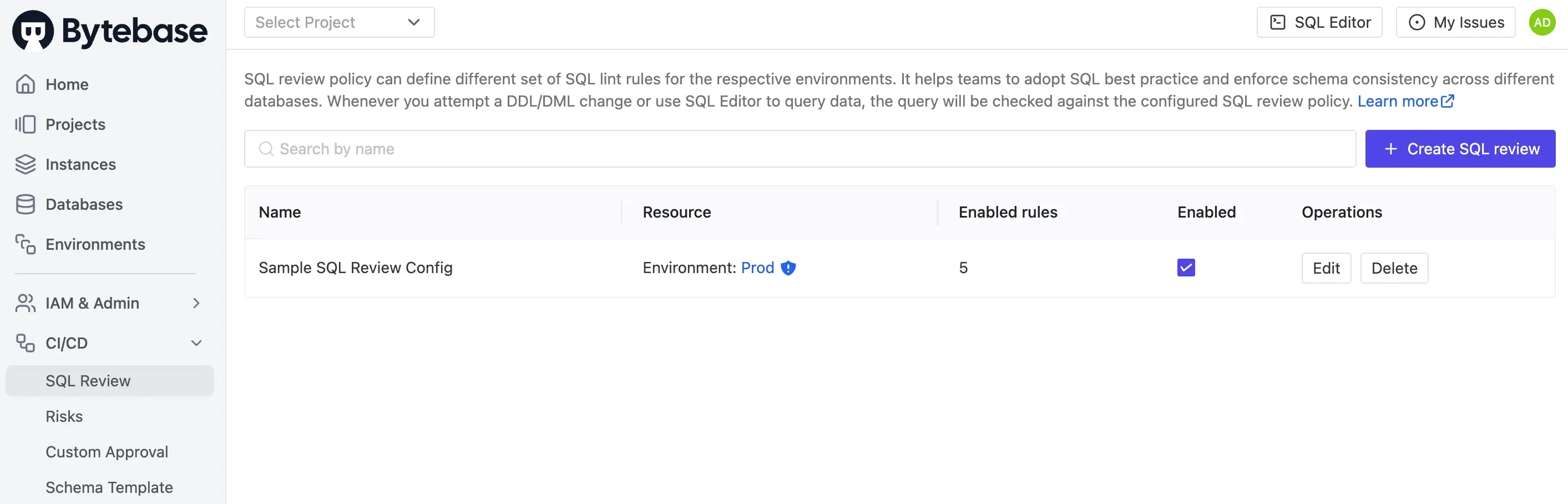
1. Navigate to **CI/CD > SQL Review** in the left sidebar. You should see `Sample SQL Review Config` listed, showing that it's applied to the `Prod` environment.
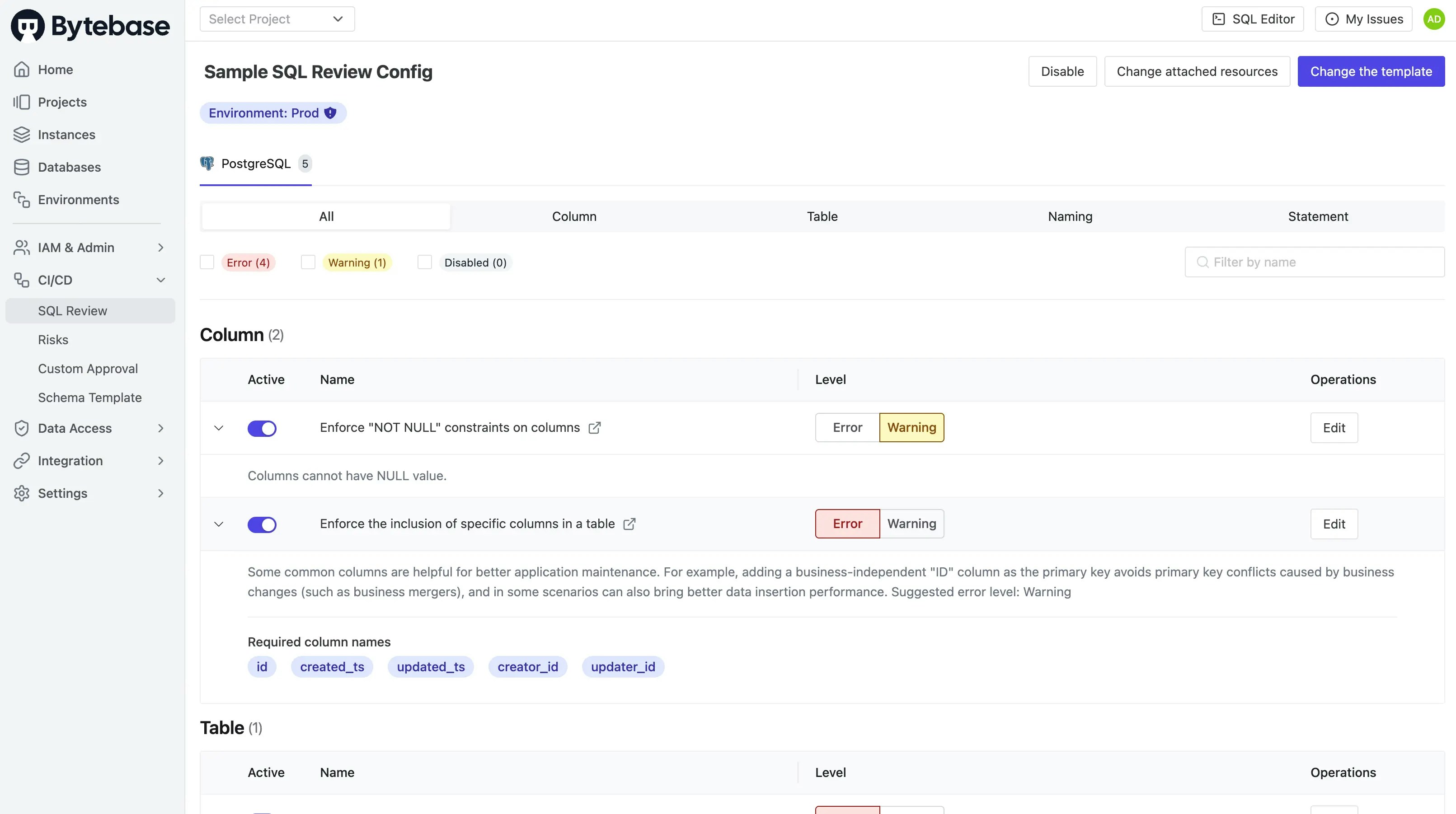
 2. Click on the configuration to examine the rules you've defined.
 ### Understanding SQL Review Rules
SQL Review rules are organized into categories based on what they validate:
#### 1. Column Rules
* **column.no-null**: Issues warnings about nullable columns to promote data integrity and prevent null-related errors
* **column.required**: Mandates the presence of essential columns (ID, timestamps, audit fields) to ensure consistent table structure
#### 2. Table Rules
* **table.require-pk**: Guarantees that every table includes a primary key, which is crucial for data integrity, replication, and query performance
#### 3. Naming Rules
* **naming.column**: Enforces consistent lowercase snake\_case naming conventions across your database schema, improving readability and maintainability
#### 4. Statement Rules
* **statement.insert.row-limit**: Caps how many rows a single INSERT statement can add, protecting against oversized writes
### Step 4 - Test SQL Review
Let's validate that your SQL Review rules are working by testing them with some sample SQL:
1. Navigate to **Project Two**, then click **Database > Databases** in the left sidebar.
2. Select the `hr_prod` database and click **Edit Schema**.
3. Create a table that intentionally violates multiple rules:
```sql theme={null}
-- This table intentionally violates multiple SQL review rules
CREATE TABLE BadExample (
FirstName VARCHAR(50), -- Violates snake_case naming convention
LastName VARCHAR(50) -- Missing required audit columns and primary key
);
```
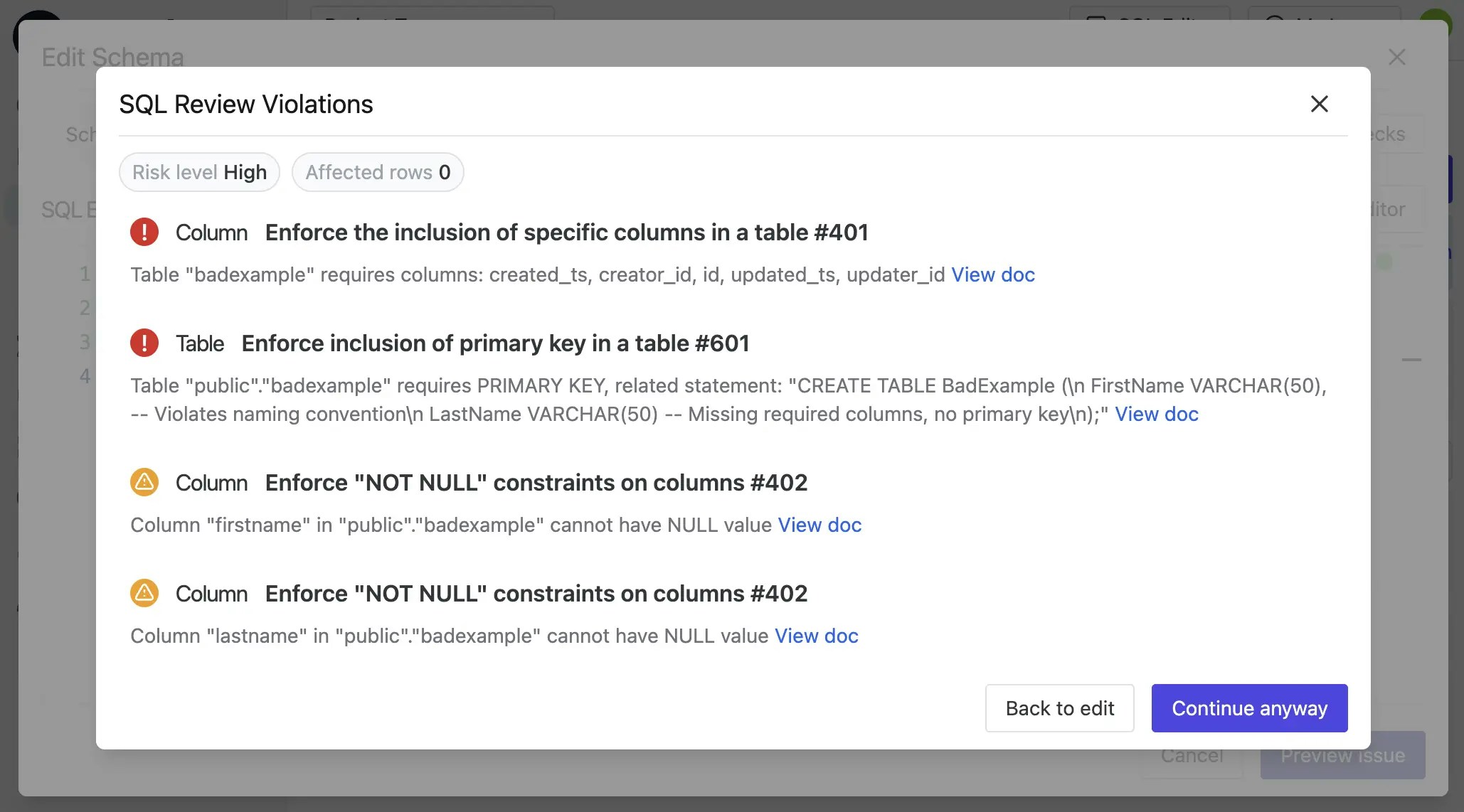
Expected violations:
* ❌ Column naming convention violation (should be `first_name`, `last_name`)
* ❌ Missing required audit columns (`id`, `created_ts`, `updated_ts`, `creator_id`, `updater_id`)
* ❌ No primary key defined
### Understanding SQL Review Rules
SQL Review rules are organized into categories based on what they validate:
#### 1. Column Rules
* **column.no-null**: Issues warnings about nullable columns to promote data integrity and prevent null-related errors
* **column.required**: Mandates the presence of essential columns (ID, timestamps, audit fields) to ensure consistent table structure
#### 2. Table Rules
* **table.require-pk**: Guarantees that every table includes a primary key, which is crucial for data integrity, replication, and query performance
#### 3. Naming Rules
* **naming.column**: Enforces consistent lowercase snake\_case naming conventions across your database schema, improving readability and maintainability
#### 4. Statement Rules
* **statement.insert.row-limit**: Caps how many rows a single INSERT statement can add, protecting against oversized writes
### Step 4 - Test SQL Review
Let's validate that your SQL Review rules are working by testing them with some sample SQL:
1. Navigate to **Project Two**, then click **Database > Databases** in the left sidebar.
2. Select the `hr_prod` database and click **Edit Schema**.
3. Create a table that intentionally violates multiple rules:
```sql theme={null}
-- This table intentionally violates multiple SQL review rules
CREATE TABLE BadExample (
FirstName VARCHAR(50), -- Violates snake_case naming convention
LastName VARCHAR(50) -- Missing required audit columns and primary key
);
```
Expected violations:
* ❌ Column naming convention violation (should be `first_name`, `last_name`)
* ❌ Missing required audit columns (`id`, `created_ts`, `updated_ts`, `creator_id`, `updater_id`)
* ❌ No primary key defined
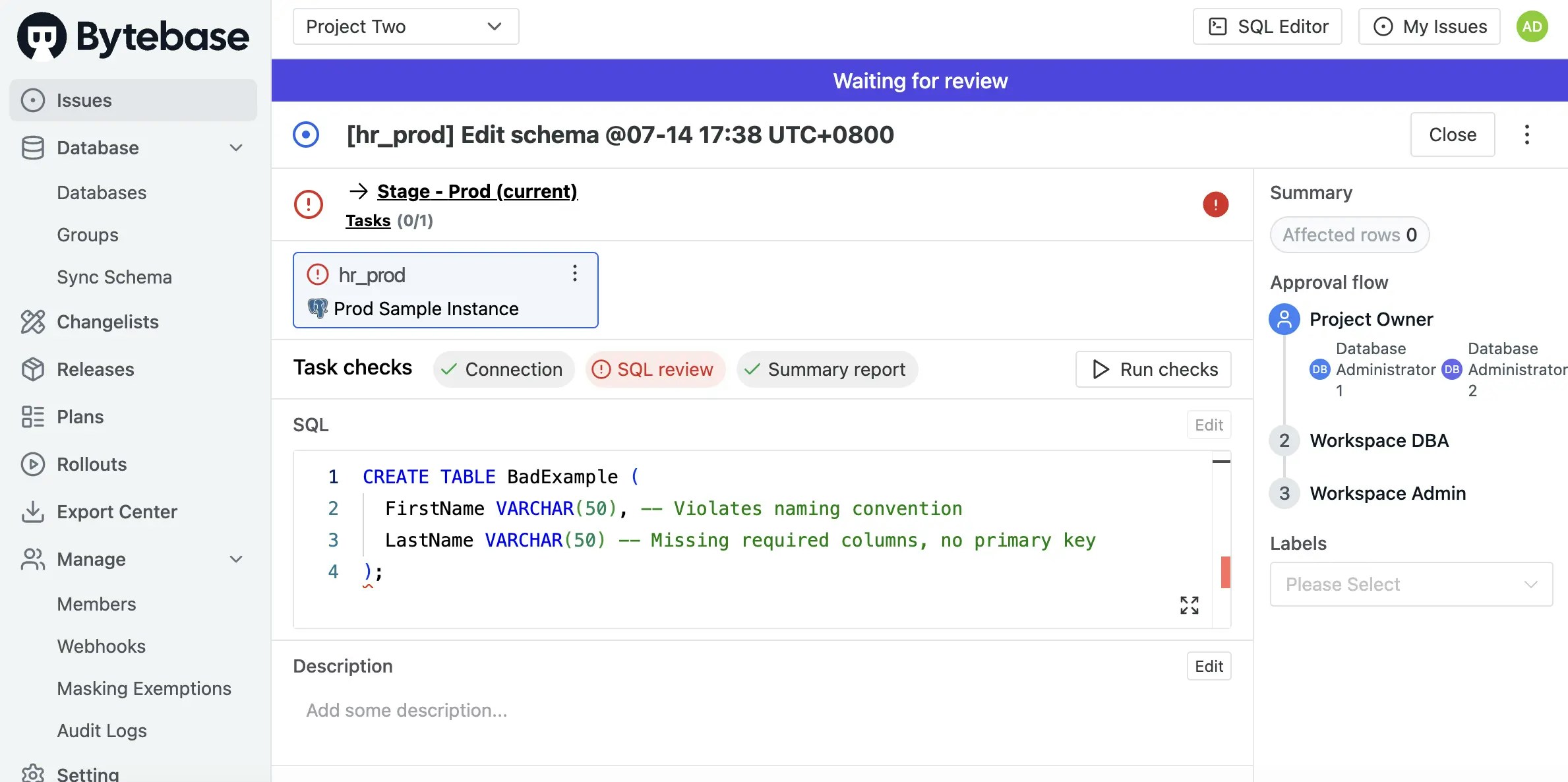
 4. Even if you proceed to create an issue, the SQL Review violations will be prominently displayed with error indicators.
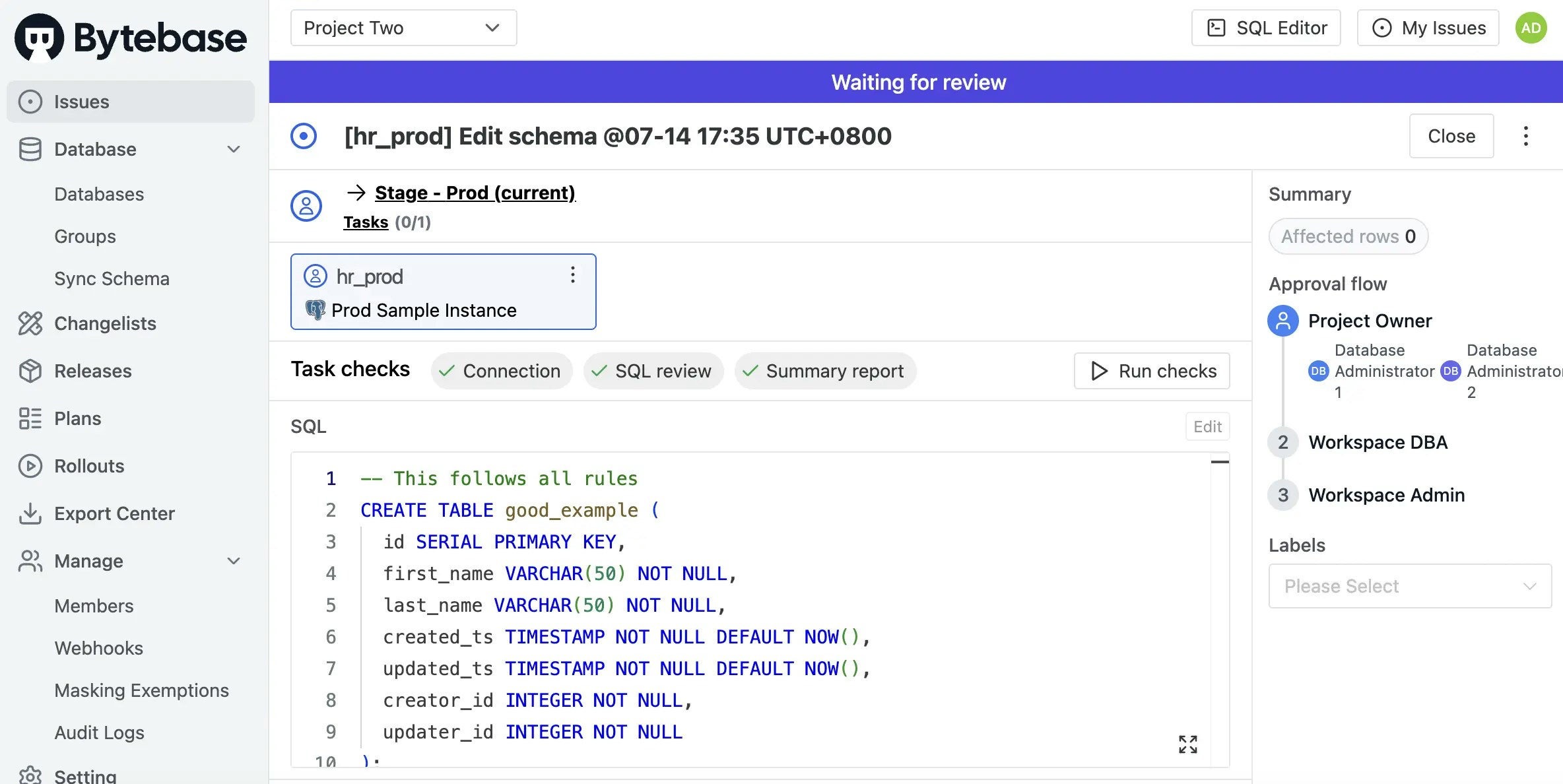
 5. Now try creating a compliant table that follows all your rules:
```sql theme={null}
-- This table complies with all SQL review rules
CREATE TABLE good_example (
id SERIAL PRIMARY KEY, -- Required primary key
first_name VARCHAR(50) NOT NULL, -- Snake_case naming, not null
last_name VARCHAR(50) NOT NULL, -- Snake_case naming, not null
created_ts TIMESTAMP NOT NULL DEFAULT NOW(), -- Required audit column
updated_ts TIMESTAMP NOT NULL DEFAULT NOW(), -- Required audit column
creator_id INTEGER NOT NULL, -- Required audit column
updater_id INTEGER NOT NULL -- Required audit column
);
```
Expected result:
* ✅ All SQL review rules pass successfully
5. Now try creating a compliant table that follows all your rules:
```sql theme={null}
-- This table complies with all SQL review rules
CREATE TABLE good_example (
id SERIAL PRIMARY KEY, -- Required primary key
first_name VARCHAR(50) NOT NULL, -- Snake_case naming, not null
last_name VARCHAR(50) NOT NULL, -- Snake_case naming, not null
created_ts TIMESTAMP NOT NULL DEFAULT NOW(), -- Required audit column
updated_ts TIMESTAMP NOT NULL DEFAULT NOW(), -- Required audit column
creator_id INTEGER NOT NULL, -- Required audit column
updater_id INTEGER NOT NULL -- Required audit column
);
```
Expected result:
* ✅ All SQL review rules pass successfully
 ## Advanced Configuration
### Targeting Multiple Environments
To apply rules to multiple environments:
```hcl theme={null}
resources = toset([
bytebase_setting.environments.environment_setting[0].environment[0].name,
bytebase_setting.environments.environment_setting[0].environment[1].name
])
```
### Engine-Specific Rules
Different rules for different database engines:
```hcl theme={null}
# MySQL-specific rule
rules {
type = "TABLE_REQUIRE_PK"
engine = "MYSQL"
level = "ERROR"
}
# PostgreSQL-specific rule
rules {
type = "TABLE_REQUIRE_PK"
engine = "POSTGRES"
level = "ERROR"
}
```
## Key Points
* **Rule Levels**:
* `ERROR`: Blocks SQL statement execution, preventing non-compliant changes from proceeding
* `WARNING`: Permits execution while alerting users to potential issues, useful for gradual policy adoption
* **Engine Specificity**: Rules can be tailored to specific database engines (PostgreSQL, MySQL, Oracle, etc.) to accommodate platform differences
* **Environment Scoping**: Apply stricter rules to production while allowing more flexibility in development and testing environments
* **Payload Configuration**: Complex rules use typed payload fields (`string_array_payload`, `naming_payload`, `number_payload`) for detailed configuration
* **Implementation Strategy**: Begin with `WARNING` level rules to familiarize teams with standards, then gradually transition to `ERROR` level for enforcement
## Advanced Configuration
### Targeting Multiple Environments
To apply rules to multiple environments:
```hcl theme={null}
resources = toset([
bytebase_setting.environments.environment_setting[0].environment[0].name,
bytebase_setting.environments.environment_setting[0].environment[1].name
])
```
### Engine-Specific Rules
Different rules for different database engines:
```hcl theme={null}
# MySQL-specific rule
rules {
type = "TABLE_REQUIRE_PK"
engine = "MYSQL"
level = "ERROR"
}
# PostgreSQL-specific rule
rules {
type = "TABLE_REQUIRE_PK"
engine = "POSTGRES"
level = "ERROR"
}
```
## Key Points
* **Rule Levels**:
* `ERROR`: Blocks SQL statement execution, preventing non-compliant changes from proceeding
* `WARNING`: Permits execution while alerting users to potential issues, useful for gradual policy adoption
* **Engine Specificity**: Rules can be tailored to specific database engines (PostgreSQL, MySQL, Oracle, etc.) to accommodate platform differences
* **Environment Scoping**: Apply stricter rules to production while allowing more flexibility in development and testing environments
* **Payload Configuration**: Complex rules use typed payload fields (`string_array_payload`, `naming_payload`, `number_payload`) for detailed configuration
* **Implementation Strategy**: Begin with `WARNING` level rules to familiarize teams with standards, then gradually transition to `ERROR` level for enforcement