> ## Documentation Index
> Fetch the complete documentation index at: https://docs.bytebase.com/llms.txt
> Use this file to discover all available pages before exploring further.
# SQL Review with Bytebase API
When modifying data in the database, it's crucial to ensure that the changes are both safe and accurate. Bytebase offers a feature called [SQL Review](/sql-review/review-policy/), which allows you to evaluate your SQL changes before they are applied to the database. SQL Review can be invoked from the Bytebase GUI, CI or API.
This is one of the tutorial series of SQL Review:
1. [SQL Review with Bytebase GUI](/tutorials/sql-review-gui/)
2. SQL Review with CI (integrated with Database GitOps workflow):
* [Database GitOps with GitHub Actions](/tutorials/gitops-github-workflow/#step-3-configure-sql-review-in-bytebase)
* [Database GitOps with Azure DevOps](/tutorials/gitops-azure-devops-workflow/#step-3-configure-sql-review-in-bytebase)
* [Database GitOps with GitLab CI](/tutorials/gitops-gitlab-workflow/#step-3-configure-sql-review-in-bytebase)
* [Database GitOps with Bitbucket Pipelines](/tutorials/gitops-bitbucket-workflow/#step-3-configure-sql-review-in-bytebase)
3. SQL Review with Bytebase API (this one)
4. [Codify SQL Review Policies with Bytebase API](/tutorials/api-sql-review-policy/)
This tutorial will walk you through using SQL Review in Bytebase with Bytebase API to improve your database schema change process. The **Community Plan** is sufficient for completing this tutorial.
## Prerequisites
Make sure you have completed the previous tutorial [SQL Review with Bytebase GUI](/tutorials/sql-review-gui/).
If you want to test the SQL Review API locally with cloud CI/CD services, you'll need to expose your local Bytebase instance. See [Network Architecture guide](/get-started/self-host/network-architecture) for options like ngrok or VS Code port forwarding.
## API Examples
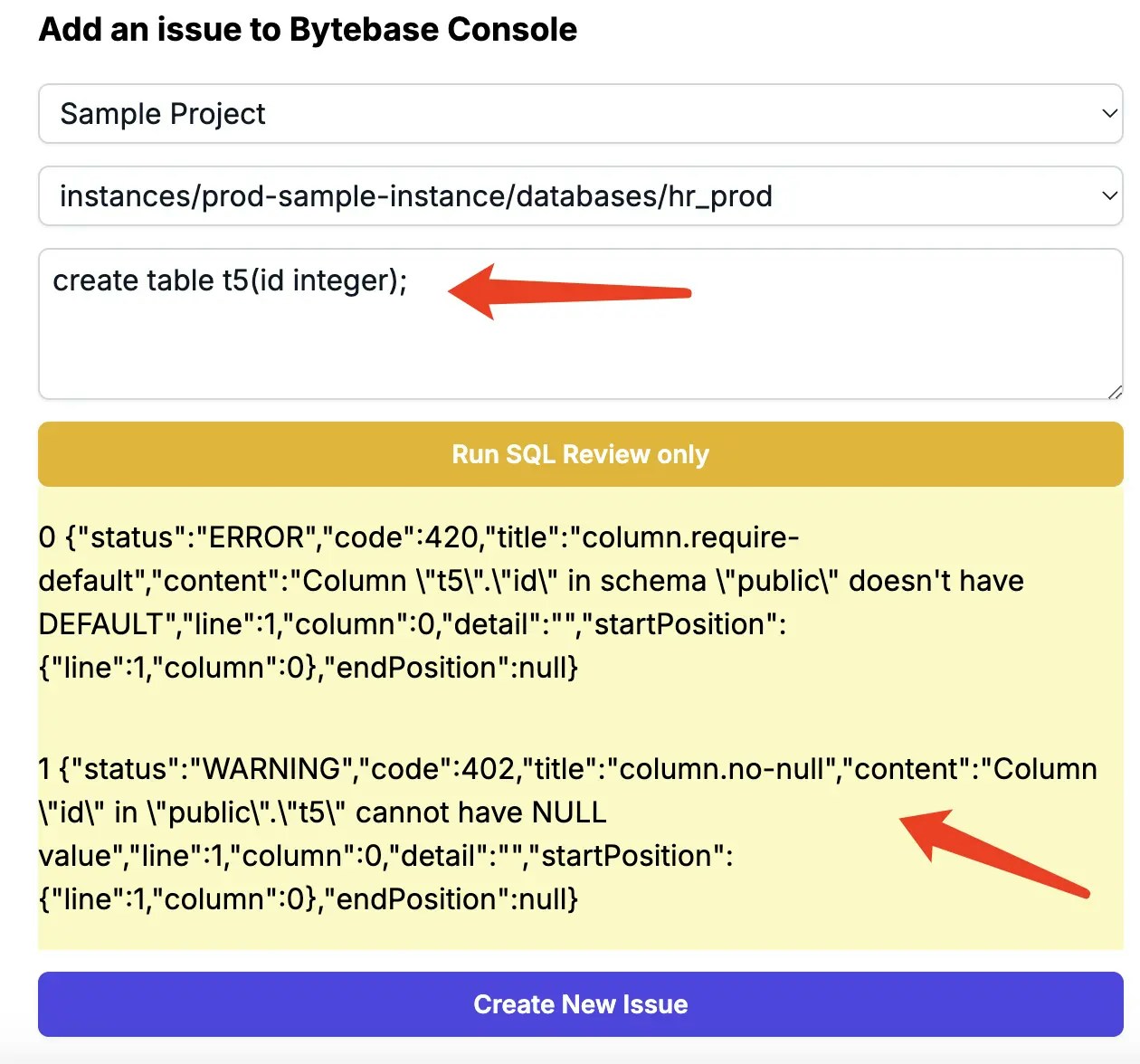
You may call [Bytebase API](/integrations/api/sql-review/) in your internal portal or GitHub Actions to trigger SQL Review. Check out [https://github.com/bytebase/example-api/tree/main/issue-creation](https://github.com/bytebase/example-api/tree/main/issue-creation)
 You can also call the API to configure SQL Review policies.
## Summary
Now you have learned how to trigger SQL Review in Bytebase API. You may also refer to the [SQL Review](/sql-review/review-policy) document for more details. Next, let's learn how to [codify SQL Review policies with API](/tutorials/api-sql-review-policy/)
You can also call the API to configure SQL Review policies.
## Summary
Now you have learned how to trigger SQL Review in Bytebase API. You may also refer to the [SQL Review](/sql-review/review-policy) document for more details. Next, let's learn how to [codify SQL Review policies with API](/tutorials/api-sql-review-policy/)