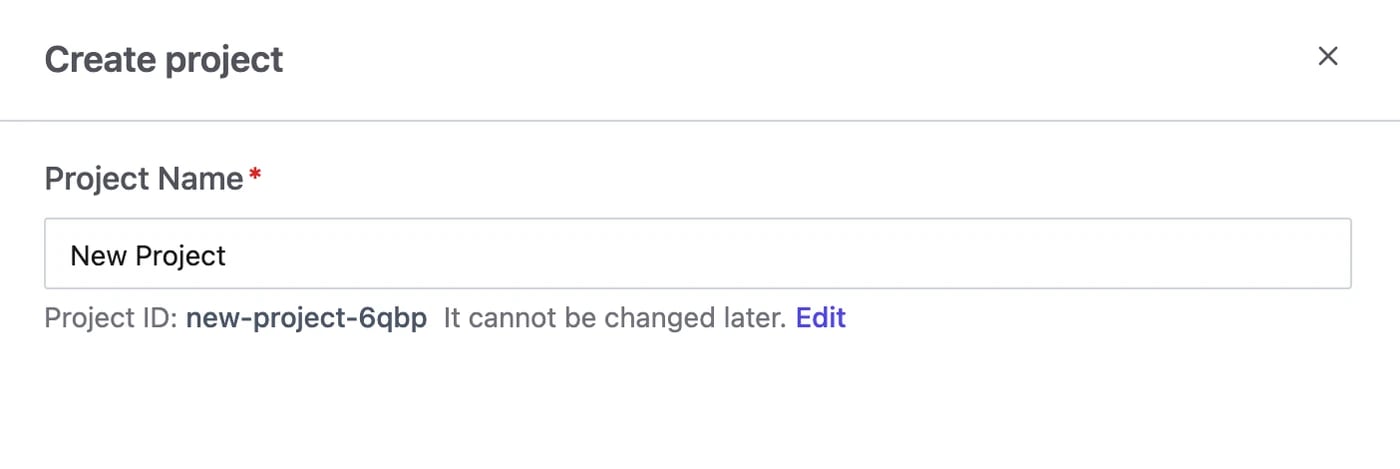
If you enabled sample databases in Step 1, use the project created during setup and continue to Step 4; its sample database already belongs to it.Go to Projects and click Create. Give it a name; the Project ID is derived from it and can’t be changed later.
A database must be in a project before you can change it.
Go to the workspace Databases page, select the database Bytebase synced from your workspace instance, and click Transfer Project — then pick the project you just created.Databases on a project instance already belong to its project and cannot be transferred separately.
Was this page helpful?
{"docsConfig":{"theme":"mint","$schema":"https://mintlify.com/docs.json","name":"Bytebase Docs","colors":{"primary":"#2b66ff","light":"#4faaff","dark":"#1c49be"},"logo":{"light":"https://mintcdn.com/dbx/vw8BbfZhlW9y-cr_/images/logo/logo-full.png?fit=max\u0026auto=format\u0026n=vw8BbfZhlW9y-cr_\u0026q=85\u0026s=894c5021793b82b6bcef8b09cef3d85d","dark":"https://mintcdn.com/dbx/vw8BbfZhlW9y-cr_/images/logo/logo-full-white.png?fit=max\u0026auto=format\u0026n=vw8BbfZhlW9y-cr_\u0026q=85\u0026s=9f660755d7e64c8f3d4882e66589af29"},"favicon":"https://mintcdn.com/dbx/otHCKEZkOwO4gA2D/favicon.svg?fit=max\u0026auto=format\u0026n=otHCKEZkOwO4gA2D\u0026q=85\u0026s=a7e205f761697f5ffcec570fa5de78b0","navbar":{"links":[{"href":"https://www.bytebase.com","label":"bytebase.com"}],"primary":{"type":"button","label":"Try Cloud","href":"https://cloud.bytebase.com/"}},"footer":{"socials":{"x":"https://x.com/bytebase","github":"https://github.com/bytebase/bytebase","linkedin":"https://linkedin.com/company/bytebase"}},"seo":{"metatags":{"canonical":"https://docs.bytebase.com"}},"icons":{"library":"lucide"},"integrations":{"ga4":{"measurementId":"G-4BZ4JH7449"}},"errors":{"404":{"redirect":false}},"contextual":{"options":["copy","view","chatgpt","claude"],"display":"header"},"styling":{"latex":true},"navigation":{"global":{"anchors":[]},"pages":[]}},"deployment":{"deploymentMetadataValue":{"subdomain":"dbx","hasAudioNarration":false,"actualSubdomain":"dbx","customDomains":["docs.bytebase.com"],"gitSource":{"type":"github","owner":"bytebase","repo":"bytebase.com","deployBranch":"main","contentDirectory":"docs","isPrivate":true,"mountPath":"","label":""},"chroma":{"liveDeploymentHistoryId":"6aec9494ca078695d82aa0bf","collectionId":"3cac1a02-9b31-4ccb-8ff2-dcb45d5e8199","schemaVersion":"v3","latestBuiltDeploymentHistoryId":"6aec9494ca078695d82aa0bf"},"feedback":{"thumbs":true},"entitlements":{"AI_CHAT":{"status":"ENABLED"},"WEB_MCP":{"status":"ENABLED"},"NARRATION":{"status":"ENABLED"}},"buildId":"6aec9494ca078695d82aa0bf","clientVersion":"0.0.4074","searchFilterCounts":[{"language":"default","tag":"Changelog","count":54},{"language":"default","tag":"Change Management","count":46},{"language":"default","tag":"Get Started","count":43},{"language":"default","tag":"Tutorials","count":41},{"language":"default","tag":"Administration","count":32},{"language":"default","tag":"GitOps Workflow","count":24},{"language":"default","tag":"Access Control","count":23},{"language":"default","tag":"Security","count":19},{"language":"default","tag":"UI-Driven Workflow","count":15},{"language":"default","tag":"Install","count":11}]},"assistantConfig":{"enableAskAiButton":true,"enableAskAiSearchBar":false,"deflection":{"enabled":true,"email":"help@bytebase.com"}},"basePath":"","hasChatPermissions":true,"hasWebMcpPermissions":true,"toggles":[{"name":"kill-isr","enabled":true,"variant":{"name":"disabled","enabled":false,"feature_enabled":true},"impressionData":false},{"name":"agent-mintlify-slack","enabled":true,"variant":{"name":"disabled","enabled":false,"feature_enabled":true},"impressionData":false},{"name":"agent-integrations-settings","enabled":true,"variant":{"name":"disabled","enabled":false,"feature_enabled":true},"impressionData":false},{"name":"rbac-expansion","enabled":true,"variant":{"name":"disabled","enabled":false,"feature_enabled":true},"impressionData":false},{"name":"automations-pr-grouping","enabled":true,"variant":{"name":"disabled","enabled":false,"feature_enabled":true},"impressionData":false},{"name":"custom-prefix","enabled":true,"variant":{"name":"disabled","enabled":false,"feature_enabled":true},"impressionData":false},{"name":"analytics-v7","enabled":true,"variant":{"name":"disabled","enabled":false,"feature_enabled":true},"impressionData":false},{"name":"user-flows-analytics","enabled":true,"variant":{"name":"disabled","enabled":false,"feature_enabled":true},"impressionData":false},{"name":"no-publish-flow","enabled":true,"variant":{"name":"disabled","enabled":false,"feature_enabled":true},"impressionData":false},{"name":"workos-onboarding","enabled":true,"variant":{"name":"disabled","enabled":false,"feature_enabled":true},"impressionData":false},{"name":"llms-txt-v2","enabled":true,"variant":{"name":"disabled","enabled":false,"feature_enabled":true},"impressionData":false},{"name":"snapshot-serving-live","enabled":true,"variant":{"name":"disabled","enabled":false,"feature_enabled":true},"impressionData":false},{"name":"stripTemperatureMiddleware","enabled":true,"variant":{"name":"disabled","enabled":false,"feature_enabled":true},"impressionData":false},{"name":"support-platform-pylon-zendesk","enabled":true,"variant":{"name":"disabled","enabled":false,"feature_enabled":true},"impressionData":false},{"name":"snapshot-serving","enabled":true,"variant":{"name":"disabled","enabled":false,"feature_enabled":true},"impressionData":false},{"name":"instant-rollback","enabled":true,"variant":{"name":"disabled","enabled":false,"feature_enabled":true},"impressionData":false},{"name":"granular-notifications-server","enabled":true,"variant":{"name":"disabled","enabled":false,"feature_enabled":true},"impressionData":false},{"name":"granular-notifications","enabled":true,"variant":{"name":"disabled","enabled":false,"feature_enabled":true},"impressionData":false},{"name":"automations-fable","enabled":true,"variant":{"name":"disabled","enabled":false,"feature_enabled":true},"impressionData":false},{"name":"fixed-ai-action-pricing","enabled":true,"variant":{"name":"disabled","enabled":false,"feature_enabled":true},"impressionData":false},{"name":"automation-resolve-merge-conflict","enabled":true,"variant":{"name":"disabled","enabled":false,"feature_enabled":true},"impressionData":false},{"name":"scoped-publishing","enabled":true,"variant":{"name":"disabled","enabled":false,"feature_enabled":true},"impressionData":false},{"name":"mintql","enabled":true,"variant":{"name":"disabled","enabled":false,"feature_enabled":true},"impressionData":false},{"name":"page-level-analytics","enabled":true,"variant":{"name":"disabled","enabled":false,"feature_enabled":true},"impressionData":false},{"name":"editor-version-history-v2","enabled":true,"variant":{"name":"disabled","enabled":false,"feature_enabled":true},"impressionData":false},{"name":"billing-page-v2","enabled":true,"variant":{"name":"disabled","enabled":false,"feature_enabled":true},"impressionData":false},{"name":"full-page-search","enabled":true,"variant":{"name":"disabled","enabled":false,"feature_enabled":true},"impressionData":false},{"name":"workspace-projects","enabled":true,"variant":{"name":"disabled","enabled":false,"feature_enabled":true},"impressionData":false},{"name":"assistant-v5","enabled":true,"variant":{"name":"disabled","enabled":false,"feature_enabled":true},"impressionData":false},{"name":"fork-pr-previews","enabled":true,"variant":{"name":"disabled","enabled":false,"feature_enabled":true},"impressionData":false},{"name":"revalidation-jwt","enabled":true,"variant":{"name":"disabled","enabled":false,"feature_enabled":true},"impressionData":false},{"name":"vite-origin","enabled":true,"variant":{"name":"disabled","enabled":false,"feature_enabled":true},"impressionData":false},{"name":"workos-sso-scim","enabled":true,"variant":{"name":"disabled","enabled":false,"feature_enabled":true},"impressionData":false},{"name":"hobby-abuse-scan","enabled":true,"variant":{"name":"disabled","enabled":false,"feature_enabled":true},"impressionData":false},{"name":"dashboard-inbox","enabled":true,"variant":{"name":"disabled","enabled":false,"feature_enabled":true},"impressionData":false},{"name":"workos-signup","enabled":true,"variant":{"name":"disabled","enabled":false,"feature_enabled":true},"impressionData":false},{"name":"turbopuffer-dual-write","enabled":true,"variant":{"name":"disabled","enabled":false,"feature_enabled":true},"impressionData":false},{"name":"workos-enabled","enabled":true,"variant":{"name":"disabled","enabled":false,"feature_enabled":true},"impressionData":false},{"name":"approve-review-flow","enabled":true,"variant":{"name":"disabled","enabled":false,"feature_enabled":true},"impressionData":false},{"name":"sso-setup-deadline-banner","enabled":true,"variant":{"name":"disabled","enabled":false,"feature_enabled":true},"impressionData":false},{"name":"turbopuffer-serve","enabled":true,"variant":{"name":"disabled","enabled":false,"feature_enabled":true},"impressionData":false},{"name":"live-agents","enabled":true,"variant":{"name":"disabled","enabled":false,"feature_enabled":true},"impressionData":false},{"name":"comment-mode","enabled":true,"variant":{"name":"disabled","enabled":false,"feature_enabled":true},"impressionData":false}],"googleFontsInlined":false},"customCss":[{"filePath":"demo-embed.css","content":".demo-embed{position:relative;display:block;margin:1.5rem 0;border:0;border-radius:0;cursor:zoom-in;text-decoration:none!important}.demo-embed img{display:block;width:100%;margin:0!important;border-radius:0!important}.demo-embed::after{content:\"Play the interactive demo\";position:absolute;left:50%;top:50%;transform:translate(-50%, -50%);padding:0.5rem 0.875rem 0.5rem 2.25rem;border:1px solid rgb(228 228 231);border-radius:9999px;background:rgb(255 255 255 / 0.96) no-repeat 0.875rem center / 1rem 1rem\n\t\turl(\"data:image/svg+xml,%3Csvg xmlns='http://www.w3.org/2000/svg' viewBox='0 0 24 24' fill='none' stroke='%2318181b' stroke-width='2' stroke-linecap='round' stroke-linejoin='round'%3E%3Cpath d='M8 3H5a2 2 0 0 0-2 2v3M21 8V5a2 2 0 0 0-2-2h-3M3 16v3a2 2 0 0 0 2 2h3M16 21h3a2 2 0 0 0 2-2v-3'/%3E%3C/svg%3E\");color:rgb(24 24 27);font-size:0.8125rem;font-weight:500;line-height:1.25rem;box-shadow:0 2px 8px rgb(0 0 0 / 0.12);transition:transform 0.15s ease}.demo-embed:hover::after{transform:translate(-50%, -50%) scale(1.04)}.demo-dialog{position:fixed;inset:0;margin:auto;width:min(96vw, calc((100vh - 5rem) * 792 / 480), 1352px);max-width:none;max-height:none;padding:0;border:0;background:transparent;box-shadow:none;overflow:visible}.demo-dialog::backdrop{background:rgb(255 255 255 / 0.85);backdrop-filter:blur(8px);-webkit-backdrop-filter:blur(8px)}html.dark .demo-dialog::backdrop{background:rgb(9 9 11 / 0.85)}.demo-dialog iframe{display:block;width:100%;aspect-ratio:792 / 480;border:0}.demo-dialog__close{position:fixed;top:1rem;right:1rem;display:flex;align-items:center;justify-content:center;width:2.5rem;height:2.5rem;border:1px solid rgb(228 228 231);border-radius:9999px;background:#fff;color:rgb(24 24 27);font-size:1.25rem;line-height:1;cursor:pointer}html.dark .demo-dialog__close{border-color:rgb(63 63 70);background:rgb(24 24 27);color:#fff}"}],"page":{"pagePath":"get-started/step-by-step/create-a-project","slug":"/get-started/step-by-step/create-a-project","pageMetadata":{"title":"Step 3: Create a Project","description":null,"href":"/get-started/step-by-step/create-a-project"},"pageType":"default","mdx":{"mdxSource":{"compiledSource":"\"use strict\";const{Fragment:_Fragment,jsx:_jsx,jsxs:_jsxs}=arguments[0];const{useMDXComponents:_provideComponents}=arguments[0];function _createMdxContent(props){const _components={a:`a`,p:`p`,strong:`strong`,..._provideComponents(),...props.components},{Heading,OptimizedImage,Tip}=_components;if(!Heading)_missingMdxReference(`Heading`,true);if(!OptimizedImage)_missingMdxReference(`OptimizedImage`,true);if(!Tip)_missingMdxReference(`Tip`,true);return _jsxs(_Fragment,{children:[_jsxs(_components.p,{children:[_jsx(_components.strong,{children:_jsx(_components.a,{href:`/concepts/project`,children:`Project`})}),` groups related databases, change records, and member permissions. Each database and change record belongs to one project.`]}),`\n`,_jsx(Heading,{level:`2`,id:`create-project`,children:`Create project`}),`\n`,_jsx(_components.p,{children:`If you enabled sample databases in Step 1, use the project created during setup and continue to Step 4; its sample database already belongs to it.`}),`\n`,_jsxs(_components.p,{children:[`Go to `,_jsx(_components.strong,{children:`Projects`}),` and click `,_jsx(_components.strong,{children:`Create`}),`. Give it a name; the `,_jsx(_components.strong,{children:`Project ID`}),` is derived from it and can’t be changed later.`]}),`\n`,_jsx(OptimizedImage,{src:`https://mintcdn.com/dbx/nhRq3XICz1Y621Jw/content/docs/get-started/step-by-step/create-a-project/create-project.webp?fit=max\u0026auto=format\u0026n=nhRq3XICz1Y621Jw\u0026q=85\u0026s=102fecae5750fcde152f14d56c986fa5`,alt:`Create a project`,\"data-og-width\":`1400`,width:`1400`,\"data-og-height\":`469`,height:`469`,\"data-path\":`content/docs/get-started/step-by-step/create-a-project/create-project.webp`,\"data-optimize\":`true`,\"data-opv\":`3`,srcset:`https://mintcdn.com/dbx/nhRq3XICz1Y621Jw/content/docs/get-started/step-by-step/create-a-project/create-project.webp?w=280\u0026fit=max\u0026auto=format\u0026n=nhRq3XICz1Y621Jw\u0026q=85\u0026s=8a54f2a346560b229d27ef4e38f43b2a 280w, https://mintcdn.com/dbx/nhRq3XICz1Y621Jw/content/docs/get-started/step-by-step/create-a-project/create-project.webp?w=560\u0026fit=max\u0026auto=format\u0026n=nhRq3XICz1Y621Jw\u0026q=85\u0026s=a4150333877f4205c368d296336e7a01 560w, https://mintcdn.com/dbx/nhRq3XICz1Y621Jw/content/docs/get-started/step-by-step/create-a-project/create-project.webp?w=840\u0026fit=max\u0026auto=format\u0026n=nhRq3XICz1Y621Jw\u0026q=85\u0026s=38abe51d7c66f8d9b9a53f0c0fd8fe88 840w, https://mintcdn.com/dbx/nhRq3XICz1Y621Jw/content/docs/get-started/step-by-step/create-a-project/create-project.webp?w=1100\u0026fit=max\u0026auto=format\u0026n=nhRq3XICz1Y621Jw\u0026q=85\u0026s=90c5f65005253755784846f5625c668c 1100w, https://mintcdn.com/dbx/nhRq3XICz1Y621Jw/content/docs/get-started/step-by-step/create-a-project/create-project.webp?w=1650\u0026fit=max\u0026auto=format\u0026n=nhRq3XICz1Y621Jw\u0026q=85\u0026s=f645f6562f4c23ecb905d5da8942c75b 1650w, https://mintcdn.com/dbx/nhRq3XICz1Y621Jw/content/docs/get-started/step-by-step/create-a-project/create-project.webp?w=2500\u0026fit=max\u0026auto=format\u0026n=nhRq3XICz1Y621Jw\u0026q=85\u0026s=8655fb44fb9f8a02fe472dfebf8e4529 2500w`}),`\n`,_jsx(Heading,{level:`2`,id:`transfer-a-database-in`,children:`Transfer a database in`}),`\n`,_jsx(Tip,{children:_jsx(_components.p,{children:`A database must be in a project before you can change it.`})}),`\n`,_jsxs(_components.p,{children:[`Go to the workspace `,_jsx(_components.strong,{children:`Databases`}),` page, select the database Bytebase synced from your workspace instance, and click `,_jsx(_components.strong,{children:`Transfer Project`}),` — then pick the project you just created.`]}),`\n`,_jsxs(_components.p,{children:[`Databases on a `,_jsx(_components.a,{href:`/concepts/instance#workspace-and-project-instances`,children:`project instance`}),` already belong to its project and cannot be transferred separately.`]}),`\n`,_jsx(OptimizedImage,{src:`https://mintcdn.com/dbx/InJaiu0wIzIEy6G2/content/docs/get-started/step-by-step/create-a-project/bb-add-or-transfer-db.webp?fit=max\u0026auto=format\u0026n=InJaiu0wIzIEy6G2\u0026q=85\u0026s=de1f5c16945a8c714c6851bdd70eb23e`,alt:`Transfer a database into the project`,\"data-og-width\":`1600`,width:`1600`,\"data-og-height\":`1000`,height:`1000`,\"data-path\":`content/docs/get-started/step-by-step/create-a-project/bb-add-or-transfer-db.webp`,\"data-optimize\":`true`,\"data-opv\":`3`,srcset:`https://mintcdn.com/dbx/InJaiu0wIzIEy6G2/content/docs/get-started/step-by-step/create-a-project/bb-add-or-transfer-db.webp?w=280\u0026fit=max\u0026auto=format\u0026n=InJaiu0wIzIEy6G2\u0026q=85\u0026s=f40dbe23ce1925b73d65196a628ce150 280w, https://mintcdn.com/dbx/InJaiu0wIzIEy6G2/content/docs/get-started/step-by-step/create-a-project/bb-add-or-transfer-db.webp?w=560\u0026fit=max\u0026auto=format\u0026n=InJaiu0wIzIEy6G2\u0026q=85\u0026s=864770ee0dc86e18de32f5bb61e1fa59 560w, https://mintcdn.com/dbx/InJaiu0wIzIEy6G2/content/docs/get-started/step-by-step/create-a-project/bb-add-or-transfer-db.webp?w=840\u0026fit=max\u0026auto=format\u0026n=InJaiu0wIzIEy6G2\u0026q=85\u0026s=6743a6ee6d1ffbf1480c7731c5660143 840w, https://mintcdn.com/dbx/InJaiu0wIzIEy6G2/content/docs/get-started/step-by-step/create-a-project/bb-add-or-transfer-db.webp?w=1100\u0026fit=max\u0026auto=format\u0026n=InJaiu0wIzIEy6G2\u0026q=85\u0026s=9cc57c6107d9f52a05a54094297695f7 1100w, https://mintcdn.com/dbx/InJaiu0wIzIEy6G2/content/docs/get-started/step-by-step/create-a-project/bb-add-or-transfer-db.webp?w=1650\u0026fit=max\u0026auto=format\u0026n=InJaiu0wIzIEy6G2\u0026q=85\u0026s=3c2aab5dd72e276adc749998c08f4bfa 1650w, https://mintcdn.com/dbx/InJaiu0wIzIEy6G2/content/docs/get-started/step-by-step/create-a-project/bb-add-or-transfer-db.webp?w=2500\u0026fit=max\u0026auto=format\u0026n=InJaiu0wIzIEy6G2\u0026q=85\u0026s=449408a2d5062174ce57fe61c76ccfe5 2500w`})]})}function MDXContent(props={}){const{wrapper:MDXLayout}={..._provideComponents(),...props.components};return MDXLayout?_jsx(MDXLayout,{...props,children:_jsx(_createMdxContent,{...props})}):_createMdxContent(props)}return{default:MDXContent};function _missingMdxReference(id,component){throw new Error(`Expected `+(component?`component`:`object`)+\" `\"+id+\"` to be defined: you likely forgot to import, pass, or provide it.\")}","frontmatter":{},"scope":{"config":{},"pageMetadata":{"title":"Step 3: Create a Project","description":null,"href":"/get-started/step-by-step/create-a-project"}}},"mdxSourceWithNoJs":null},"mdxExtracts":{"tableOfContents":[{"title":"Create project","slug":"create-project","depth":2,"children":[]},{"title":"Transfer a database in","slug":"transfer-a-database-in","depth":2,"children":[]}],"codeExamples":{}},"jsLinks":["/_mintlify/custom/dbx/9053740759cb8dde/demo-embed.js"],"subdomain":"dbx","siteName":"Bytebase Docs","title":"Step 3: Create a Project - Bytebase Docs","navMaps":{"firstHrefInVersion":{},"firstHrefInLanguage":{}},"lastModified":"2026-11-05T14:37:42.219Z","originalFileLocation":"get-started/step-by-step/create-a-project.mdx"},"headHtml":"\u003cscript data-mint-head>(function(){var d=document.documentElement,p=null;if(!p){try{p=localStorage.getItem(\"isDarkMode\")}catch(e){}if(p==='true')p='dark';else if(p==='false')p='light';if(p!=='light'\u0026\u0026p!=='dark'\u0026\u0026p!=='system')p=\"system\"}var r=p==='system'?(matchMedia(\"(prefers-color-scheme: dark)\").matches?'dark':'light'):p;d.classList.remove(r==='dark'?'light':'dark');d.classList.add(r);d.setAttribute(\"data-theme-preference\",p)})();\u003c/script>\u003cmeta data-mint-head name=\"application-name\" content=\"Bytebase Docs\">\u003cmeta data-mint-head name=\"generator\" content=\"Mintlify\">\u003clink data-mint-head rel=\"icon\" type=\"image/png\" sizes=\"192x192\" href=\"/mintlify-assets/_mintlify/favicons/dbx/R2-p_QktkMNyxiB0/_generated/favicon/android-chrome-192x192.png\" media=\"(prefers-color-scheme: light)\">\u003clink data-mint-head rel=\"apple-touch-icon\" type=\"image/png\" sizes=\"180x180\" href=\"/mintlify-assets/_mintlify/favicons/dbx/R2-p_QktkMNyxiB0/_generated/favicon/apple-touch-icon.png\">\u003clink data-mint-head rel=\"icon\" type=\"image/png\" sizes=\"16x16\" href=\"/mintlify-assets/_mintlify/favicons/dbx/R2-p_QktkMNyxiB0/_generated/favicon/favicon-16x16.png\" media=\"(prefers-color-scheme: light)\">\u003clink data-mint-head rel=\"icon\" type=\"image/png\" sizes=\"32x32\" href=\"/mintlify-assets/_mintlify/favicons/dbx/R2-p_QktkMNyxiB0/_generated/favicon/favicon-32x32.png\" media=\"(prefers-color-scheme: light)\">\u003clink data-mint-head rel=\"shortcut icon\" type=\"image/x-icon\" href=\"/mintlify-assets/_mintlify/favicons/dbx/R2-p_QktkMNyxiB0/_generated/favicon/favicon.ico\" media=\"(prefers-color-scheme: light)\">\u003clink data-mint-head rel=\"icon\" type=\"image/png\" sizes=\"192x192\" href=\"/mintlify-assets/_mintlify/favicons/dbx/R2-p_QktkMNyxiB0/_generated/favicon-dark/android-chrome-192x192.png\" media=\"(prefers-color-scheme: dark)\">\u003clink data-mint-head rel=\"icon\" type=\"image/png\" sizes=\"16x16\" href=\"/mintlify-assets/_mintlify/favicons/dbx/R2-p_QktkMNyxiB0/_generated/favicon-dark/favicon-16x16.png\" media=\"(prefers-color-scheme: dark)\">\u003clink data-mint-head rel=\"icon\" type=\"image/png\" sizes=\"32x32\" href=\"/mintlify-assets/_mintlify/favicons/dbx/R2-p_QktkMNyxiB0/_generated/favicon-dark/favicon-32x32.png\" media=\"(prefers-color-scheme: dark)\">\u003clink data-mint-head rel=\"shortcut icon\" type=\"image/x-icon\" href=\"/mintlify-assets/_mintlify/favicons/dbx/R2-p_QktkMNyxiB0/_generated/favicon-dark/favicon.ico\" media=\"(prefers-color-scheme: dark)\">\u003cmeta data-mint-head property=\"og:title\" content=\"Step 3: Create a Project - Bytebase Docs\">\u003cmeta data-mint-head property=\"og:site_name\" content=\"Bytebase Docs\">\u003cmeta data-mint-head property=\"og:url\" content=\"https://docs.bytebase.com/get-started/step-by-step/create-a-project\">\u003cmeta data-mint-head property=\"og:type\" content=\"website\">\u003cmeta data-mint-head property=\"og:image\" content=\"https://dbx.mintlify.site/_mintlify/api/og/v2?division=Quick+Start\u0026amp;title=Step+3%3A+Create+a+Project\u0026amp;theme=83d7e50c9104a5d993880fba\u0026amp;signature=1022a6add0d42eb5821ec56996e4c657096e2f7cc317d0c89e6c9fffbe37ca02\">\u003cmeta data-mint-head property=\"og:image:width\" content=\"1200\">\u003cmeta data-mint-head property=\"og:image:height\" content=\"630\">\u003cmeta data-mint-head name=\"twitter:card\" content=\"summary_large_image\">\u003cmeta data-mint-head name=\"twitter:title\" content=\"Step 3: Create a Project - Bytebase Docs\">\u003cmeta data-mint-head name=\"twitter:image\" content=\"https://dbx.mintlify.site/_mintlify/api/og/v2?division=Quick+Start\u0026amp;title=Step+3%3A+Create+a+Project\u0026amp;theme=83d7e50c9104a5d993880fba\u0026amp;signature=1022a6add0d42eb5821ec56996e4c657096e2f7cc317d0c89e6c9fffbe37ca02\">\u003cmeta data-mint-head name=\"twitter:image:width\" content=\"1200\">\u003cmeta data-mint-head name=\"twitter:image:height\" content=\"630\">\u003cmeta data-mint-head name=\"msapplication-config\" content=\"/mintlify-assets/_mintlify/favicons/dbx/R2-p_QktkMNyxiB0/_generated/favicon/browserconfig.xml\">\u003cmeta data-mint-head name=\"apple-mobile-web-app-title\" content=\"Bytebase Docs\">\u003cmeta data-mint-head name=\"msapplication-TileColor\" content=\"#2b66ff\">\u003clink data-mint-head rel=\"canonical\" href=\"https://docs.bytebase.com/get-started/step-by-step/create-a-project\">\u003clink data-mint-head rel=\"alternate\" type=\"application/xml\" href=\"/sitemap.xml\">\u003clink data-mint-head rel=\"alternate\" type=\"text/markdown\" href=\"/get-started/step-by-step/create-a-project.md\">\u003cscript data-mint-head type=\"application/ld+json\">{\"@context\":\"https://schema.org\",\"@graph\":[{\"@type\":\"Organization\",\"@id\":\"https://docs.bytebase.com/#organization\",\"name\":\"Bytebase Docs\",\"url\":\"https://docs.bytebase.com\",\"logo\":{\"@type\":\"ImageObject\",\"url\":\"https://mintcdn.com/dbx/vw8BbfZhlW9y-cr_/images/logo/logo-full.png?fit=max\u0026auto=format\u0026n=vw8BbfZhlW9y-cr_\u0026q=85\u0026s=894c5021793b82b6bcef8b09cef3d85d\"}},{\"@type\":\"WebSite\",\"@id\":\"https://docs.bytebase.com#website\",\"name\":\"Bytebase Docs\",\"url\":\"https://docs.bytebase.com\",\"publisher\":{\"@id\":\"https://docs.bytebase.com/#organization\"}},{\"@type\":\"WebPage\",\"@id\":\"https://docs.bytebase.com/get-started/step-by-step/create-a-project#webpage\",\"url\":\"https://docs.bytebase.com/get-started/step-by-step/create-a-project\",\"name\":\"Step 3: Create a Project\",\"dateModified\":\"2026-11-05T14:37:42.219Z\",\"isPartOf\":{\"@id\":\"https://docs.bytebase.com#website\"},\"breadcrumb\":{\"@id\":\"https://docs.bytebase.com/get-started/step-by-step/create-a-project#breadcrumb\"}},{\"@type\":\"BreadcrumbList\",\"@id\":\"https://docs.bytebase.com/get-started/step-by-step/create-a-project#breadcrumb\",\"itemListElement\":[{\"@type\":\"ListItem\",\"position\":1,\"name\":\"Quick Start\",\"item\":\"https://docs.bytebase.com/get-started/step-by-step/start-bytebase\"},{\"@type\":\"ListItem\",\"position\":2,\"name\":\"Step 3: Create a Project\",\"item\":\"https://docs.bytebase.com/get-started/step-by-step/create-a-project\"}]},{\"@type\":[\"Article\",\"TechArticle\"],\"@id\":\"https://docs.bytebase.com/get-started/step-by-step/create-a-project#article\",\"headline\":\"Step 3: Create a Project\",\"name\":\"Step 3: Create a Project\",\"url\":\"https://docs.bytebase.com/get-started/step-by-step/create-a-project\",\"mainEntityOfPage\":{\"@id\":\"https://docs.bytebase.com/get-started/step-by-step/create-a-project#webpage\"},\"dateModified\":\"2026-11-05T14:37:42.219Z\",\"publisher\":{\"@id\":\"https://docs.bytebase.com/#organization\"},\"isPartOf\":{\"@id\":\"https://docs.bytebase.com#website\"}}]}\u003c/script>\u003cscript data-mint-head type=\"application/ld+json\">{\"@context\":\"https://schema.org\",\"@type\":\"WebSite\",\"name\":\"Bytebase Docs\",\"creator\":{\"@type\":\"Organization\",\"name\":\"Mintlify\",\"url\":\"https://mintlify.com\"}}\u003c/script>","siteName":"Bytebase Docs","nav":{"global":{"anchors":[]},"tabs":[{"tab":"Get Started","groups":[{"group":"Introduction","pages":[{"title":"What's Bytebase","href":"/introduction/what-is-bytebase"},{"title":"Supported Databases","href":"/introduction/supported-databases"},{"title":"Use Cases","href":"/introduction/use-cases"},{"title":"FAQ","href":"/faq"}]},{"group":"Quick Start","pages":[{"title":"Step 1: Start Bytebase","href":"/get-started/step-by-step/start-bytebase"},{"title":"Step 2: Connect a Database","description":null,"href":"/get-started/step-by-step/add-an-instance"},{"title":"Step 3: Create a Project","href":"/get-started/step-by-step/create-a-project"},{"title":"Step 4: Change Schema","description":null,"href":"/get-started/step-by-step/change-schema"},{"title":"Step 5: Query Data","href":"/get-started/step-by-step/query-data"}]},{"group":"Bytebase Essentials","pages":[{"title":"Bytebase Essentials","sidebarTitle":"Overview","href":"/concepts/overview"},{"group":"Core Concepts","pages":[{"title":"Project","href":"/concepts/project"},{"title":"Instance","href":"/concepts/instance"},{"title":"Database","href":"/concepts/database"},{"title":"Environment","href":"/concepts/environment"},{"title":"Plan","href":"/concepts/plan"},{"title":"Issue","href":"/concepts/issue"},{"title":"Release","href":"/concepts/release"},{"title":"Rollout","href":"/concepts/rollout"},{"title":"SQL Review","href":"/concepts/sql-review"}]}]},{"group":"Install","pages":[{"title":"Self-Host vs Cloud","href":"/get-started/self-host-vs-cloud"},{"title":"Cloud","href":"/get-started/cloud"},{"group":"Self-Host","pages":[{"title":"Deploy with Docker","href":"/get-started/self-host/deploy-with-docker"},{"title":"Deploy with Kubernetes","href":"/get-started/self-host/deploy-with-kubernetes"},{"title":"Configure External PostgreSQL","href":"/get-started/self-host/external-postgres"},{"title":"High Availability","href":"/get-started/self-host/high-availability"},{"title":"Network Architecture and External Access","href":"/get-started/self-host/network-architecture"},{"title":"External Access Configuration","href":"/get-started/self-host/external-access"},{"title":"Configure External URL","href":"/get-started/self-host/external-url"},{"title":"Production Setup","href":"/get-started/self-host/production-setup"},{"title":"Upgrade","href":"/get-started/self-host/upgrade"}]}]},{"group":"Connect Databases","pages":[{"title":"Overview","href":"/get-started/connect/overview"},{"group":"Database Engines","pages":[{"title":"MySQL","href":"/get-started/connect/mysql"},{"title":"PostgreSQL","href":"/get-started/connect/postgresql"},{"title":"Oracle","href":"/get-started/connect/oracle"},{"title":"SQL Server","href":"/get-started/connect/sql-server"},{"title":"MongoDB","href":"/get-started/connect/mongodb"}]},{"group":"Cloud Providers","pages":[{"title":"AWS Database Connections","sidebarTitle":"AWS","href":"/get-started/connect/aws"},{"title":"Azure Database Connections","sidebarTitle":"Azure","href":"/get-started/connect/azure"},{"title":"GCP Database Connections","sidebarTitle":"GCP","href":"/get-started/connect/gcp"}]}]},{"group":"Onboarding Guides","pages":[{"title":"Onboarding Plan","href":"/onboarding/plan"},{"title":"POC Checklist","href":"/onboarding/poc"},{"title":"SQL Editor Data Access Control","href":"/onboarding/sql-editor-data-access-control"},{"title":"Organize Resources","href":"/onboarding/organize-resources"}]}]},{"tab":"Change Management","pages":[{"title":"Change Management","href":"/change-database/change-workflow"}]},{"tab":"Access Control","pages":[{"title":"Access Control","href":"/security/database-permission/overview"}]},{"tab":"Administration","pages":[{"title":"Administration","href":"/ai-assistant"}]},{"tab":"Tutorials","pages":[{"title":"Tutorials","href":"/tutorials/risks-best-practice"}]},{"tab":"API Reference","href":"https://api.bytebase.com"},{"tab":"Changelog","pages":[{"title":"Changelog","href":"/changelog/bytebase-3-24-1"}]}]},"basePath":"","title":"Step 3: Create a Project - Bytebase Docs","buildId":"dpl_BLQvU86QFwq3AhPofSTw6q8dGWKm","deploymentId":"dpl_BLQvU86QFwq3AhPofSTw6q8dGWKm","dynamics":["a74be98ba7"],"chunks":["zoom-image-lightbox-CLQdF-Ar.js","lightbox-handle-r17bVUz3.js"]}