

Available only for:
- Enterprise plan
- The default review policy, which runs on every review and needs no configuration.
- Your own AI review policy, which adds checks you write in plain language, such as a team convention.
Prerequisites
- The workspace AI Assistant setting is enabled. AI SQL Review uses the same provider and model.
- Bytebase has synced the schema of the target databases. The review reads the synced schema, and fails for a database whose schema is not synced.
Enable AI SQL Review
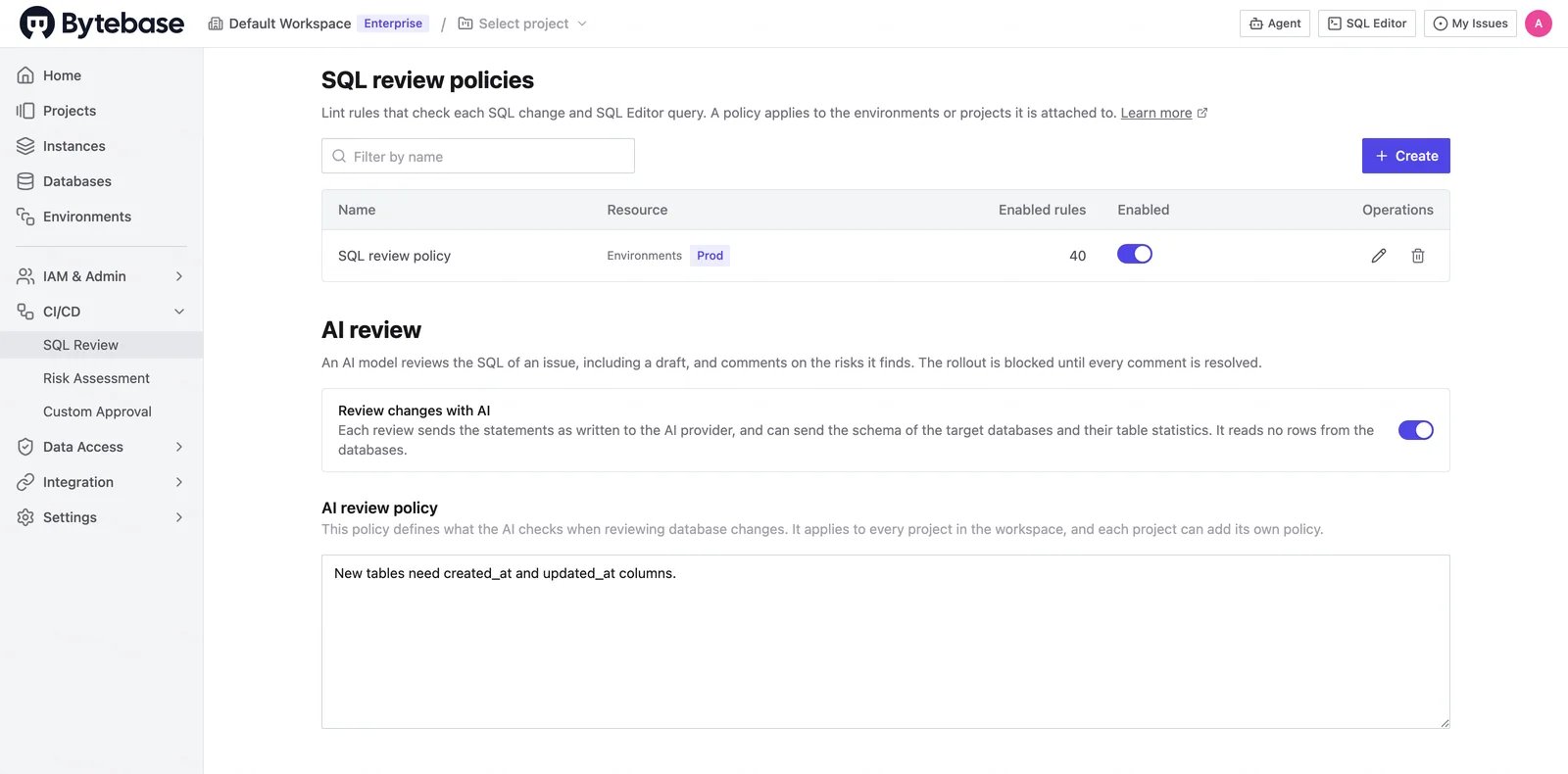
AI SQL Review has its own switch, which is off by default. Changing it requires the Workspace Admin or Workspace DBA role.- In the workspace sidebar, go to CI/CD > SQL Review.
- In the AI review section, turn on Review changes with AI.
- Click Update.
Default review policy
The default review policy runs on every review. It checks for:- Breakage: a statement that fails on the target database, or breaks a view, function, trigger, or foreign key that depends on what it changes. This includes a constraint that existing rows would break.
- Operational risk: a long lock, a table rewrite, or a full scan on a large table.
- Data loss: a cascade that deletes rows in tables the statements never name.
The default review policy prompt
The default review policy prompt
This is the part of the prompt that says what the model looks for. The full prompt, including how the model works and the format of its answer, is in
base_prompt.md.Adjust the default review policy
The default review policy has no settings of its own. You change it through your AI review policy, in one of two ways. In both, name the check as the list above does. Tune a check when it reports more than you need. Narrow when it applies, or lower the priority it reports at. The review can see each table’s row count and size, so a limit on them works:Write an AI review policy
A policy adds your own checks to the default review policy, in plain language. It is optional: without one, the review still runs the default checks.- Workspace: in the workspace sidebar, go to CI/CD > SQL Review and edit AI review policy. It applies to every project.
- Project: in the project sidebar, go to CI/CD > SQL Review and edit Project additional policy. It is added to the workspace policy and takes precedence where the two conflict.
When a review runs
AI SQL Review covers the database change plans you create in the Bytebase console. A review starts when:- You create the plan, including as a draft.
- The SQL of the plan changes.
- Someone clicks Run, Rerun, or Retry on the AI review row, under Automated review in the plan’s Review section.

- Plans that create a database.
- GitOps changes that come from a release.
- Access grant requests.
- A plan that already has a rollout.
Read the findings
Each finding is a comment thread from AI review. It appears in two places:- On the SQL: in the plan’s Changes section, as a comment under the line it refers to. Use the arrows beside the editor to step through the comments.
- In Activity: under the entry for the run, such as AI review reviewed the SQL · 2 new findings, with the line of SQL it refers to.

Every open thread holds the automatic rollout, whatever its priority. See Resolve threads before rollout.
When the review runs again:
- A finding it reports again keeps its thread and replies. If it now reports the finding at a higher priority, a resolved thread opens again.
- A finding it no longer reports is resolved automatically.
- If the review cannot run, for example because the AI provider returns an error, the AI review row shows the error and a Retry button, and earlier findings stay as they were.
Resolve threads before rollout
Bytebase creates the rollout automatically when all checks pass, every thread is resolved, and the plan is approved. An open thread holds the automatic rollout whoever started it, AI SQL Review or a person, and whatever its priority. To clear a finding, do one of the following:- Change the SQL. The review runs again and resolves the findings it no longer reports.
- Click Resolve on the thread to accept the risk.
What AI SQL Review sends to the AI provider
Each review sends the statements as written, the default review policy and your policies, facts about the target database such as its engine and version, and the object definitions and table statistics the model looks up in the synced schema. It reads no rows from your databases. See What Bytebase sends to the AI provider.Limitations
- Findings per run: a run shows at most 10 open findings, ranked by priority and then by their order in the plan. Open threads from earlier runs count toward the 10 and are always kept; resolved threads do not count. The limit keeps the findings that matter from being lost in a long list of noise. Further new findings are held back, without notice, until you fix or resolve the ones shown and run the review again. We are working to improve this.
- Sampled databases: the review calls the model several times for each target database, so a change across many databases costs many model calls. When the project setting CI Data Sampling Size is set, the review covers the same databases that plan checks sample: the first that many targets. Without it, the review covers every target database.
- Review time: for each database, the model looks up the schema facts it needs and then writes its findings, and Bytebase then merges and summarizes the findings across databases. How long this takes depends on the model and how long it thinks; Bytebase uses the provider’s default thinking level. In our tests, a simple change on two databases took 43 seconds to 1 minute 11 seconds with Gemini 3.1 Pro, and more than twice as long with Gemini 3.8 Flash, which thinks for longer before it answers.
- Time and model calls: the review of each database stops after 10 minutes or 20 model calls. If the review of any database stops, the whole run fails: it posts no new findings, earlier findings stay as they were, and the AI review row shows the error and a Retry button. A failed run does not hold the automatic rollout. To get the review through:
- Click Retry. A model does not take the same time on every run.
- Split a long change into smaller plans, so each review has fewer statements to check.
- Ask a workspace admin to switch AI Assistant to a model that answers faster. The setting applies to every AI feature in the workspace.
- SQL size: SQL over 256 KiB is not reviewed.
- Synced schema only: the review does not query the database. If the schema changed outside Bytebase, sync the database before you run the review.