

🤖 AI SQL Review
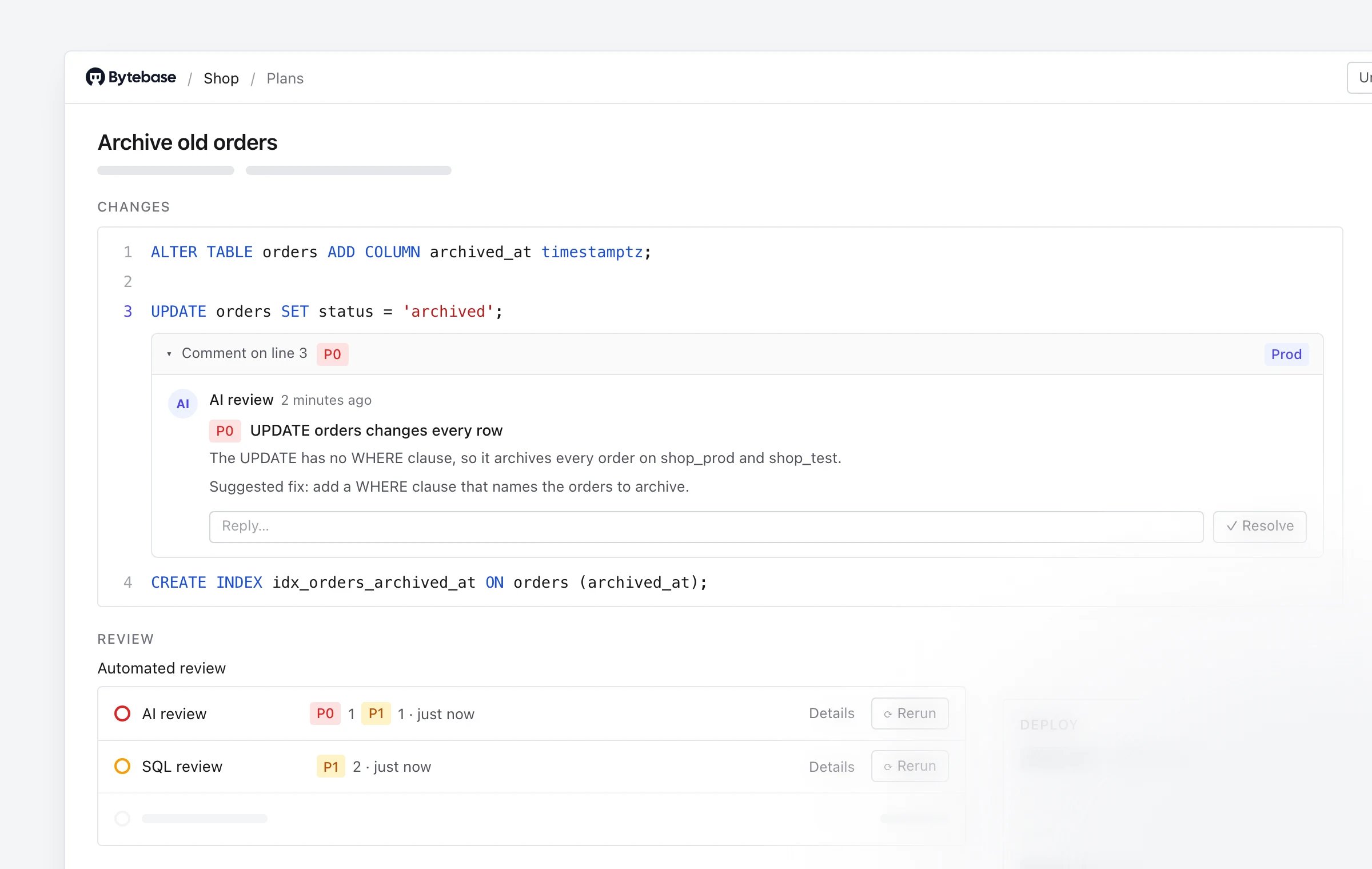
UPDATE without a WHERE, a change that drops data, a lock on a busy table — with the reason and a suggested fix.
- Reviews while you write. It runs as soon as you create a plan and again each time you change its SQL, so feedback arrives before anyone is asked to approve.
- One comment per problem. A problem found on several databases is one comment that names them all. Its thread stays put when the review runs again, and only the ten most important problems are open at a time.
- Every check in one place. The plan’s Review section shows the AI review’s result beside SQL review and your other checks, and you can rerun each one from there. The AI review’s findings are the comments on the SQL, also listed in the plan’s Activity.
- Comments you can act on. Comment threads are now cards that name the lines they cover, fold away once resolved, and flag findings on production databases.
🔁 GitOps: See What Every Release Did
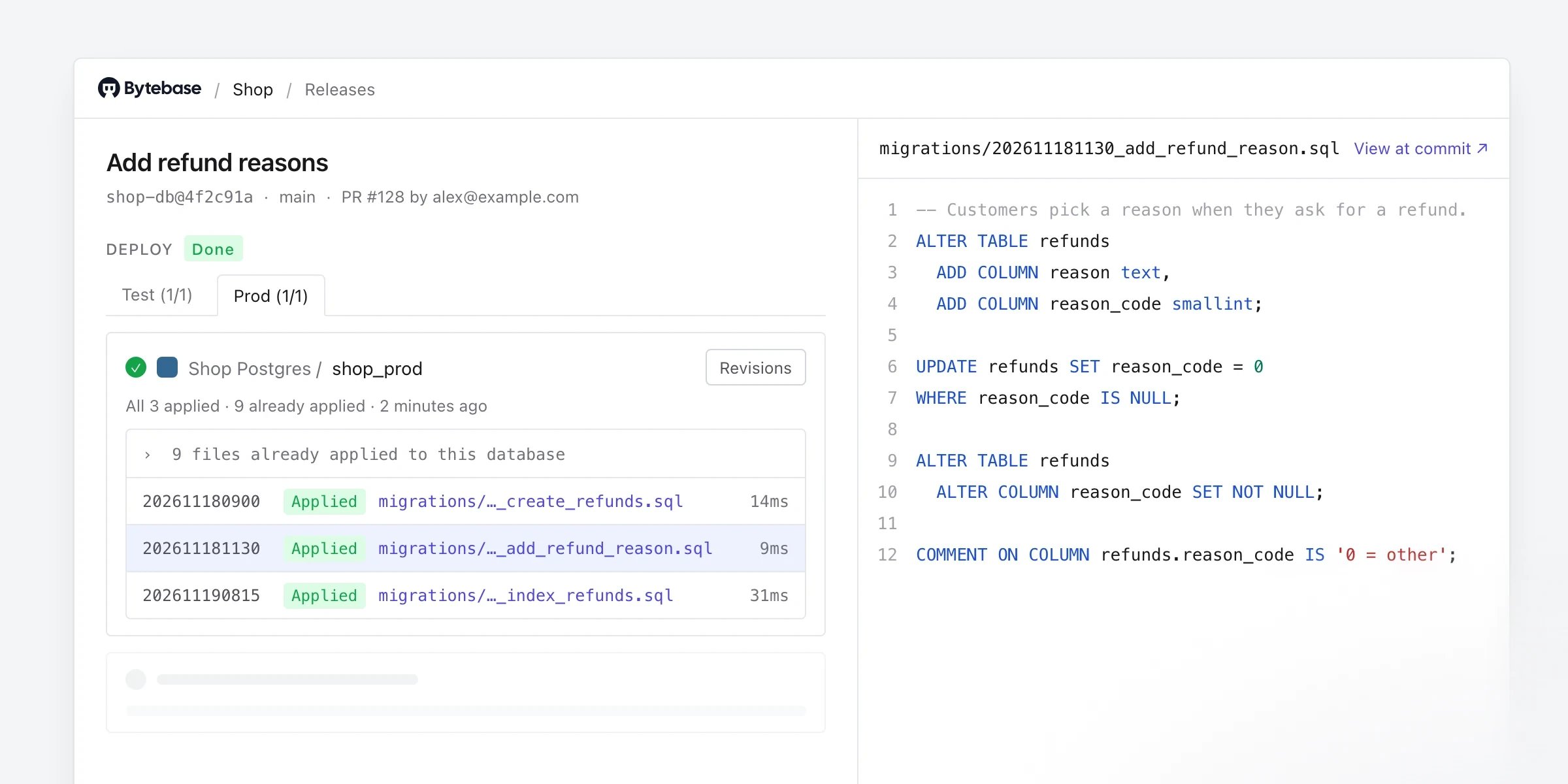
- See what a release did to each database. A release’s plan page lists, for each database, the files it applied or will apply, the ones it already had, and the error on the file that failed. Open any file in the viewer, and see the release’s commit, branch, author and pull request.
- Plans for console changes, Releases for GitOps. Plans now lists changes made in the console. Releases lists changes from GitOps, with each release’s source commit, stages and deploy progress.
- Guided setup. Open GitOps setup from a project’s Releases page to choose databases, create a workload identity for your CI, and copy complete workflow files for GitHub Actions or GitLab CI. A coding agent can do the same from your repository over MCP.
-
No token exchange step.
bytebase-action3.25.0 signs in with the workload identity itself. Its rollout job reports what ran on each database — files, affected rows, and the failing statement with its error — in the job log and summary. - Workload identities that explain themselves. Creating one is a four-step guide that ends with a test workflow, the list shows each identity’s roles, and audit logs record which CI job signed in.
- The release detail page is retired; its links open the plan that deployed the release. Releases can no longer be archived or restored in the console.
-
The Releases page now requires
bb.plans.listinstead ofbb.releases.list. Update custom roles that relied on it. - Workflow files you already committed keep working. If you regenerate them, see change details.
- Also fixed: generated workflows failing the version check on Bytebase Cloud, the GitLab production job not finding the release metadata, jobs passing or hanging when sign-in was rejected, and workload identities rejecting GitHub’s ID-based token subjects.
📤 Export Permissions and Destinations
-
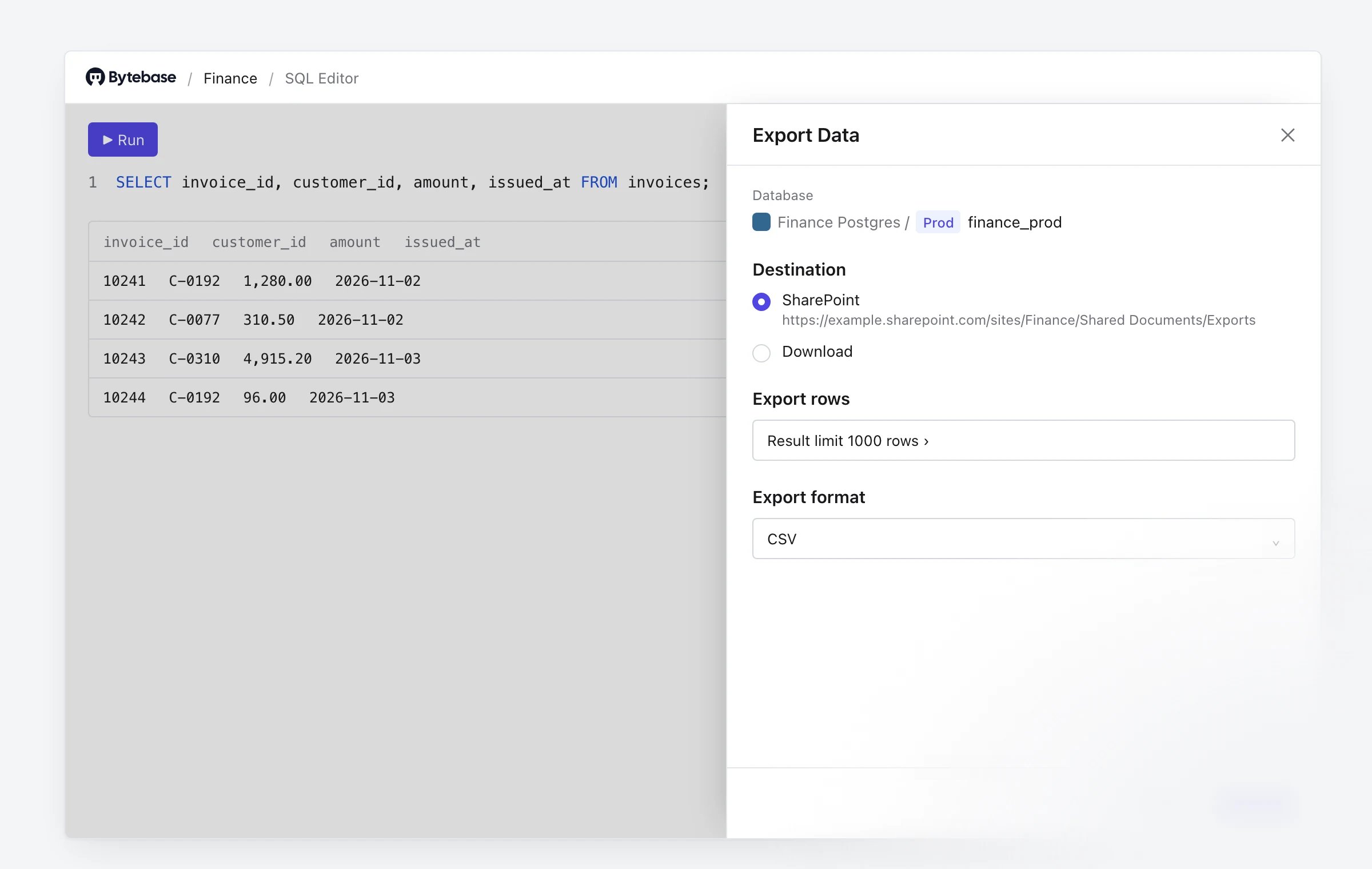
Export is its own permission. Exporting from SQL Editor, the API or MCP now requires
bb.sql.export, or an approved Request export. A new SQL Editor Exporter role adds export to SQL Editor Read User; Workspace Admin, Workspace DBA and Project Owner include it. - Export to SharePoint. Exports can go straight to a project’s SharePoint document library. A workspace admin adds the Microsoft Entra app under Integration > Export Destinations, and each project picks its folder. With a folder set, Export defaults to SharePoint, shows progress, and lets you retry only the databases that failed. Self-hosted, Enterprise plan.
- Choose whether SQL Editor can download. The new Allow downloading exports setting (Settings > General > SQL Editor) can turn Download off. SQL Editor then exports only to a destination you configured, such as a project’s SharePoint folder; with none configured, it can’t export at all, even for someone with the export permission or an approved request.
- Faster batch exports. SQL Editor exports up to four databases at a time, and Cancel now stops a running export.
-
If your workspace allowed export without approval, members who export through SQL Editor User or SQL Editor Read User keep exporting through a SQL Editor Exporter binding the upgrade adds. Members whose custom roles have
bb.sql.selectlose export until you addbb.sql.exportto those roles. New SQL Editor User assignments don’t include export, so assign SQL Editor Exporter as well. - If your workspace required approval, members still export through Request export, and Workspace Admins, Workspace DBAs and Project Owners can now export without one. To keep these workspaces at their most restrictive, the upgrade turns Allow downloading exports off. SQL Editor then offers no Download, even for an approved request, until you turn it back on or give the project a SharePoint folder.
-
Before upgrading, check for a custom role with the ID
sqlEditorExporter, and stop every replica if you run more than one. Terraform users have a step too. See upgrade notes, and the full before-and-after in change details. - Also fixed: exports masked values twice, so an exported masked value didn’t match what SQL Editor showed.
🔔 Other Notable Changes
-
MCP: confirmed admin changes, safer writes, and access requests — In Read-write mode, the new
administer_workspacetool lets an agent change approval rules and masking rules, add a PostgreSQL instance to a project, or create a CI workload identity with the GitOps Service Agent role. Each change applies only after the user confirms it in their MCP client, and the agent has only the user’s own permissions. A CI identity created this way can roll out changes in its project without approval, and stays active until you remove it. To keep agents from making these changes, leave MCP at Read-only. See MCP docs.query_databasenow asks the user before running a statement Bytebase can’t confirm is a read, offering Run now, Change it in chat or Create an issue. MCP clients that can’t show this form still run such statements without asking.- The new
request_access_granttool files a time-boxed access grant request and says when no one else can approve it. Users whose access comes only from project roles, such as Project Developer, can now query and change their projects’ databases over MCP, and agents can read approval rules, environments, semantic types and data classification. - Some tool inputs and outputs changed, so check scripts and agent configurations that call them (change details).
- Also fixed:
query_databasereporting a multi-statement request as successful when a later statement failed, and writes failing on PostgreSQL instances with a read-only data source.
-
Approval rules: procedure calls get their own statement type — Procedure calls and dynamic SQL are now classified as EXECUTE, with moderate default risk, on every engine that supports them. You can now give them their own approval flow. Rules that matched them as unclassified statements no longer do, so add
EXECUTEto those rules. See change details. - Database engines: changes that can refuse existing work — Several engines now refuse statements, connection values or versions they accepted before, mostly where the old result was wrong. If you use PostgreSQL, CockroachDB or Redshift connections, MySQL 5.7, MariaDB, TiDB, Hive, BigQuery, Snowflake key-pair sign-in, SQL Server, or prior backup on MySQL-family engines, check the table.
-
Listing a project’s databases requires the list permission — Listing a project’s databases, in the console, the API and Terraform, now checks
bb.databases.listin that project instead ofbb.projects.get. Built-in roles are unaffected; a custom role that should list databases needsbb.databases.list. See change details.
🚀 Features
-
Query plans for every engine that can explain — SQL Editor now draws query plans for MySQL, MariaDB, TiDB, Oracle, OceanBase, ClickHouse, Trino, MongoDB, CockroachDB, Redshift, StarRocks, Doris, Snowflake, Hive and Databricks. Before, it drew them only for PostgreSQL, SQL Server and Spanner. BigQuery shows the stages a job ran, and Elasticsearch profiles a search. Switch a result to Plan to see the plan of what just ran, or choose Explain from Run’s menu. The plan opens on its costliest step, and measured plans show estimated against actual rows. On MySQL, MariaDB, TiDB, OceanBase and StarRocks, SQL Editor now also runs
EXPLAIN ANALYZEover a read, so you can get measured plans there too. - AI assistant works with the resource in front of you — @-mention a project, database, issue or plan to focus the assistant’s answer on it. The assistant can draft a plan’s SQL, masking rules and exemptions, or an access grant request after a denied or masked query, and leaves each draft for you to review and save. Ask Agent buttons on failed checks, review findings and instance connection errors explain what went wrong. The assistant asks before it runs SQL or changes anything, shows token usage per chat, and pauses at a token limit per run that you can raise.
- Add Neon databases in one pass — When adding a PostgreSQL instance, choose Neon as the host to list the branches an API key can see and import the ones you pick as instances. Environment and sync settings are set once for all of them, with per-branch overrides. Bytebase does not store the API key. For MySQL, PostgreSQL, SQL Server and Oracle, Import from URL fills in the connection form from a pasted connection string.
🎄 Enhancements
- An approval step’s reviewer list now shows everyone who holds the role, and is searchable.
- Schema Editor, Sync Schema and rollback now generate migrations that keep partitioning, identity columns, column positions and system-versioned tables. This applies to MySQL, MariaDB, OceanBase, PostgreSQL, CockroachDB and SQL Server, and also fixes corrupted Unicode comments on SQL Server. The text of generated migrations may differ from earlier versions.
- Schema sync picks up more objects: MariaDB system-versioned tables and sequences, Oracle object tables and invisible and virtual columns, and OceanBase external tables and materialized views. Sync the instance to see them.
- Cassandra/Elasticsearch/ClickHouse/MongoDB — Connections through an SSH tunnel now work.
-
Self-hosted (Helm) — The chart can now pass
--hafor high-availability deployments and expose/metricsto scrapers.
🐞 Bug Fixes
- Fix SSO sign-in removing users from SCIM-managed groups, which took away their project access each time they signed in. SCIM now owns those groups’ membership, so changes to them arrive with SCIM provisioning rather than at the next sign-in.
- Fix users without permission to list instances landing on a permission-denied page right after signing in.
- Fix audit log searches becoming slow for some filters.
- Fix a database’s stored schema sometimes reverting to its pre-change version after a migration.
- Self-hosted (Helm) — Fix long upgrade migrations being killed and restarted after about 15 minutes (upgrade notes).
-
SQL Server — Fix SQL Editor Export refusing a query that starts with
SET TRANSACTION ISOLATION LEVELorSET NOCOUNT, which Run accepted. - Redis — Fix Redis Cloud and Redis Enterprise databases failing to sync.
-
Oracle — Fix garbled Chinese text in query results and comments when instances use different database character sets, queries and changes running in the sign-in user’s schema instead of the data source’s configured schema, and SQL review naming rules flagging built-ins such as
COUNTandSQL%ROWCOUNT. - MySQL/MariaDB/TiDB — Fix prior backups that could lose rows when restored (engine changes lists the statements now refused).
-
Cosmos DB — Fix cross-partition queries with
ORDER BY,DISTINCT,GROUP BYorTOPfailing or returning wrong rows. - Hive — Fix connections always failing.
- Redshift — Fix schema sync failing for users who are not superusers, and view definitions being cut off.
-
PostgreSQL/CockroachDB/Redshift — Fix
timestamptzqueries failing on instances with a POSIX-style time zone such as+08:00; such queries are also much faster.
🏗️ Upgrade Notes
-
Custom role with the ID
sqlEditorExporter: the upgrade stops with an error if one exists, because 3.25.0 adds a built-in role with that ID. Before upgrading, create a replacement custom role on your current version, move its bindings to it, and deletesqlEditorExporter. See change details. - High availability: no rolling upgrade to 3.25.0. If you run Bytebase in HA mode, stop every replica before starting 3.25.0 instead of upgrading them one at a time. Replicas still on an older version don’t apply the new export controls.
-
Self-hosted (Helm), chart 1.1.7 or later:
helm upgrade --waitnow waits until the database migration finishes. Set--timeoutlonger than your expected migration time, because with--atomica timeout rolls the upgrade back. -
Terraform: Use Terraform provider 3.25.0 with Bytebase 3.25.0, and upgrade Bytebase first. See the migration guide.
- Remove
disable_exportfromquery_data_policyin everybytebase_policy; the provider now rejectsdisable_export = true. That value was the old Allow data export without approval switch turned off, and the upgrade has already carried it over. To hide Download in SQL Editor, set the workspace-leveldisable_download = true. This does not stop export, which is controlled bybb.sql.export. - Pause automatic
terraform applyuntil you have runterraform planafter the upgrade. In workspaces that allowed export without approval, the plan removes the SQL Editor Exporter bindings the upgrade added, and applying it takes export away from those members. Add the bindings to yourbytebase_iam_policyconfig first. - Custom roles in
bytebase_rolemay needbb.sql.export,bb.plans.listorbb.databases.list(API changes). The account the provider signs in with also needsbb.databases.listif it uses a custom role, becausebytebase_projectlists the project’s databases. - With a maximum role expiration set, a
bytebase_iam_policyapply that adds a member to an existing binding fails when the binding’s expiry exceeds the maximum or it has none (API changes). - New, optional: the SharePoint export setting (
settings/EXPORT, which needs Terraform 1.11+ for its write-only secret) and AI review policies.
- Remove
📃 Change Details
Export permission
-
Custom roles are not changed. A custom role with
bb.sql.selectbut notbb.sql.exportcan no longer export. -
Allow downloading exports affects only SQL Editor. Exports through the API and MCP still follow
bb.sql.exportalone. -
SQLService.Exportnow returnsPERMISSION_DENIED(HTTP 403) when the caller may not export, where it used to return an internal error. Settingdisable_export = trueon a query data policy returnsINVALID_ARGUMENT. - To stop a person exporting, remove export from their roles. To stop exports through requests in a project, turn off Allow access grants there.
MCP tool changes
Engine changes
EXECUTE statement type
EXECUTE covers SQL ServerEXEC and EXECUTE (procedure calls, EXEC('...'), sp_executesql), CALL, PostgreSQL DO blocks, EXECUTE of prepared statements, EXECUTE IMMEDIATE, and Oracle anonymous BEGIN ... END blocks. Its default risk is moderate. Conditions that test for STATEMENT_TYPE_UNSPECIFIED no longer match these statements; saved rules are not migrated. PostgreSQL declarative (SDL) releases now report CALL and DO as not allowed.
API changes
GitOps workflow files
Workflow files you already committed keep working. Regenerated files differ in these ways:-
They pin
bytebase-actionto your server version, and sign in with the workload identity, which needs image 3.25.0 or later. GitHub jobs needid-token: write; GitLab jobs name the ID tokenBYTEBASE_ID_TOKEN. -
GitHub workflows use
actions/checkout@v7, which needs Actions Runner 2.327.1 or later; GitHub Enterprise Server must have v7 synced. -
The GitLab production deploy job is no longer manual, and the self-hosted runner switch is removed (edit
runs-onyourself). -
The
--outputfile gains aresultobject. In GitLab, addartifacts: when: alwaysto keep the report from a failed job.