Bytebase provides customizable SQL lint rules to check common issues in database change and query process.Different sets of rules can form different SQL Review Policies for the respective environment.
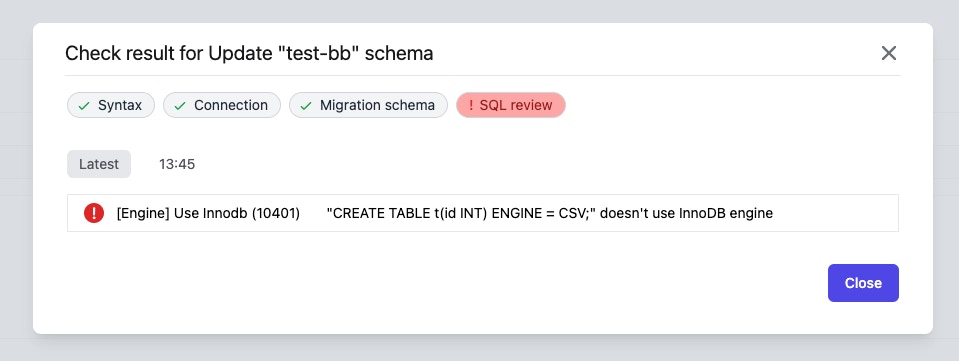
InnoDB is the default storage engine of MySQL 5.5+. It provides powerful transaction features. Normally, using InnoDB as the storage engine is the only option. Bytebase provides this rule to catch all scenarios where other engines are attempted.
Using fully qualified object names in SQL ensures clarity and precision. It helps the database system to quickly locate and distinguish between objects, even if they have the same name but exist in different schemas or databases. This practice can improve performance by reducing ambiguity and aiding in the efficient execution of queries.
Bytebase checks whether the object name appearing in the SQL statement is fully qualified. The exception is that bytebase does not check pseudo table names in common table expressions (CTE), such as foo in WITH foo AS (SELECT * FROM public.pokes) SELECT * FROM foo.
The unified naming convention is desired by developers. And the same applies to the database space. Bytebase provides this rule to unify the table naming convention.
Table Naming Convention uses regular expression as the format for naming pattern, and also limits the naming max length. The default maximum length is 64 characters. Length limit does not support PostgreSQL.
The unified naming convention is desired by developers. And the same applies to the database space. Bytebase provides this rule to unify the column naming convention.
Column Naming Convention uses regular expression format for naming pattern, and also limits the naming max length. The default maximum length is 64 characters. Length limit does not support PostgreSQL.
The unified naming convention is desired by developers. And the same applies to the database space. Bytebase provides this rule to unify the auto-increment column naming convention.
Auto-increment Column Naming Convention uses regular expression format for naming pattern, and also limits the naming maximum length. The default maximum length is 64 characters.
The unified naming convention is desired by developers. And the same applies to the database space. Bytebase provides this rule to unify the index naming convention.
Index Naming Convention uses template format. Specifically, the template is an extended regular expression. The rest follows the regular expression rules except the part with curly braces.For example, ^idx_{{table}}_{{column_list}}$ is a template where {{table}} is the table name and {{column_list}} is the list of the column name. So for index on user(id, name), the legal name is idx_user_id_name.It also limits the naming max length. The default maximum length is 64 characters. Length limit does not support PostgreSQL.
Bytebase checks that all index names in DDL conform to the naming conventions.
Index Naming Convention rule is only valid for index, which means it does NOT work for unique key, foreign key and primary key.
Also see primary key naming, unique key naming convention and foreign key naming convention.
The unified naming convention is desired by developers. And the same applies to the database space. Bytebase provides this rule to unify the primary key naming convention.
This rule does NOT support MySQL and TiDB. Because the name of a PRIMARY KEY is always PRIMARY in MySQL and TiDB.
Primary Key Naming Convention uses template format. Specifically, the template is an extended regular expression. The rest follows the regular expression rules except the part with curly braces.For example, ^pk_{{table}}_{{column_list}}$ is a template where {{table}} is the table name and {{column_list}} is the list of the column name. So for primary key on user(id, name), the legal name is pk_user_id_name.
Bytebase checks that all index names in DDL conform to the naming conventions.
Primary Key Naming Convention rule is only valid for primary key, which means it does NOT work for unique key, foreign key and normal index.
Also see index naming convention, unique key naming convention and foreign key naming convention.
The unified naming convention is desired by developers. And the same applies to the database space. Bytebase provides this rule to unify the unique key naming convention.
Unique Key Naming Convention uses template format. Specifically, the template is an extended regular expression. The rest follows the regular expression rules except the part with curly braces.For example, ^uk_{{table}}_{{column_list}}$ is a template where {{table}} is the table name and {{column_list}} is the list of the column name. So for unique key on user(id, name), the legal name is uk_user_id_name.It also limits the naming max length. The default maximum length is 64 characters. Length limit does not support PostgreSQL.
Bytebase checks that all unique key names in DDL conform to the naming conventions.
Unique Key Naming Convention rule is only valid for unique key, which means it does NOT work for index, foreign key and primary key.
Also see index naming convention, primary key naming convention and foreign key naming convention.
The unified naming convention is desired by developers. And the same applies to the database space. Bytebase provides this rule to unify the foreign key naming convention.
Foreign Key Naming Convention uses template format. Specifically, the template is an extended regular expression. The rest follows the regular expression rules except the part with curly braces.For example, ^fk_{{referencing_table}}_{{referencing_column}}_{{referenced_table}}_{{referenced_column}}$ is a template where {{referencing_table}} is the name of the referencing table, {{referencing_column}} is the list of the referencing column name, {{referenced_table}} is the name of the referenced table and {{referenced_column}} is the list of the referencing column name. So for unique key on user(id, name), the legal name is uk_user_id_name.It also limits the naming max length. The default maximum length is 64 characters. Length limit does not support PostgreSQL.
Bytebase checks that all foreign key names in DDL conform to the naming conventions.
Foreign Key Naming Convention rule is only valid for foreign key, which means it does NOT work for index, unique key and primary key.
Also see index naming convention, primary key naming convention and unique key naming convention.
Using keywords as table names in Oracle, or any other database management system, is generally not recommended for several reasons:
Reserved Keywords: Database systems have a set of reserved keywords that are used for defining the structure and operations of the database. These keywords have specific meanings and functionalities within the system. If you use a reserved keyword as a table name, it can lead to conflicts and ambiguity when executing queries or performing operations on the table.
Query Conflicts: When you use a reserved keyword as a table name, it can cause conflicts and confusion when constructing SQL queries. The database may interpret the keyword as a command or function instead of a table name, resulting in unexpected behavior or errors. It becomes necessary to use special techniques or syntax to differentiate the table name from the keyword, which can make the queries more complex and error-prone.
Code Readability: Using keywords as table names can make the code less readable and maintainable. Table names are meant to represent the entities or concepts they represent in the system. Choosing descriptive and meaningful names for tables improves code clarity and understanding. When keywords are used, it can be challenging for developers, administrators, or future maintainers to grasp the purpose and usage of the tables quickly.
Portability: If you decide to migrate your database from one DBMS to another in the future, using keywords as table names can cause compatibility issues. Different database systems have different sets of reserved keywords, and these keywords may vary in meaning and functionality. Migrating a database containing table names that are keywords in the target DBMS may require modifying the table names or using workarounds, which can be time-consuming and error-prone.
Bytebase provides this rule to unify the identifier case.For Oracle, if the identifier is not quoted, it is converted to uppercase. In order to unify the identifier case, you can use this rule to disallow the lowercase identifier.
SELECT * introduces additional performance cost or ambiguous semantics.For scenarios where all columns are not required, you should SELECT the columns you need to avoid getting unneeded data.For scenarios where all columns are required, you should list all column names to avoid semantic ambiguity. Otherwise, the data consumer cannot know the column information. And SELECT * may bring additional modifications and errors when modifying the table schema.
There are countless stories about people forgetting the WHERE clause in an UPDATE or DELETE and losing data. In queries, not using WHERE can also cause performance issues.If you are sure you need to act on all data, use WHERE 1=1 to remind yourself of the consequences of that action.
Database cannot use an index to match entries when there is a leading wildcard. It can cause serious performance problems because it may scan the entire table.
The PostgreSQL will lock the table and rewrite the whole table when you adding column with default value. You can separate the adding column, setting default value and backfilling all existing rows.
Adding CHECK constraints without NOT VALID can cause downtime because it blocks reads and writes. You can manually verify all rows and validate the constraint after creating.
Limit DDL operations on tables with large data volumes
DDL operations on large tables can cause long locks because they need exclusive access to update the table’s structure and metadata, which takes more time for bigger tables.
In almost all cases, each table needs a primary key.e.g. in MySQL, the InnoDB storage engine always creates a primary key if you didn’t specify it explicitly or didn’t create a unique key, thus making an extra column you don’t have access to.
Bytebase considers this rule to be violated if the SQL tries to create a no primary key table or drop the primary key. If the SQL drops all columns in the primary key, Bytebase also considers that this SQL drops the primary key.
This rule disallows users to create foreign key in the table.A foreign key is a logical association of rows between two tables, in a parent-child relationship. A row in a “parent” table may be referenced by one or more rows in a “child” table.FOREIGN KEY constraints are impossible to maintain once your data grows and is split over multiple database servers. This typically happens when you introduce functional partitioning/sharding and/or horizontal sharding.
Only tables named with specific naming patterns can be deleted. This requires users to do a rename and then drop the table.The naming convention uses regular expression format. By default the table name must have _del suffix.
Introducing backward incompatible schema changes is one of the most common mistakes made by developers. And enforcing backward compatible schema change is the standard practice adopted by many engineering organizations. Bytebase provides the built-in backward compatible check to catch all common incompatible schema change scenarios.
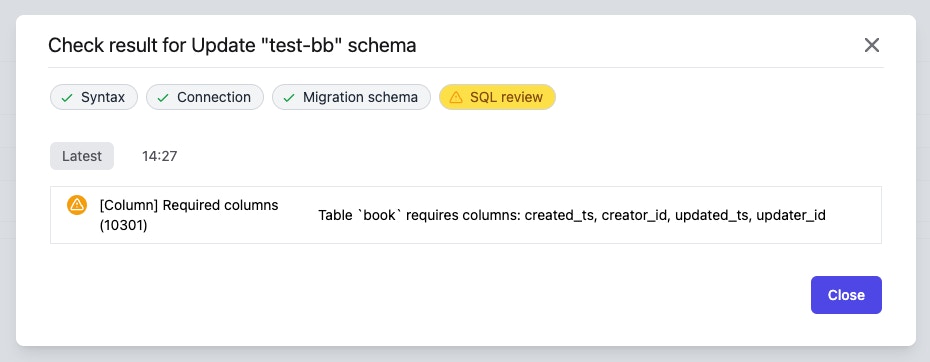
For most projects, you may want to enforce some columns for every table. For example, need id as identification and the primary key for each table or need created_ts and updated_ts to record creation and modification times.You can customize which columns are required.
Bytebase defaults all tables to meet the requirements. If the SQL tries to define a table not having all the required columns or attempts to drop the required column, Bytebase considers this rule to be violated.
Changing column type may fail because the data cannot be converted. Bytebase provides this rule to alert you that the SQL statement would change the column type.
CHANGE COLUMN is a MySQL extension to standard SQL. CHANGE COLUMN can change column definition and names, or both.
Most of the time, you just want to change one of two. So you need to use RENAME COLUMN and MODIFY COLUMN instead of CHANGE COLUMN to avoid unexpected modifications.
This rule will count the two types of the columns:
the column with default current time , such as DEFAULT NOW()
the column with ON UPDATE current time, such as ON UPDATE NOW()
If the count of type one columns is more than two or the count of type two columns is more than one, this rule will alert users.The meaning of the number is:
A table usually has created_ts and updated_ts column with DEFAULT NOW().
A table usually has updated_ts column with ON UPDATE NOW()
Disallow setting volatile default value on columns
Volatile functions, such as clock_timestamp(), update each row with the value at the time of ALTER TABLE ADD COLUMN execution. This can lead to lengthy updates and potential performance issues.